
Latest Version
September 02, 2026
SITALLCOM Sistemas Inteligentes
Tools
Android
11
Free
br.com.sitacom.sitrax.zoomloc
Report a Problem
More About Zoom Loc – Real‑time Fleet Tracking for Android
What is Zoom Loc?
Zoom Loc is a free Android application developed by SITALLCOM Sistemas Inteligentes. It provides a mobile interface for managing a vehicle fleet, allowing supervisors and drivers to stay informed about vehicle positions and status in real time.
Main features
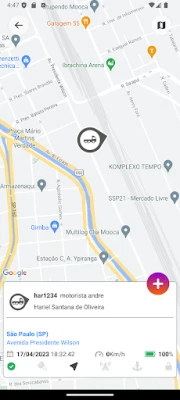
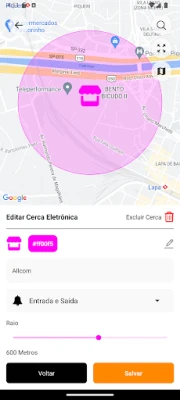
- Live vehicle map – See the current location of each vehicle on an interactive map.
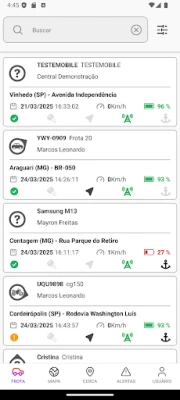
- Fleet overview – Get a quick summary of all assets, including communication status.
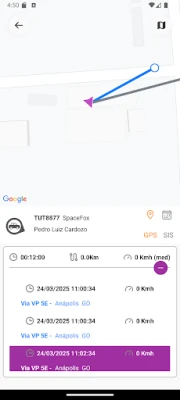
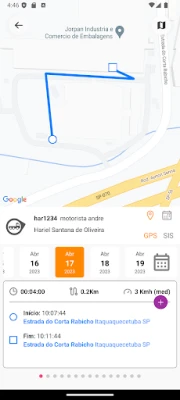
- Historical data lookup – Search past trips by date to review routes and timestamps.
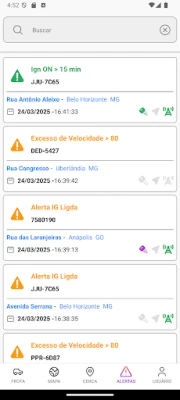
- Push notifications – Receive alerts when a vehicle reports an incident or deviates from its expected path.
- Command sending – Send simple commands to the vehicle’s onboard system when supported.
How it works
After installing Zoom Loc, you log in with the credentials provided by your fleet manager. The app connects to the backend service that aggregates GPS data from each vehicle’s tracking unit. Once connected, the map updates automatically as new location points arrive. You can tap a vehicle icon to view details such as speed, last communication time, and any active alerts.
Practical uses
- Dispatchers can verify that drivers are following planned routes.
- Managers can identify idle vehicles and optimize utilization.
- Safety officers receive immediate notifications of accidents or unauthorized movements.
- Field technicians can locate the nearest vehicle when assistance is needed.
Installation information
Zoom Loc is distributed as a free download from the Google Play Store. The installation process follows the standard Android procedure: tap Install, grant any required permissions, and launch the app. The first launch will prompt you to enter your account details.
Compatibility
The app requires a device running a recent version of Android that supports Google Play services and location permissions. Specific version numbers are not listed, but the app is designed for modern smartphones and tablets.
Things to know before installing
- Access to location services is necessary for the map and tracking features.
- Internet connectivity (mobile data or Wi‑Fi) is required to receive live updates.
- The app does not store vehicle data locally; all information is retrieved from the provider’s server.
Who may find Zoom Loc useful?
Any organization that operates multiple vehicles—logistics companies, service fleets, delivery services, or field service teams—can benefit from the real‑time visibility that Zoom Loc offers. Individual drivers who need to stay informed about assignments and alerts may also use the app.
Frequently asked questions
Do I need a special GPS device in each vehicle?
Zoom Loc works with the tracking hardware already installed by your fleet provider. The app itself only displays the data that the backend service supplies.
Can I use Zoom Loc offline?
Live tracking requires an active internet connection. Historical data that has already been downloaded can be viewed offline, but new location updates will not appear until connectivity is restored.
Is there a cost to use the app?
The application is free to download and install. Any subscription or service fees are managed by the fleet provider, not by the app itself.
Rate the App
User Reviews











Popular Apps










 Games
Games Entertainment
 Communication
 E-mail
 Security
 Tools
Tools Media
Media Internet
 Finance
 Design
 Education
 IT Tools
 Travel & Local
 Android
 Windows
 Linux
Linux