

Latest Version
September 18, 2026
INALP RS
Tools
Android
112
Free
com.inalp.arassist
Report a Problem
More About AR Assist - Remote by INALP RS
What is AR Assist - Remote?
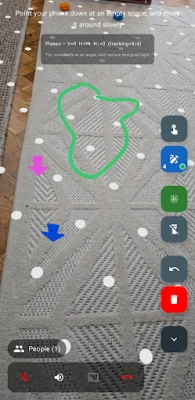
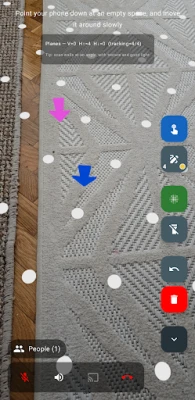
AR Assist - Remote is a free Android tool that turns a standard video call into an interactive, augmented‑reality (AR) support session. By overlaying drawings, pointers and other visual cues on the live video feed, the app lets a remote helper illustrate exactly what needs to be done, while the on‑site user sees the guidance in real time.
Main features
- Live video connection – Initiate a one‑to‑one video call with a colleague, technician or friend.
- AR annotations – Use drawing tools, arrows and text to mark objects directly on the video stream.
- Pointer and highlight tools – Emphasize specific areas without cluttering the view.
- Simple interface – Controls are placed intuitively so you can focus on the problem rather than the app.
How it works
After installing the app, you start a video call with the person you want to assist. During the call, a toolbar appears that offers drawing, text and pointer options. Anything you place on the screen is transmitted instantly to the remote participant, who sees the same AR overlay on their device. Both parties can add or erase annotations, creating a collaborative environment that mimics standing side‑by‑side.
Practical uses
The AR overlay makes the app useful in many scenarios, such as:
- Technical support – Guide a user through software configuration, hardware installation or troubleshooting steps.
- Field service – Help field technicians repair equipment without needing to travel to the site.
- Education and training – Demonstrate procedures to students or new employees in a visual, hands‑on way.
- Home DIY projects – Show a friend how to assemble furniture, fix a leak or perform other household tasks.
Installation information
The app is distributed as a free download from the Google Play Store. Simply search for AR Assist - Remote, tap Install, and wait for the download to complete. No additional configuration is required beyond granting camera and microphone permissions for the video call.
Things to know before installing
- The app requires a device capable of running Android and supporting the camera and microphone.
- Both participants need an active internet connection for the video stream.
- AR annotations are transmitted in real time, so a stable connection improves the experience.
Who may find it useful?
Anyone who regularly provides or receives remote assistance can benefit from AR Assist - Remote. This includes IT support staff, equipment installers, educators, hobbyists and friends helping each other with everyday tasks.
Frequently asked questions
Is the app free to use?
Yes, AR Assist - Remote is offered at no cost.
Do I need a special headset or glasses?
No additional hardware is required; the app works with the standard camera and screen of your Android device.
Can multiple people join the same session?
The current design supports a one‑to‑one video call with AR annotations.
Is my video feed private?
The app uses standard Android permissions for camera and microphone. Video data is transmitted only for the duration of the call.
Rate the App
User Reviews














Popular Apps










 Games
Games Entertainment
 Communication
 E-mail
 Security
 Tools
Tools Media
Media Internet
 Finance
 Design
 Education
 Android Firmwares
 Travel & Local
 Android
 Windows
 Linux
Linux