Latest Version
September 18, 2026
Samsung Electronics Co., Ltd.
Tools
Android
137
Free
com.sec.android.app.clockpackage
Report a Problem
More About Clock – Samsung’s Built‑in Time Management Suite
Overview
Clock is Samsung Electronics’ native time‑keeping application for Android devices. It bundles four core utilities—Alarm, World Clock, Stopwatch, and Timer—into a single interface, allowing users to organise daily schedules, track elapsed time, and stay aware of global times and weather conditions.
Key Features
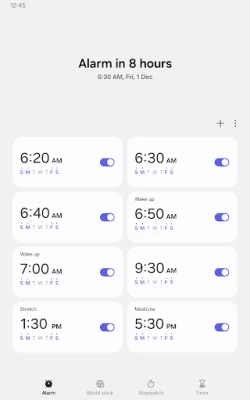
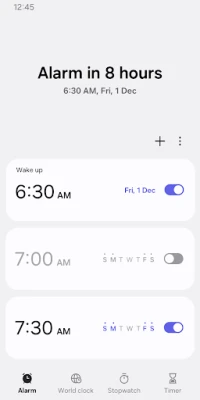
- Alarm: Set one‑time or recurring alarms, assign specific dates, and use the snooze function to create a series of alerts that behave like multiple alarms.
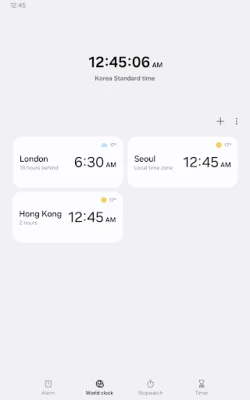
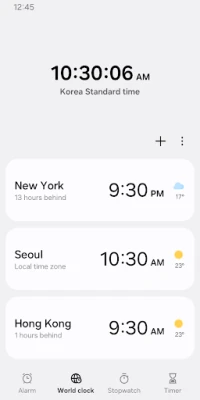
- World Clock: View current time and weather for selected cities worldwide, with a globe icon for quick location reference.
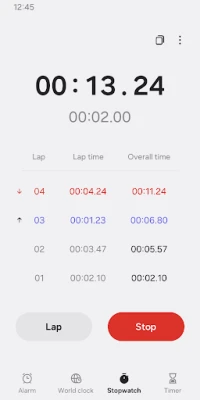
- Stopwatch: Record lap times, view elapsed sections, and copy measured values for external use.
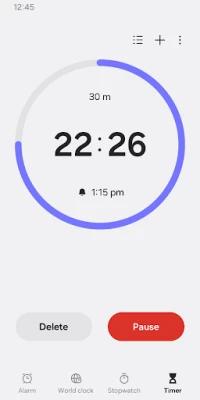
- Timer: Save frequently used durations as presets and run several timers at once.
Permissions
The app works with basic functionality without extra permissions, but optional access enhances certain experiences:
- Music and audio – to play custom sounds stored on the device for alarms or timer alerts.
- Notifications – to display ongoing timers and alert users about upcoming or missed alarms.
- Photos and videos (Android 14+) – to choose images or video clips as alarm backgrounds.
- Calendar – to surface upcoming events when a weather‑based alarm background is used.
Installation & Compatibility
Clock is distributed as a free app under the package name com.sec.android.app.clockpackage. It is pre‑installed on many Samsung devices, but can also be obtained through standard Android app channels. No specific Android version, size, or additional system requirements are listed, so it is expected to run on devices that meet Samsung’s baseline OS criteria.
Things to Consider Before Installing
- Optional permissions are not mandatory for core functions; users can decline them if they prefer a more private setup.
- Custom alarm sounds and background images require access to media files, which may involve granting the Music & audio or Photos & videos permissions.
- The Weather alarm background may reference calendar events, so enabling Calendar permission improves that feature.
Frequently Asked Questions
Can I use Clock without granting any permissions?
Yes. The basic alarm, world clock, stopwatch, and timer features operate without additional permissions. Optional permissions only enhance media‑related or calendar‑linked functions.
How does the World Clock display weather?
For each city added to the World Clock, the app retrieves current weather information, allowing users to see both time and local conditions at a glance.
Is it possible to run more than one timer simultaneously?
Yes. The Timer utility supports multiple concurrent timers, each of which can be saved as a preset for quick reuse.
Can I set an alarm to play a song from my library?
By granting the Music and audio permission, the app can access audio files stored on the device and use them as alarm tones.
Rate the App
User Reviews






Popular Apps









 Games
 Entertainment
 Communication
 E-mail
 Security
 Tools
 Media
 Internet
 Finance
 Design
 Education
 Android Firmwares
 Travel & Local
 Android
 Windows
 Linux