

Latest Version
Latest
September 18, 2026
AURANODE LTD
Tools
Android
93
Free
com.lookandfeel.cleanerforwhatsapp
Report a Problem
More About Cleaner for WhatsApp – Manage and Trim WhatsApp Media
What is Cleaner for WhatsApp?
Cleaner for WhatsApp is a utility app from AURANODE LTD that lets you browse the media files that WhatsApp stores on your Android device. It provides a simple interface for reviewing and removing unwanted photos, videos, voice notes and other attachments, helping you keep your storage under control.
Main features
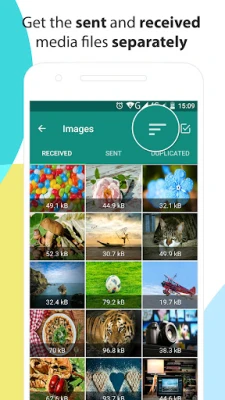
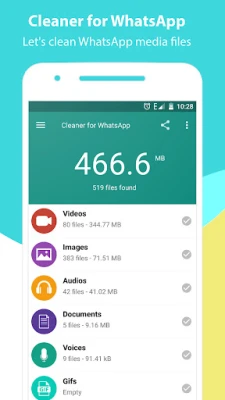
- Unified view of WhatsApp media – All received and sent files are displayed in one list, grouped by type.
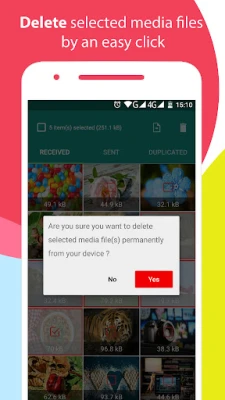
- Selective deletion – Tap any item to delete it individually, or use a single button to clear an entire category.
- Category filters – Quickly switch between photos, videos, audio, documents and other file types.
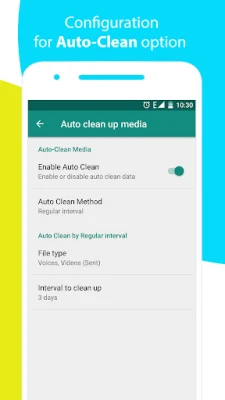
- Auto‑clean option – Set a schedule or storage‑limit trigger so the app removes older files automatically.
- Preview before deleting – Open thumbnails or play media directly from the app to confirm what you are removing.
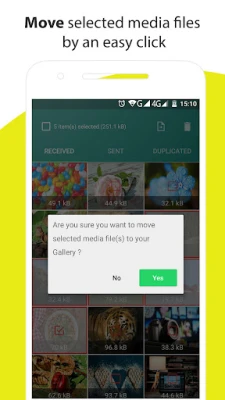
- Move important files – Transfer selected items out of the WhatsApp folder to another location on your device.
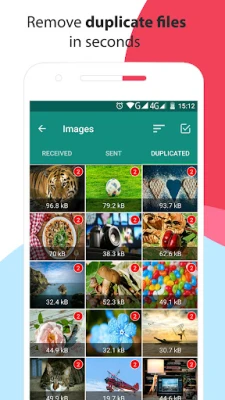
- Duplicate detection – Find identical files and delete the extras to reclaim space.
- Sorting tools – Order files by date or size for easier decision‑making.
How it works
When you launch the app it scans the standard WhatsApp directories (e.g., /WhatsApp/Media) and builds a catalog of the stored items. The catalog is presented in a clean list with thumbnails where applicable. From there you can apply filters, sort the view, and choose actions such as delete, move or mark as favorite. If you enable the auto‑clean feature, the app will run the same scan at the interval you specify and automatically remove files that exceed the defined storage threshold.
Practical uses
- Free up space on devices with limited internal storage.
- Remove old group chat videos that are no longer needed.
- Keep personal photo collections separate from WhatsApp media.
- Prevent the WhatsApp folder from growing indefinitely.
Installation information
The app is distributed as a free download. Install it like any other Android package, grant the required storage permissions, and you’ll be ready to start cleaning.
Things to know before installing
- The app does not modify WhatsApp itself; it only works with the files WhatsApp creates.
- Deleting a file from the app removes it permanently from the device; make sure to back up any content you want to keep.
- Auto‑clean runs in the background and may consume a small amount of battery while scanning.
Who may find it useful?
Anyone who uses WhatsApp heavily and notices that media files are taking up a noticeable portion of their device’s storage will benefit from Cleaner for WhatsApp. It is especially handy for users with low‑capacity phones, frequent group chats, or those who like to keep their media library tidy.
Frequently asked questions
Does Cleaner for WhatsApp delete messages?
No. The app only accesses the media files stored in WhatsApp’s folder. Text messages remain untouched.
Can I restore a file after deletion?
Once a file is deleted through the app, it is removed from the device storage. If you need a backup, copy the file elsewhere before deleting.
Is the app safe to use?
The app operates locally on your device and does not transmit data to external servers. It requires only standard storage permissions to read and modify files.
Rate the App
User Reviews















Popular Apps










 Games
Games Entertainment
 Communication
 E-mail
 Security
 Tools
Tools Media
Media Internet
 Finance
 Design
 Education
 Android Firmwares
 Travel & Local
 Android
 Windows
 Linux
Linux