

Latest Version
Latest
September 18, 2026
SyncTech Pty Ltd
Tools
Android
102
Free
com.riteshsahu.SMSBackupRestore
Report a Problem
More About SMS Backup & Restore – Securely Save Your Messages and Call Logs
What is SMS Backup & Restore?
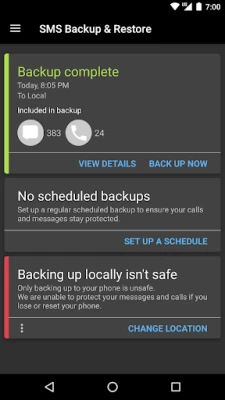
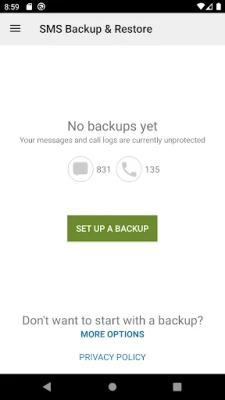
SMS Backup & Restore is a free utility from SyncTech Pty Ltd that lets Android users create copies of their text messages, multimedia messages and call history. The app stores these backups in an XML format that can be read on a computer or transferred to another device.
Main features
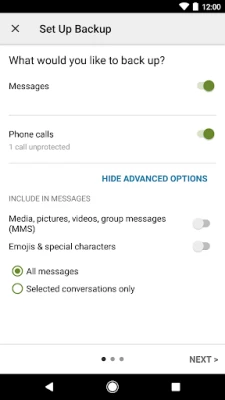
- Comprehensive backup: Saves SMS, MMS and call logs in a single file.
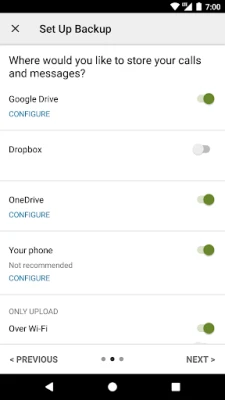
- Local and cloud options: Backups are created on the device by default, with the ability to copy the file to Google Drive, Dropbox or OneDrive.
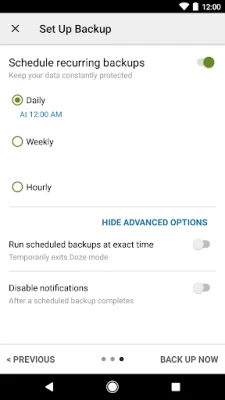
- Scheduled backups: Users can set a recurring time (daily, weekly, etc.) for automatic backups.
- Selectively choose data: Pick specific conversations or call‑log entries to include or exclude.
- Searchable archives: Backups can be opened in the app to locate particular messages.
- Transfer between phones: Move a backup to a new Android device and restore it, even across different OS versions.
- Wi‑Fi Direct transfer: Quickly copy a backup to another phone without using the internet.
- Space management: After confirming a backup exists, the app can delete messages or call logs to free storage.
- Email export: Send the XML file via email for an additional offline copy.
How it works
When you launch the app, it scans the device for SMS, MMS and call‑log entries. You can start a backup immediately or configure a schedule. The resulting XML file is stored in a dedicated folder on internal storage. If you enable a cloud service, the app uploads a copy automatically after the backup finishes. To restore, simply select a previously created file and choose whether to import messages, call logs, or both. The restore process writes the data back into the system databases, making the messages appear in your default messaging app.
Practical uses
- Protect important conversations before switching phones.
- Keep a record of call history for personal or business reference.
- Free up space on a device that is running low on storage.
- Maintain an offline archive that can be reviewed on a computer.
Installation information
The app is available through the standard Android package installer. After downloading, grant the requested permissions for messages, call logs and storage so the backup and restore functions can operate correctly. No additional configuration is required to start creating backups.
Things to know before installing
- The app can only restore backups that were created with the same tool; it does not import files from other backup utilities.
- Backups are stored locally by default; consider uploading a copy to a cloud service or emailing it to ensure you have a separate copy before performing a factory reset.
- While the XML format is readable on a computer, the app itself provides the most convenient way to view and search the contents.
Who may find it useful?
Anyone who relies on text messaging for personal or professional communication, as well as users who need a reliable way to preserve call‑log information. The app is especially handy for people who change phones frequently or who want an extra safeguard against accidental data loss.
Frequently asked questions
Do I need an internet connection to back up?
No. Backups are created on the device without network access. Uploading to cloud services requires an internet connection, but this step is optional.
Can I restore a backup to a different Android version?
Yes. Because the backup format is independent of the Android version, you can move the XML file to another phone running a newer or older OS and restore it there.
Is my data shared with the developer?
The app does not transmit your messages or call logs to the developer. Files are only uploaded to the cloud services you select.
Rate the App
User Reviews














Popular Apps










 Games
Games Entertainment
 Communication
 E-mail
 Security
 Tools
Tools Media
Media Internet
 Finance
 Design
 Education
 Android Firmwares
 Travel & Local
 Android
 Windows
 Linux
Linux