

Latest Version
Latest
August 30, 2026
Zestas
Tools
Android
127
Free
com.zestas.cryptmyfiles
Report a Problem
More About ZenCrypt – Secure File Encryption for Android
What is ZenCrypt?
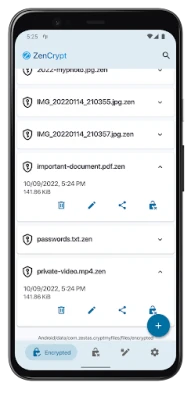
ZenCrypt is a lightweight Android application that lets you protect any file on your device by encrypting it with strong cryptographic algorithms. The app is developed by Zestas and offered free of charge, giving users a straightforward way to keep personal documents, photos, videos, and other data private.
Main features
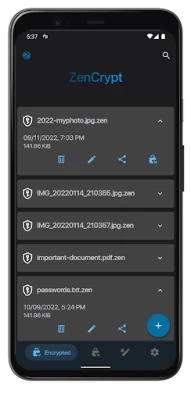
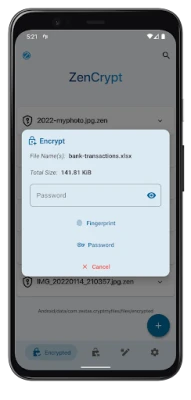
- One‑tap encryption and decryption – Select a file, choose a password, and let ZenCrypt handle the rest.
- AES‑256 encryption – Uses a widely trusted symmetric cipher to secure your data.
- Random IV generation – Each encryption operation creates a fresh initialization vector, adding an extra layer of security.
- Password‑based key derivation – Supports PBKDF2 to stretch passwords and make brute‑force attacks more difficult.
- Open‑source code – The source is publicly available, allowing anyone to review the implementation.
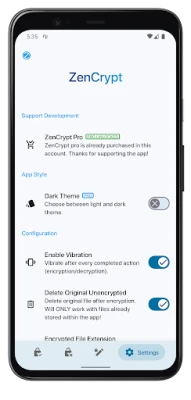
- Optional dark theme – A dark UI mode is included for low‑light environments.
How it works
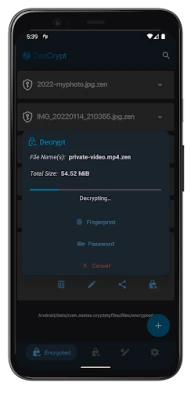
When you start an encryption task, ZenCrypt generates a random salt and IV, then derives a key from the password you provide using PBKDF2. The file is encrypted with AES‑256 in CBC mode and saved with a .zen extension (or a similar marker). Decryption follows the reverse process: the app reads the stored salt and IV, re‑derives the key from your password, and restores the original file.
Practical uses
- Secure personal photos or videos before sharing them.
- Protect sensitive documents such as PDFs, contracts, or notes.
- Encrypt backup files that you store on cloud services or external drives.
- Keep private app data (e.g., exported databases) safe from casual inspection.
Installation information
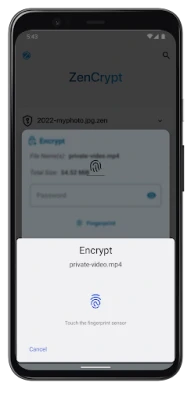
ZenCrypt can be installed directly from the Google Play Store. The app requires standard Android permissions to read and write files on internal or external storage. No special hardware is needed, though devices with a fingerprint sensor can optionally use biometric protection if they choose to enable it.
Compatibility
The application is built for Android devices that support the standard cryptographic libraries. While the exact minimum Android version is not listed, the app runs on most modern smartphones and tablets that can install apps from the Play Store.
Things to know before installing
- Remember the password you use for encryption; losing it means the file cannot be recovered.
- Encryption is performed locally on your device; no data is sent to external servers.
- The free version offers unlimited encryptions, so there are no hidden limits on usage.
Who may find ZenCrypt useful?
Anyone who stores personal or professional files on a mobile device and wants an easy way to keep them private. This includes students, journalists, freelancers, and anyone concerned about data privacy.
Frequently asked questions
Can I encrypt any file type?
Yes. ZenCrypt works with any file that the Android file system can access, including images, videos, documents, archives, and even APK files.
Is biometric protection available?
If your device has a fingerprint sensor, ZenCrypt can store the encryption key behind biometric authentication, adding convenience without compromising security.
Is the app safe to use?
ZenCrypt uses well‑known cryptographic standards and its source code is publicly available for review, which helps ensure transparency.
Can encrypted files be opened on other devices?
Yes, as long as the other device has ZenCrypt installed and you provide the correct password (or biometric data) used during encryption.
Rate the App
User Reviews















Popular Apps










 Games
 Entertainment
 Communication
 E-mail
 Security
 Tools
 Media
 Internet
 Finance
 Design
 Education
 Android Firmwares
 Travel & Local
 Android
 Windows
 Linux