

Latest Version
August 18, 2026
LightEast
Tools
Android
251
Free
com.lighteast.whatsapptools
Report a Problem
More About WhatsApp Tools – Handy Utilities for Messaging
What is WhatsApp Tools?
WhatsApp Tools, developed by LightEast, is a lightweight Android utility that works alongside the official WhatsApp app. It offers a collection of optional helpers such as automatic replies, message scheduling, recurring reminders and a simple way to save status media. The app does not replace WhatsApp; it only extends certain workflows through notification access and standard Android intents.
Main Features
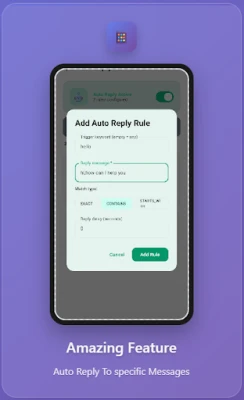
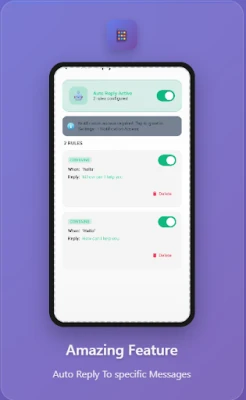
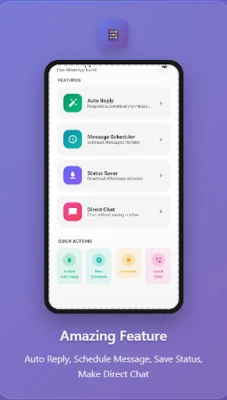
- Auto‑reply – Define custom reply rules that trigger when incoming messages match specific text patterns. You can set exact matches, partial matches or messages that start with a given phrase, and add a short delay to avoid rapid back‑and‑forth replies.
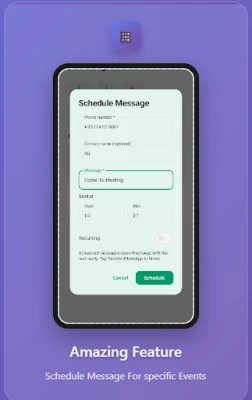
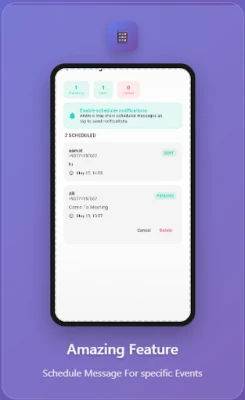
- Message Scheduler – Compose a message once and choose a future date and time for it to be prepared. When the scheduled moment arrives, the app opens WhatsApp with the text pre‑filled, letting you review and send it manually.
- Recurring Messages – Set up messages that repeat at regular intervals – daily, hourly or on a custom schedule – useful for reminders or routine notifications.
- Status Saver – Browse status files that are already stored on your device and save images or videos with a single tap. The saver works only with content that WhatsApp has cached locally.
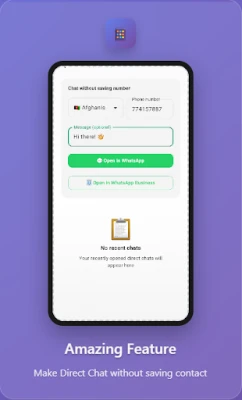
- Direct Chat – Start a conversation with a phone number without adding the contact to your address book, simplifying one‑off communications.
How It Works
WhatsApp Tools relies on Android’s notification‑access permission to detect incoming messages. It never reads the content of chats directly; instead, it reacts to the notification payload. For actions that involve sending a message, the app uses standard Android intents to open WhatsApp with the prepared text. This approach keeps the interaction transparent to the user and ensures that no messages are sent without explicit confirmation.
Practical Uses
- Automate quick acknowledgments when you are busy or driving.
- Prepare birthday wishes, meeting reminders or promotional notices in advance.
- Send regular updates to a group without remembering to type the same text each time.
- Save interesting status images or videos for later reference without leaving WhatsApp.
- Contact a service number without cluttering your contacts list.
Installation Information
The app is distributed as a free download. After installing, you will be prompted to grant notification access so that auto‑reply and scheduling can function. No additional login or subscription is required.
Things to Know Before Installing
- The app is not affiliated with WhatsApp Inc.; it operates as an independent helper.
- All processing happens on your device; no personal data is uploaded to external servers.
- Features that prepare a message still require you to confirm the send action inside WhatsApp.
- Some functions may be limited on devices with aggressive battery‑saving settings unless the app is excluded from such optimizations.
Who May Find It Useful?
Anyone who uses WhatsApp for personal or business communication and wants to reduce repetitive typing will benefit. Small business owners, community managers, students and anyone who frequently shares status media can use the tools to streamline their workflow.
Frequently Asked Questions
Do I need a separate account for WhatsApp Tools?
No. The app works with the WhatsApp installation already present on your device.
Can the app send messages automatically?
Messages are prepared and displayed in WhatsApp; you must tap send manually. Automatic background sending is not supported.
Is my chat content stored by the app?
Only the notification information needed for auto‑reply is accessed temporarily. No chat logs are saved or transmitted.
Will the app work on all Android versions?
WhatsApp Tools requires Android’s notification‑access feature, which is available on most recent Android releases. Compatibility with very old versions cannot be guaranteed.
Rate the App
User Reviews















Popular Apps










 Games
Games Entertainment
 Communication
 E-mail
 Security
 Tools
Tools Media
Media Internet
 Finance
 Design
 Education
 Android Firmwares
 Travel & Local
 Android
 Windows
 Linux
Linux