
Latest Version
August 17, 2026
ESO TECH
Tools
Android
123
Free
com.esotech.waplus
Report a Problem
More About WAPlus Ultra – WhatsApp™ Tools
What is WAPlus Ultra?
WAPlus Ultra is a free Android utility that adds a set of productivity helpers to WhatsApp and related messaging apps. It focuses on keeping everything local on your device, so you can manage follow‑ups, templates and call‑related notes without cluttering your contacts list.
Main features
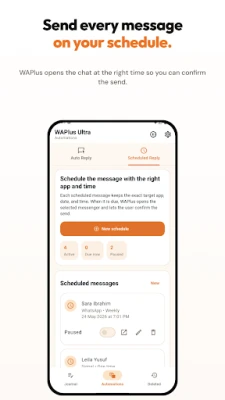
- Scheduled send – Compose a message for WhatsApp, WhatsApp Business, Telegram or Signal and set a future time. When the moment arrives the app opens the target messenger with the text ready, letting you confirm and send.
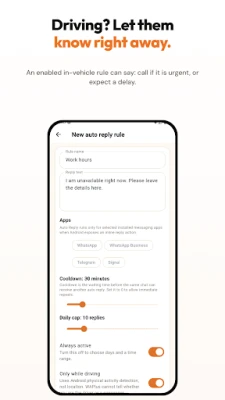
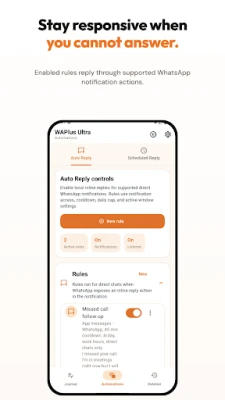
- Auto‑reply rules – Define simple conditions (for example, when you are driving or in a meeting) and let WAPlus generate a reply through the inline notification reply feature.
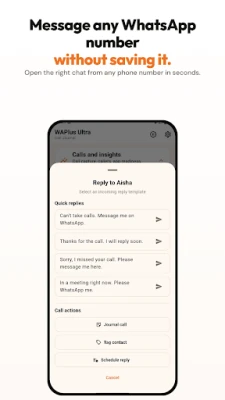
- Reply without saving – Start a chat with any phone number directly from WAPlus, bypassing the need to add the number to your contacts first.
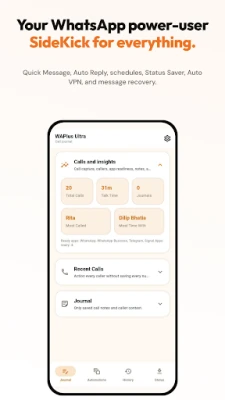
- After‑call actions – Detect missed, rejected, incoming or outgoing calls via the notification system and instantly offer options such as sending a template, adding a note or scheduling a follow‑up.
- Call journal & contact memory – Attach notes, tags, birthdays or other context to phone numbers and keep the information stored locally for easy reference.
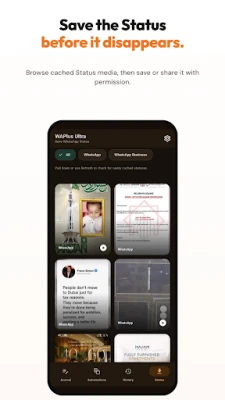
- Status save & share – When you grant the required permission, capture WhatsApp Status media for later viewing or sharing.
- WhatsApp history – Optionally retain selected notification previews so you can review message snippets after the original notification disappears.
- Local backup & restore – Export your templates, tags and schedules to a file on your device and restore them when needed.
How it works
The app runs in the background and listens to Android notifications for calls and messaging events. When a trigger matches a rule you have created, WAPlus presents a small overlay with the appropriate action. All data – templates, notes, schedules – stays inside the app’s private storage; nothing is uploaded to a cloud service.
Practical uses
- Sales or support teams can schedule follow‑up messages after a client call, ensuring no lead is forgotten.
- Drivers can set an auto‑reply that informs contacts they are on the road and will respond later.
- Frequent callers can keep a personal log of call outcomes, adding tags like “vendor” or “appointment” for quick filtering.
- Users who receive many WhatsApp Status updates can save the ones they like without opening the original chat.
Installation information
Search for WAPlus Ultra – WhatsApp™ Tools in the Google Play Store, tap Install, and grant the requested permissions when the app first launches. The core functionality works without additional configuration, but you can fine‑tune rules and templates in the Settings screen.
Things to know before installing
- The app relies on notification access; you must enable this permission in the system settings for call detection and auto‑reply to work.
- Scheduled messages are prepared but require you to press Send manually; this design keeps you in control of each outbound message.
- All stored data remains on the device; there is no built‑in cloud sync.
Who may find it useful?
Anyone who uses WhatsApp for business or personal communication and wants a lightweight way to manage follow‑ups, templates and call‑related notes. The tool is especially handy for freelancers, small‑business owners, sales representatives and anyone who receives frequent calls while using messaging apps.
Frequently asked questions
Do I need an internet connection for the scheduled send?
Yes, the target messenger must be online when you confirm the send, but the scheduling itself works offline.
Can WAPlus Ultra send messages automatically?
No. The app always opens the chosen messenger with the prepared text, and you must tap the Send button yourself.
Is my data shared with third parties?
All information is stored locally on your device; the app does not upload templates, notes or call logs to external servers.
Will the app work on all Android versions?
The app requires Android’s notification access API, which is available on most recent Android releases. Specific version requirements are listed on the Play Store page.
Rate the App
User Reviews















Popular Apps










 Games
Games Entertainment
 Communication
 E-mail
 Security
 Tools
Tools Media
Media Internet
 Finance
 Design
 Education
 Android Firmwares
 Travel & Local
 Android
 Windows
 Linux
Linux