Latest Version
Latest
September 08, 2026
Verizon Consumer Group
Tools
Android
9
Free
com.verizon.contenttransfer
Report a Problem
More About Verizon Content Transfer – Move Your Data Seamlessly
What is Verizon Content Transfer?
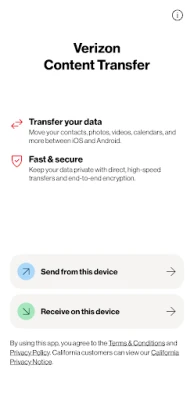
Verizon Content Transfer is a free utility that helps you move personal data from one mobile device to another. It is designed to work without the need for physical cables, cloud backups, or signing into additional accounts. The app focuses on a straightforward, device‑to‑device transfer experience.
Main Features
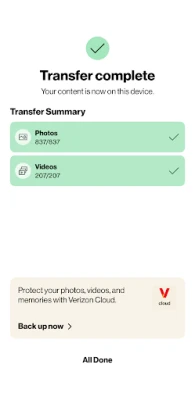
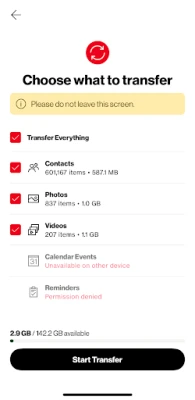
- Broad data types – contacts, photos, videos, calendar entries, call logs and audio recordings can be moved.
- Cross‑platform support – works between Android phones and also supports transfers from iPhone to Android.
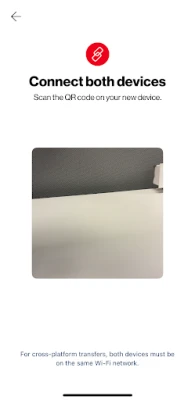
- Instant pairing – devices are paired by scanning a QR code displayed on each screen.
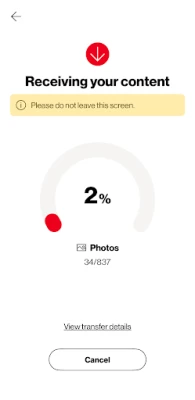
- Real‑time progress – you can see how much data has been transferred and the app can resume if the connection is interrupted.
How It Works
1. Install the app on both the source and the target device.
2. Open the app on each device and follow the on‑screen prompts to generate a QR code.
3. Scan the QR code from the other device to establish a secure connection.
4. Choose the categories of data you want to move.
5. Start the transfer and watch the progress bar. If the process is paused, you can resume it later.
Practical Uses
The app is handy when you are upgrading to a new phone and want to keep your personal information intact. It is also useful for switching from an iPhone to an Android device, as it eliminates the need for multiple backup services. Because the transfer happens locally, you do not need an internet connection once the devices are paired.
Installation Information
Search for "Verizon Content Transfer" in the Google Play Store, then tap Install. The app is free and does not require a Verizon account to function. After installation, grant the permissions the app requests so it can access contacts, media files and call logs.
Compatibility
The app runs on Android devices that meet the minimum system requirements defined by the Play Store. It also supports iPhone devices for the source side of a transfer, though the iPhone must have the companion version of the app installed from the App Store.
Things to Know Before Installing
- Both devices need to have the app installed and be within Bluetooth or Wi‑Fi range for the QR‑code pairing to work.
- Large media libraries may take longer to transfer; ensure the devices stay powered during the process.
- The app does not store any of your data on external servers; all transfers occur directly between the devices.
Who May Find It Useful?
Anyone who is changing phones, especially those moving from iOS to Android, will benefit from a quick, cable‑free transfer. It is also suitable for users who prefer not to rely on cloud backups for privacy reasons.
Frequently Asked Questions
Do I need a Verizon account?
No. The app works independently of any carrier account.
Is the transfer encrypted?
Yes, the connection between the devices is encrypted to protect your data during the transfer.
Can I transfer apps?
The app focuses on personal data such as contacts, media and logs. Application packages are not transferred.
What happens if the transfer is interrupted?
The progress is saved, and you can resume the transfer once the devices are re‑connected.
Rate the App
User Reviews





Popular Apps










 Games
Games Entertainment
 Communication
 E-mail
 Security
 Tools
Tools Media
Media Internet
 Finance
 Design
 Education
 IT Tools
 Travel & Local
 Android
 Windows
 Linux
Linux