


Latest Version
September 12, 2026
Mobile Apps Team
Tools
Android
7
Free
com.mobileappsteam.unseen
Report a Problem
More About Unseen Chat – No Last Seen
What is Unseen Chat?
Unseen Chat – No Last Seen is a free Android utility that focuses on privacy during everyday messaging. Its core purpose is to let you view incoming text, media, and other content without sending the usual read acknowledgments that many chat platforms generate automatically.
Main capabilities
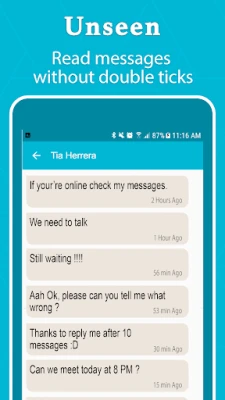
- Read without a read receipt: The app intercepts incoming messages and displays them in a way that does not inform the sender that the message has been opened.
- Hide last‑seen status: When supported, the tool can prevent your own online or last‑seen timestamp from being updated while you browse messages.
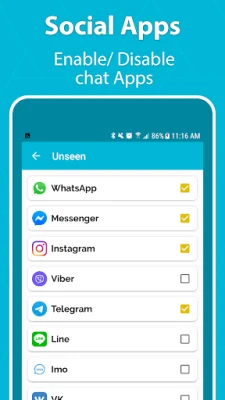
- Support for multiple chat services: Designed to work with a range of popular messaging applications on Android, the app aims to provide a consistent “unseen” experience across different platforms.
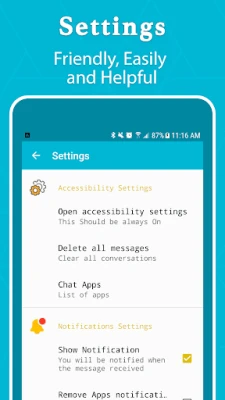
- Simple interface: A clean, user‑friendly layout makes it easy to toggle the unseen mode on or off and to navigate through your conversations.
How it works
Unseen Chat operates as an overlay that monitors notification data from supported messaging apps. When a new message arrives, the app captures the content and presents it within its own view. Because the original app never receives the usual “message read” signal, the sender’s interface remains unchanged – no blue ticks, double checks, or updated online status.
The process runs locally on your device; no data is sent to external servers, which helps maintain the privacy of the content you view.
Practical uses
- Maintain discretion in professional settings where reading a message immediately could be inappropriate.
- Avoid accidental social pressure that can arise from read receipts in personal relationships.
- Review messages while traveling or in environments where you prefer not to signal your activity.
Installation notes
To install Unseen Chat, locate the app in the Google Play Store and tap Install. The installation process follows the standard Android workflow. After installation, you will be prompted to grant notification access so the app can read incoming messages. Accepting this permission is essential for the core functionality.
Compatibility considerations
The app is built for Android devices that support the standard notification‑access framework. Because it relies on system‑level notification data, it works best on devices running recent versions of Android where the permission model is stable. Users on very old Android releases may experience limited functionality.
Things to keep in mind
- Unseen Chat does not modify the original messaging applications; it only provides a separate view.
- The app cannot guarantee invisibility for every possible messaging service, especially those that use proprietary read‑receipt mechanisms.
- Battery usage is modest, but keeping the unseen mode active continuously may increase power consumption slightly.
Who might find it useful?
Anyone who values privacy in digital communication can benefit from Unseen Chat. This includes professionals who need to manage work messages discreetly, individuals who prefer not to reveal their reading habits in personal chats, and users who simply want an extra layer of control over how their activity appears to others.
Frequently asked questions
Does Unseen Chat store my messages?
No. The app displays messages in real time and does not retain a permanent copy unless you choose to save them manually.
Will the app work with all messaging platforms?
Unseen Chat is designed to work with the majority of popular Android messaging apps that rely on standard notification channels. Compatibility with less common or heavily customized apps may vary.
Is any personal data transmitted outside my device?
The app processes notifications locally and does not send message content to external servers.
Can I toggle the unseen mode on a per‑app basis?
Yes. Within Unseen Chat’s settings you can enable or disable the feature for each supported messaging application individually.
Rate the App
User Reviews














Popular Apps










 Games
Games Entertainment
 Communication
 E-mail
 Security
 Tools
Tools Media
Media Internet
 Finance
 Design
 Education
 IT Tools
 Travel & Local
 Android
 Windows
 Linux
Linux