

Latest Version
September 04, 2026
Ved Technologies
Tools
Android
0
Free
com.vedtechnologies.toolbox
Report a Problem
More About Toolbox – Everyday Utilities for Android
What is Toolbox – Everyday Utilities?
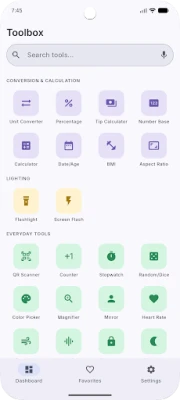
Toolbox – Everyday Utilities, developed by Ved Technologies, is a free Android application that brings together a broad collection of practical tools. Designed for users who prefer a single app rather than installing many separate utilities, Toolbox offers measurement, conversion, calculation and general‑purpose features that work entirely offline.
Main features
Measurement tools
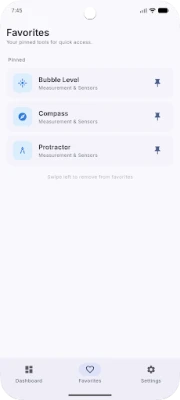
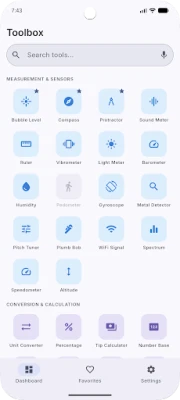
- Compass – Digital direction indicator using the device’s magnetometer.
- Ruler – On‑screen measurement of objects using the touch interface.
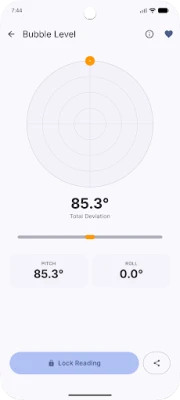
- Level – Real‑time surface‑flatness check.
- Protractor – Angle measurement for simple geometry tasks.
- Sound meter – Displays ambient noise level in decibels.
- Light meter – Shows ambient light intensity in lux.
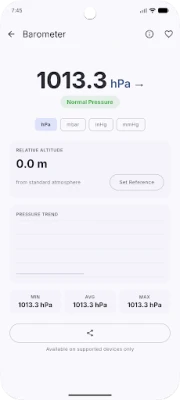
- Barometer – Reads atmospheric pressure when the device supports it.
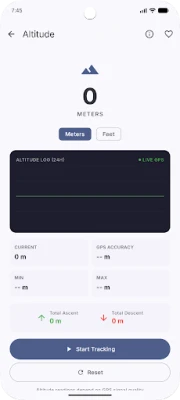
- Altitude – Provides elevation above sea level based on pressure data.
- Speedometer – Tracks movement speed using GPS.
- Metal detector – Uses magnetic sensors to indicate nearby metal objects.
- Wi‑Fi signal – Shows current wireless signal strength.
- Pitch tuner – Helps musicians tune instruments by detecting pitch.
- Gyroscope – Displays real‑time rotation and orientation data.
- Vibrometer – Measures vibration intensity.
- Plumb bob – Digital vertical alignment check.
- Spectrum analyzer – Visualises audio frequencies.
Conversion and calculation tools
- Unit converter – Handles hundreds of units across categories such as length, weight, temperature and more.
- Calculator – Simple, fast calculator for everyday arithmetic.
- BMI calculator – Computes body‑mass index from height and weight.
- Tip calculator – Helps split bills and calculate gratuities.
- Number base converter – Converts between binary, octal, decimal and hexadecimal.
- Date calculator – Determines the number of days between two dates.
- Aspect‑ratio calculator – Calculates and converts screen or image ratios.
- Percentage calculator – Quick percentage computations.
Everyday utilities
- Stopwatch & timer – Precision timing with lap support.
- QR code scanner – Reads QR codes and barcodes without internet.
- Flashlight – Turns the device’s LED or screen into a bright torch.
- Magnifier – Zooms in on text or objects for easier viewing.
How it works
All tools are built into the app and run locally on the device. When a tool requires a sensor (for example, the compass or barometer), Toolbox accesses the corresponding hardware component through Android’s standard APIs. Tools that need network information, such as the Wi‑Fi signal strength, read the current connection state without transmitting data. Because the app does not depend on external services, it can be used in offline environments, making it suitable for travel, field work or situations with limited connectivity.
Practical uses
- DIY projects – Use the level, ruler and plumb bob to ensure accurate measurements.
- Outdoor activities – Compass, altitude and speedometer help hikers and cyclists track their route.
- Home cooking – Unit converter and tip calculator simplify everyday calculations.
- Fitness – BMI calculator provides quick health feedback.
- Music practice – Pitch tuner assists with instrument tuning without needing separate hardware.
Installation information
The app is available through the standard Android package name com.vedtechnologies.toolbox. Install it from a trusted app store, then grant any required permissions (e.g., location for GPS‑based speedometer). No additional configuration is needed; each tool can be launched directly from the main menu.
Things to know before installing
- The app does not contain advertisements or analytics, which helps preserve battery life and privacy.
- Some measurement tools rely on device sensors that may not be present on all phones (e.g., barometer, metal detector). Those tools will be disabled if the hardware is unavailable.
- All calculations are performed locally; no data is sent to external servers.
Who may find Toolbox useful?
Anyone who needs quick access to a variety of utility functions without juggling multiple apps. This includes students, hobbyists, field technicians, travelers, and everyday users who appreciate an all‑in‑one toolbox on their smartphone.
Frequently asked questions
Is an internet connection required?
No. All tools operate offline. An internet connection is only needed for the initial download and installation.
Will the app collect my personal data?
The application is designed to run without analytics or trackers. It does not transmit personal information to external servers.
Can I use the tools on a tablet?
Yes. The interface adapts to larger screens, and the same sensor‑based features are available on tablets that include the necessary hardware.
What happens if my device lacks a specific sensor?
Tools that depend on missing sensors will be shown as unavailable or will display a notice explaining the limitation.
Rate the App
User Reviews















Popular Apps










 Games
Games Entertainment
 Communication
 E-mail
 Security
 Tools
Tools Media
Media Internet
 Finance
 Design
 Education
 IT Tools
 Travel & Local
 Android
 Windows
 Linux
Linux