


Latest Version
September 08, 2026
Sriharsha Boini
Tools
Android
11
Free
com.indussparks.textmagic
Report a Problem
More About Text Magic – Creative Text Tools for Android
What is Text Magic?
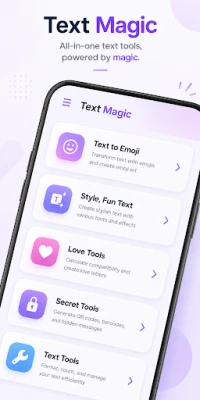
Text Magic is a free Android utility developed by Sriharsha Boini. It brings a suite of text‑related tools into a single, offline‑ready app. Whether you need to add flair to a social‑media post, generate a quick QR code, or experiment with hidden messages, Text Magic offers a range of functions that go beyond the standard keyboard.
Main Features
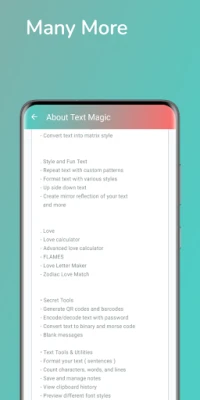
- Text styling – Convert plain words into emoji art, upside‑down text, mirrored reflections, or matrix‑style patterns. The app also includes a font generator that produces decorative characters for bios and captions.
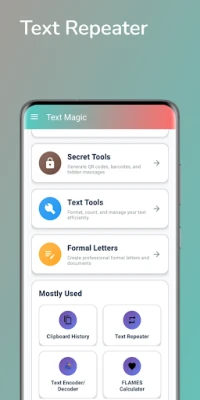
- Clipboard manager – Keep a history of copied snippets, edit them, and paste when needed.
- Repeater – Duplicate any string with custom patterns, useful for creating visual separators or repetitive designs.
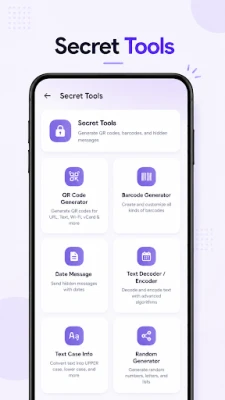
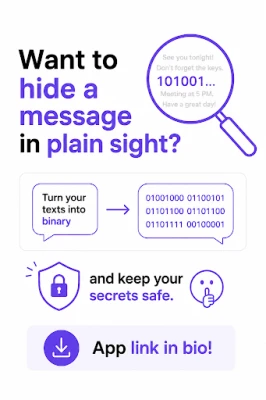
- Encoding tools – Transform text into binary, Morse code, or password‑protected strings, and decode them back to readable form.
- QR & barcode creator – Generate QR codes from any text, enabling quick sharing of links, contact details, or secret messages.
- Love utilities – Simple love calculator and FLAMES compatibility checker for light‑hearted fun.
How It Works
After installing the app, you are presented with a clean menu that groups tools by purpose. Selecting a tool opens a straightforward interface: type or paste your source text, choose the desired transformation, and view the result instantly. Most utilities include a copy button so the output can be transferred to other apps without leaving Text Magic.
Practical Uses
- Social media creators can quickly generate eye‑catching text for Instagram bios, TikTok captions, or Discord usernames.
- Students and writers benefit from the word‑count and case‑formatting utilities when drafting essays or notes.
- Event planners may use the QR code generator to share event details or RSVP links in a printable format.
- Privacy‑conscious users can encode messages in Morse or binary before sharing them through messaging apps.
Installation Information
The app is available for free on the Appitika marketplace. Simply tap the install button, grant the standard permissions for storage access (if you wish to save generated QR images), and launch Text Magic from your app drawer.
Compatibility
Text Magic runs on Android devices that meet the minimum system requirements defined by the Google Play framework. Because the app works entirely offline, it does not depend on a specific Android version beyond the baseline required for basic app execution.
Things to Know Before Installing
- The app does not require an internet connection for its core features, making it suitable for use in low‑connectivity environments.
- All tools are bundled within the same package; there are no in‑app purchases or ads reported at the time of writing.
- Since the developer has not listed a specific version number, you may want to check for updates periodically to receive any new features or bug fixes.
Who May Find It Useful?
Anyone who enjoys playing with text will appreciate Text Magic. This includes social‑media enthusiasts, casual gamers looking for fun love calculators, educators who need quick formatting tools, and developers who require a handy encoder/decoder on the go.
Frequently Asked Questions
- Is an internet connection required? No. All features work offline after the app is installed.
- Can I save the QR codes I create? Yes, the app provides an option to export the generated QR image to your device’s gallery.
- Does the app collect personal data? The app’s description does not mention data collection beyond the permissions needed for storage access.
- Is there a way to undo a transformation? You can simply re‑enter the original text or use the clipboard history to retrieve a previous version.
Rate the App
User Reviews















Popular Apps










 Games
Games Entertainment
 Communication
 E-mail
 Security
 Tools
Tools Media
Media Internet
 Finance
 Design
 Education
 IT Tools
 Travel & Local
 Android
 Windows
 Linux
Linux