

Latest Version
Latest
September 16, 2026
Stay Browser
Tools
Android
8
Free
com.dajiu.stay
Report a Problem
More About Stay Browser – Light Browser for Android
What is Stay Browser?
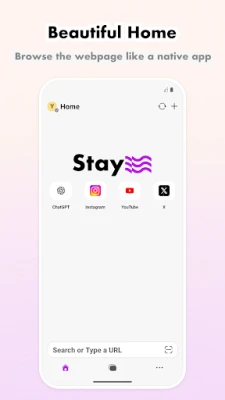
Stay Browser is a free Android web browser built to be fast and minimal while still offering tools that power users appreciate. It aims to reduce on‑screen clutter, block unwanted ads, and let you organize tabs in a way that matches your workflow.
Main features
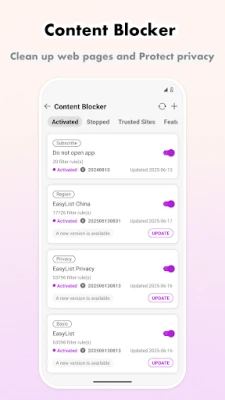
- Ad blocking – Built‑in filters keep most ads and trackers out of the way, helping pages load faster and reducing data usage.
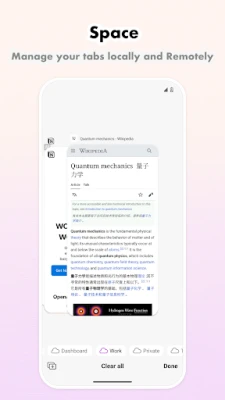
- Tab grouping with Spaces – You can create separate groups of tabs, called Spaces, for different projects or topics and switch between them instantly.
- Dark mode support – Web pages are rendered in dark theme when the system setting is enabled, easing eye strain in low‑light environments.
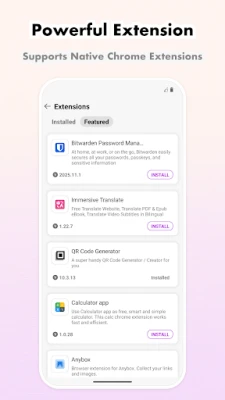
- User script compatibility – The browser works with scripts written for Tampermonkey or Violentmonkey, allowing custom tweaks to website behavior.
- Download manager – Files can be saved directly from the browser with a simple download interface.
- Home‑screen shortcuts – Single‑page sites can be added to the Android home screen as “home applications,” giving them an app‑like feel without a separate install.
How it works
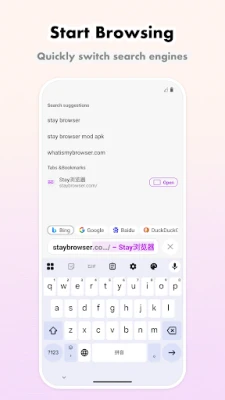
When you launch Stay Browser, the interface presents a clean address bar and a set of controls for managing tabs. Enabling the ad blocker is a one‑tap action in the settings menu; the browser then applies a default filter list that can be updated automatically. Spaces are created from the tab overview screen; each Space acts as an isolated container for its tabs, which can be synced across devices if you sign in with a Stay account.
User scripts are managed through a dedicated screen where you can add, enable, or disable scripts. The browser respects the permissions declared by each script, and it checks for updates when a script source provides a newer version.
Practical uses
- Research or study sessions – Keep separate Spaces for each subject and switch without losing context.
- Privacy‑focused browsing – Block ads and trackers while still accessing the sites you need.
- Lightweight web apps – Turn frequently used single‑page tools into home‑screen shortcuts for quick access.
- Customization enthusiasts – Apply user scripts to modify site layouts, automate actions, or add missing features.
Installation information
The app can be installed from the Google Play Store. Search for "Stay Browser" or use the package name com.dajiu.stay. The download size is modest, reflecting the app’s lightweight design. After installation, you may be prompted to grant permissions for storage access (needed for downloads) and network access (required for browsing).
Things to know before installing
- The browser does not include a built‑in password manager; you will need to rely on Android’s autofill service or a third‑party manager.
- Syncing tabs and settings requires a Stay account; without signing in, data remains local to the device.
- While ad blocking works well for many common networks, some sites may request you to disable it to view content.
Who may find Stay Browser useful?
Anyone who wants a faster, less cluttered browsing experience on Android will benefit. It is especially appealing to users who manage many tabs, value privacy, or enjoy customizing web pages with scripts. Students, researchers, and professionals who juggle multiple online resources often find the Space feature helpful for keeping work organized.
Frequently asked questions
Is Stay Browser compatible with Android 5.0 and newer?
The developer has not listed a minimum Android version, but the app is available on the Play Store, which typically requires at least Android 5.0 (Lollipop) for most modern apps.
Can I import bookmarks from another browser?
Stay Browser includes a simple import option in its settings that can read bookmarks exported as an HTML file from other browsers.
Does the ad blocker affect page functionality?
In most cases the blocker removes only ads and trackers. If a site stops working, you can temporarily disable the blocker for that page or add the site to a whitelist.
How does the sync feature work?
When you sign in with a Stay account, the browser encrypts your tab groups, bookmarks, and script settings and stores them in the cloud. The same data is then available on any other device where you log in with the same account.
Rate the App
User Reviews















Popular Apps










 Games
Games Entertainment
 Communication
 E-mail
 Security
 Tools
Tools Media
Media Internet
 Finance
 Design
 Education
 IT Tools
 Travel & Local
 Android
 Windows
 Linux
Linux