

Latest Version
September 17, 2026
smartpositive
Tools
Android
12
Free
com.smartpositive.sms_exporter
Report a Problem
More About SMS Exporter – Export Your Text Messages Easily
What is SMS Exporter?
SMS Exporter is a lightweight utility that lets Android users create readable copies of their text message history. Whether you need a backup for personal records, want to move conversations to a new device, or simply wish to archive important chats, the app provides a straightforward way to turn messages into common file formats.
Main Features
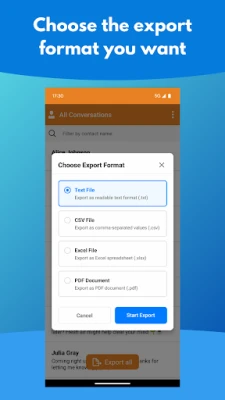
- Multiple export formats: Choose from plain text (TXT), spreadsheet‑ready CSV, portable document (PDF), or Microsoft Excel (XLSX) files.
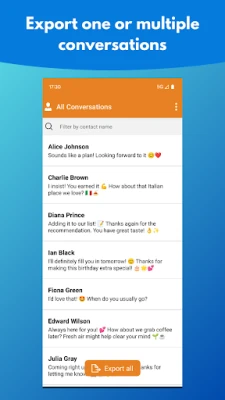
- Selective or full export: Export a single conversation, a group of threads, or your entire messaging archive.
- Privacy‑focused design: All processing happens on the device; no messages are sent to external servers.
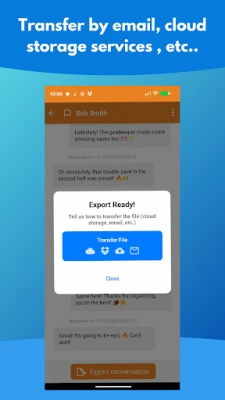
- Flexible sharing options: Once a file is generated, you can send it via email, upload to cloud storage services, or share through any messaging app you prefer.
How It Works
- Open the app and browse your list of SMS/MMS threads.
- Select the conversation(s) you want to export, or choose the option to include every message stored on the device.
- Tap the Export button and pick the desired file format.
- After the file is created, choose a method to transfer it – for example, attach it to an email, save it to Google Drive, Dropbox, or share it directly with a contact.
Practical Uses
People use SMS Exporter for a variety of reasons:
- Legal or personal records: Preserve evidence of important conversations.
- Device migration: Keep a copy of messages before switching to a new phone.
- Archiving: Store sentimental chats in a readable format for future reference.
- Analysis: Export to CSV or XLSX for simple data analysis, such as counting messages over time.
Installation Information
The app is available for free on the Android platform. Installation follows the standard process: locate the app in the Play Store, tap Install, and grant the necessary permissions to read your messages and write files to storage.
Things to Know Before Installing
- The app requires permission to access your SMS/MMS database and to write files to your device’s storage. These permissions are essential for exporting content.
- No internet connection is needed for the export process itself; however, sharing the exported file via email or cloud services will require connectivity.
- Exported files are stored locally until you decide how to share or back them up.
Who May Find It Useful?
Anyone who relies on text messaging for personal, professional, or legal communication can benefit from SMS Exporter. It is especially handy for users who keep extensive chat histories, need to retain records for compliance, or simply want a convenient way to back up their messages.
Frequently Asked Questions
Does SMS Exporter upload my messages to any server?
No. All processing occurs on your device, and the app does not transmit message content to external services.
Can I export MMS attachments?
The app focuses on the textual content of SMS and MMS. Media files attached to MMS are not included in the exported text files.
What file formats are supported for export?
TXT, CSV, PDF, and XLSX are available, giving you flexibility depending on how you plan to use the exported data.
Is there a limit to the number of messages I can export at once?
The app does not impose a hard limit, but very large archives may take longer to process and generate larger files.
Rate the App
User Reviews















Popular Apps










 Games
Games Entertainment
 Communication
 E-mail
 Security
 Tools
Tools Media
Media Internet
 Finance
 Design
 Education
 IT Tools
 Travel & Local
 Android
 Windows
 Linux
Linux