

Latest Version
Latest
September 14, 2026
Divyesh Devlani
Tools
Android
8
Free
com.dev.simcontactsmanager
Report a Problem
More About SIM Contacts Manager – Organize SIM & Phone Contacts
What is SIM Contacts Manager?
SIM Contacts Manager is a lightweight Android utility that helps you keep the contacts stored on your SIM cards and in the phone’s internal address book tidy and accessible. Developed by Divyesh Devlani, the app focuses on core contact‑management tasks without unnecessary bloat.
Main features
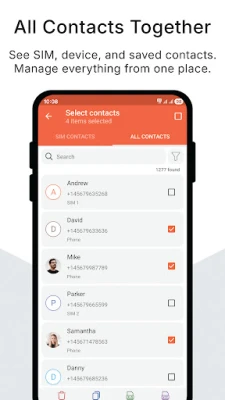
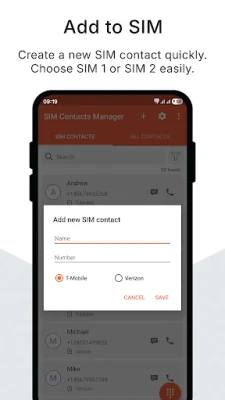
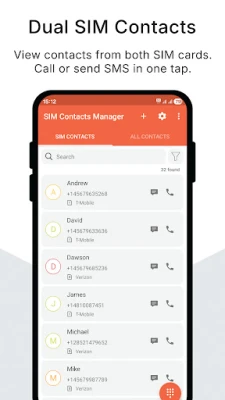
- Dual‑SIM awareness – Detects both SIM slots and lets you work with contacts from each card separately or together.
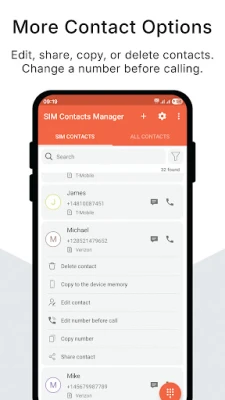
- View and edit – Browse the full list of SIM and device contacts, edit names or numbers, and delete entries you no longer need.
- Copy between storage locations – Move or duplicate contacts from the SIM to the phone memory and vice‑versa, useful when switching devices or consolidating numbers.
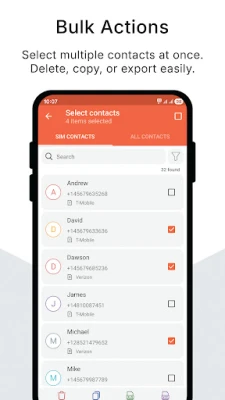
- Bulk actions – Select multiple contacts to delete or copy in a single step, saving time compared with handling each entry individually.
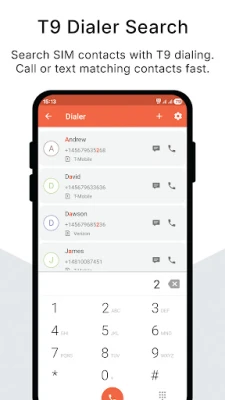
- Quick call & SMS – Initiate a phone call or compose a text message directly from the contact list.
- Search – A simple search bar lets you locate a contact by name or number instantly.
- Backup & restore – Export contacts to standard VCF files or Excel (XLS) spreadsheets, and import them back when needed.
How it works
When you launch the app, it scans the device for any SIM cards and the existing phone‑book entries. The main screen presents two tabs – one for SIM contacts and another for device contacts – each showing a sortable list. From there you can tap a contact to view details, edit fields, or use the action icons for calling or messaging.
To move contacts, select the desired entries, choose the “Copy” option, and pick the target storage (SIM or device). The app handles the necessary permission requests automatically, ensuring a smooth transfer.
Practical uses
- When you receive a new phone and want to transfer all SIM‑stored numbers to the new device’s address book.
- If you maintain separate personal and work numbers on a dual‑SIM phone, the app lets you keep each list organized without mixing them.
- Backing up contacts before a factory reset or SIM swap, using the export function to create a VCF file that can be re‑imported later.
Installation information
The app is offered as a free download from the Appitika store. It requires standard Android permissions for reading and writing contacts, as well as the ability to place calls directly from the interface. No additional configuration is needed after installation.
Things to know before installing
- The app does not include a built‑in contact sync service; it works with the contacts already stored on your device or SIM.
- Exported Excel files use the common XLS format, which can be opened with most spreadsheet programs.
- Because the app accesses contacts, it will request permission to read and modify your address book during first use.
Who may find it useful?
Anyone who uses a dual‑SIM phone, frequently changes devices, or prefers a manual approach to backing up contacts will benefit from SIM Contacts Manager. It is also handy for users who want a simple, ad‑supported app that focuses solely on contact handling.
Frequently asked questions
Can I import contacts from a VCF file?
Yes. The import function accepts standard VCF files and adds the entries to the selected storage location.
Is there a limit to how many contacts I can copy at once?
The app handles bulk operations for typical contact lists; extremely large numbers may take a few seconds to process.
Do I need an internet connection to use the core features?
No. All contact management functions work offline. An internet connection is only required for displaying ads that support the developer.
Rate the App
User Reviews















Popular Apps










 Games
Games Entertainment
 Communication
 E-mail
 Security
 Tools
Tools Media
Media Internet
 Finance
 Design
 Education
 IT Tools
 Travel & Local
 Android
 Windows
 Linux
Linux