Latest Version
Latest
September 10, 2026
Samsung Electronics Co., Ltd.
Tools
Android
4
Free
com.sec.android.easyMover
Report a Problem
More About Samsung Smart Switch Mobile – Transfer Your Data to a New Galaxy
What is Samsung Smart Switch Mobile?
Samsung Smart Switch Mobile is a free utility from Samsung Electronics that simplifies the process of moving personal data from an old phone to a new Samsung Galaxy device. It works directly on the phone, letting you copy contacts, photos, music, messages, calendar entries, Wi‑Fi settings and other content without needing a computer.
Main features
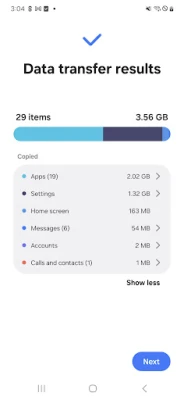
- Broad data support – Transfer contacts, call logs, messages, photos, videos, music (non‑DRM), calendar events, Wi‑Fi networks and device settings.
- Multiple source options – Move data from another Android phone, an iPhone, iCloud, or a PC/Mac using the desktop Smart Switch software.
- Wireless and wired transfer – Choose a direct Wi‑Fi connection, a USB cable, or a QR‑code scan to start the migration.
- App suggestions – After the transfer, the app can recommend similar apps available on Google Play.
How it works
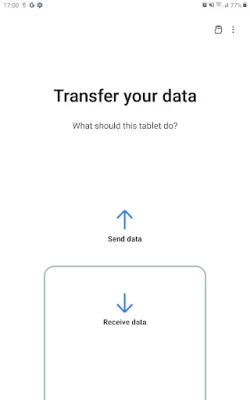
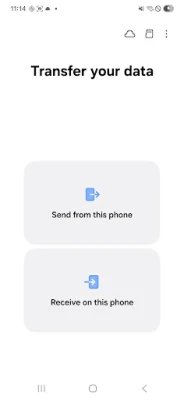
When you launch Smart Switch Mobile, the app asks whether you are moving data from another Android device, an iPhone, or a computer. Depending on the choice, it guides you through the required steps:
- Select the source – For Android, both phones need the app installed; for iPhone, you can use a cable or iCloud login; for PC/Mac, you run the desktop Smart Switch program.
- Connect the devices – Use a USB cable, a wireless hotspot, or scan a QR code displayed on the source device.
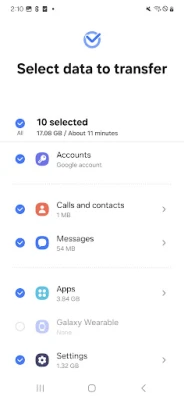
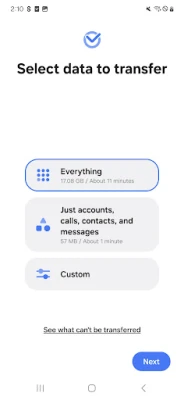
- Choose content – The app lists transferable items; you can pick everything or select specific categories.
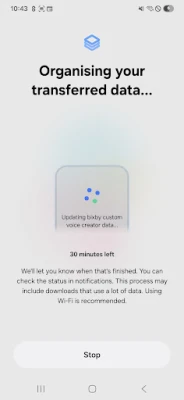
- Start the transfer – Data moves directly between devices; progress is shown in real time.
Practical uses
Smart Switch is especially handy when upgrading to a new Galaxy phone. It saves you from manually re‑entering contacts, re‑downloading photos, or re‑configuring Wi‑Fi networks. The tool also helps users who switch from iOS to Android by handling the iCloud or cable‑based migration.
Installation information
The app is available through the Google Play Store. Search for "Samsung Smart Switch Mobile" or use the package name com.sec.android.easyMover. Installation follows the standard Android process – tap Install, grant the requested permissions, and open the app.
Compatibility and requirements
Smart Switch Mobile works on Samsung Galaxy devices running Android 6.0 (Marshmallow) or later. For transfers from other Android phones, the same minimum Android version applies. iPhone transfers require iOS 12.0 or newer when using a wired connection, and iCloud transfers need iOS 4.2.1 or later.
Things to know before installing
- Both devices should have at least 500 MB of free internal storage for the transfer.
- Some permissions are required for the app to access contacts, call logs, calendar and media files.
- If you experience frequent Wi‑Fi drops on a non‑Samsung device, disabling aggressive Wi‑Fi power‑saving options may improve stability.
Who may find it useful?
Anyone moving to a new Samsung Galaxy phone, especially users who have accumulated a lot of personal data on a previous device. It also benefits iPhone owners who want a straightforward way to bring their data into the Android ecosystem.
Frequently asked questions
Can I transfer app data?
Smart Switch can move app data for apps that are also available on the new Galaxy device. The transfer is limited to Samsung‑specific apps and certain third‑party apps that support data export.
Do I need an internet connection?
A Wi‑Fi network is required only for wireless transfers between two phones. Wired transfers work without any network connection.
Is my data secure during transfer?
Data is transferred locally between the two devices; it does not pass through external servers.
Rate the App
User Reviews





Popular Apps










 Games
Games Entertainment
 Communication
 E-mail
 Security
 Tools
Tools Media
Media Internet
 Finance
 Design
 Education
 IT Tools
 Travel & Local
 Android
 Windows
 Linux
Linux