

Latest Version
September 09, 2026
Ooma
Tools
Android
5
Free
com.ooma.smartsecurity
Report a Problem
More About Ooma Connect – Admin Companion for Ooma Phone Systems
What is Ooma Connect?
Ooma Connect is an Android companion application designed for administrators of Ooma phone systems. It provides a convenient way to monitor and configure Ooma Connect hardware from a mobile device, without replacing the core calling apps.
Main features
- Admin‑only login – Access the app using your Ooma Office administrator credentials, keeping end‑user accounts separate.
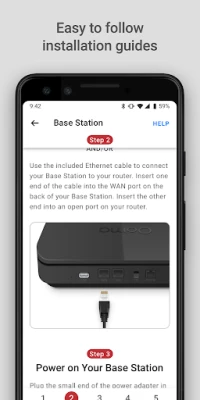
- Installation assistance – Step‑by‑step guides help you set up the Connect 460 Adapter and related equipment.
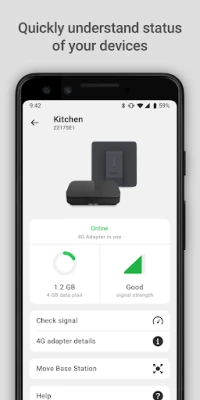
- Device status overview – See at a glance whether each Ooma device is online, offline, or experiencing connectivity issues.
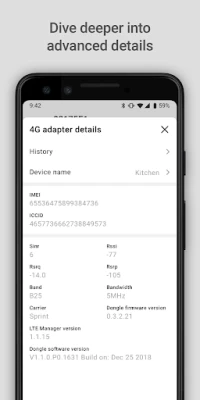
- Signal strength monitoring – Real‑time signal metrics and historical trends let you diagnose weak connections.
- Planned traffic usage view – A future update will add bandwidth and call‑traffic statistics.
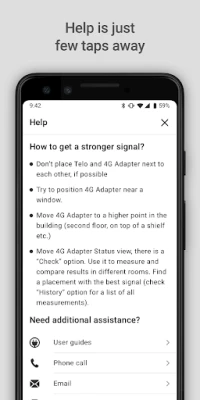
- Direct support link – Quick access to Ooma’s customer‑support channel for questions or feedback.
How it works
After installing the app, you sign in with the administrator account you use for Ooma Office. The app then communicates securely with your Ooma Connect hardware, pulling status data and configuration details. Information is presented in simple panels that update automatically, so you can spot issues without digging through logs.
Practical uses
- Verify that a newly installed Connect adapter is properly registered and receiving power.
- Monitor signal quality in different office locations to decide whether a repositioning of equipment is needed.
- Use the built‑in installation guides when adding additional adapters or expanding your phone system.
- Provide quick status snapshots to IT staff or service technicians.
Installation information
Download the app from the Google Play Store, then open it and enter your Ooma Office admin credentials. No additional permissions beyond network access are required for core functionality. The app does not place or receive phone calls; for calling you should continue to use Ooma Office or Ooma Residential.
Things to know before installing
- The app is intended for administrators only; end users will not see call‑related features.
- It does not replace the primary Ooma calling applications.
- Some features, such as traffic usage reporting, are announced for future releases and may not be present yet.
Who may find it useful?
Small‑to‑medium business owners, IT managers, and anyone responsible for maintaining an Ooma phone system will benefit from the quick visibility and troubleshooting tools the app provides.
Frequently asked questions
Can I make calls with Ooma Connect?
No. The app is strictly a management tool. For voice calls you should use Ooma Office or Ooma Residential.
Do I need a separate Ooma account?
You use the same administrator credentials you already have for Ooma Office.
Is the app free?
Yes, Ooma Connect is offered at no cost.
Will the app work on all Android devices?
The app runs on devices that meet the standard Android requirements for Google Play apps. Specific version details are not published.
Rate the App
User Reviews













Popular Apps










 Games
Games Entertainment
 Communication
 E-mail
 Security
 Tools
Tools Media
Media Internet
 Finance
 Design
 Education
 IT Tools
 Travel & Local
 Android
 Windows
 Linux
Linux