

Latest Version
Latest
September 07, 2026
Ninja VPN Ltd.
Tools
Android
1
Free
app.ninjavpn.android
Report a Problem
More About Ninja VPN – Free VPN for Secure Browsing
What is Ninja VPN?
Ninja VPN is a free Android application developed by Ninja VPN Ltd. that creates a virtual private network (VPN) connection on your device. By routing your internet traffic through encrypted tunnels, it helps keep your online activity private and can give you access to content that might be restricted in your location.
Main features
- One‑tap connection – The app is designed for quick activation without the need for an account.
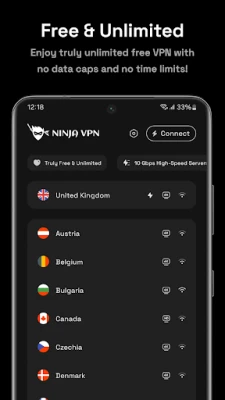
- Free usage – No subscription or payment is required to use the core VPN service.
- Multiple server locations – A selection of servers in different regions is available, allowing you to choose a location that best fits your needs.
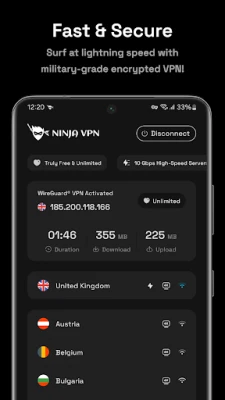
- WireGuard protocol – The app supports the modern WireGuard protocol, which is known for efficiency and strong encryption.
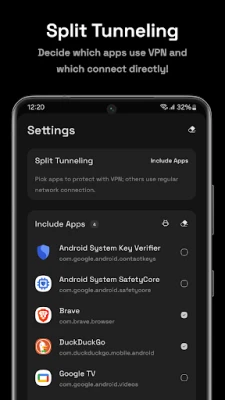
- Split tunneling – You can decide which apps use the VPN and which connect directly.
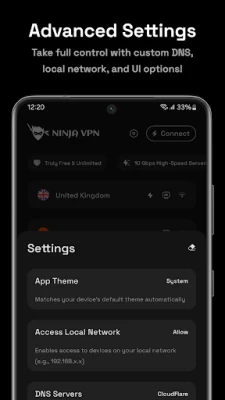
- Custom DNS support – Users can specify their own DNS servers for additional control.
How it works
When you launch Ninja VPN and tap the connect button, the app establishes a secure tunnel to one of its servers. All data that leaves your device is encrypted with 256‑bit encryption, making it unreadable to third parties such as ISPs or public Wi‑Fi operators. The VPN then forwards your traffic to the internet, masking your real IP address with the server’s address.
Practical uses
Whether you are traveling, using public Wi‑Fi, or simply want to keep your browsing history private, Ninja VPN can be a useful tool. It can also help you reach streaming services or websites that are otherwise unavailable in your region, and it may reduce latency for some online games by providing a more direct route to game servers.
Installation information
To install Ninja VPN, open the Google Play Store on your Android device, search for "Ninja VPN - Fast & Secure VPN" or use the package name app.ninjavpn.android, and tap Install. The app requires standard Android permissions for network access and VPN configuration.
Compatibility
The application is built for Android devices. Specific version requirements are not listed, but the Play Store will prevent installation on devices that do not meet the minimum OS level.
Things to know before installing
- The service is free, but the developer may display ads within the app.
- Free VPN services often have usage limits or variable speeds; performance can differ based on server load.
- While the app uses strong encryption, a free VPN does not replace a comprehensive security suite.
Who may find it useful?
Anyone who wants a quick, no‑cost way to add a layer of privacy to their Android browsing can benefit from Ninja VPN. It is especially handy for users who need occasional protection on public networks or who want to test a VPN without committing to a paid plan.
Frequently asked questions
Is registration required?
No. Ninja VPN can be used without creating an account.
Does the app keep logs of my activity?
The developer states a no‑logs policy, but detailed policy information should be reviewed in the app’s privacy statement.
Can I choose which apps use the VPN?
Yes, the split tunneling feature lets you select specific apps to route through the VPN.
Is the app safe to use?
The app uses standard VPN encryption and the WireGuard protocol, which are widely regarded as secure. As with any free service, consider reviewing the privacy policy and any permissions requested.
Rate the App
User Reviews
Other Apps in This Category















Popular Apps










 Games
Games Entertainment
 Communication
 E-mail
 Security
 Tools
Tools Media
Media Internet
 Finance
 Design
 Education
 IT Tools
 Travel & Local
 Android
 Windows
 Linux
Linux