

Latest Version
September 14, 2026
AudioCodes
Tools
Android
5
Free
com.minativeapp
Report a Problem
More About Meeting Insights – AudioCodes’ Free Meeting Assistant
What is Meeting Insights?
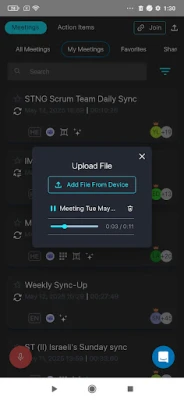
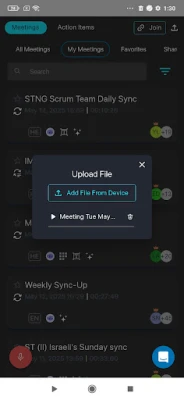
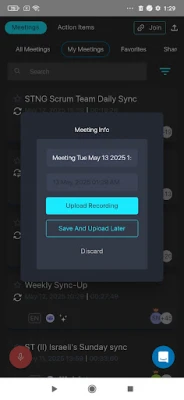
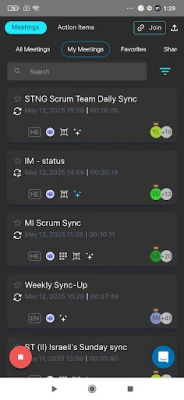
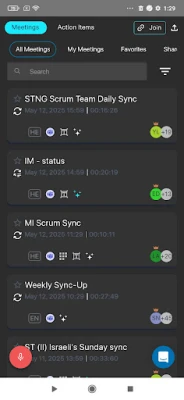
Meeting Insights is a free Android application developed by AudioCodes for organizations that need a reliable way to record and manage meeting information. Designed for both virtual and in‑person sessions, the app provides tools to capture audio, generate transcripts, and keep meeting data organized in one place.
Main capabilities
- Recording and transcription – Users can start a recording during a meeting and let the app create a text transcript of the spoken content.
- Summarization – After a session ends, the app can produce a concise summary that highlights key points and any identified action items.
- Searchable archive – Transcripts and summaries are stored locally, allowing users to search for specific terms or topics across past meetings.
- Offline support – Recordings can be made without an active internet connection, which is useful for face‑to‑face meetings in locations with limited connectivity.
How it works
When a meeting begins, the user launches Meeting Insights and starts a recording. The app captures the audio stream and, once the session is finished, processes the file to generate a transcript. The transcript is then analyzed to extract highlights and suggested action items, which are presented in a short summary that can be shared with teammates.
Practical uses
- Team leaders can quickly review meeting outcomes without listening to the full recording.
- Project managers can extract and assign action items directly from the summary.
- Remote workers can keep a written record of virtual conferences for future reference.
Installation and compatibility
Meeting Insights is available through the standard Android app distribution channels. It requires a device running a recent version of Android that supports audio recording and basic file storage. Because the app stores data locally, sufficient internal storage is needed for recordings and transcripts.
Things to consider before installing
- Check your organization’s policy on recording meetings to ensure compliance.
- Make sure the device has enough free space for the recordings you plan to keep.
- While the app does not require an internet connection for basic recording, an online connection is needed for any cloud‑based backup or integration features that your organization may enable.
Who may find Meeting Insights useful?
Any professional who regularly participates in or leads meetings—such as managers, consultants, sales teams, and project coordinators—can benefit from the ability to capture discussions and retrieve information quickly.
Frequently asked questions
Is Meeting Insights free to use?
Yes, the application is offered at no cost.
Can I share recordings with colleagues?
The app allows exported files to be shared through standard Android sharing options, but sharing policies should follow your organization’s guidelines.
Does the app work without internet?
Recording and basic transcription can be performed offline; however, any advanced processing that relies on external services will need an internet connection.
Rate the App
User Reviews














Popular Apps










 Games
Games Entertainment
 Communication
 E-mail
 Security
 Tools
Tools Media
Media Internet
 Finance
 Design
 Education
 IT Tools
 Travel & Local
 Android
 Windows
 Linux
Linux