





Latest Version
Latest
June 20, 2026
McAfee LLC
Android
1,208
Free
com.wsandroid.suite
Report a Problem
More About McAfee Security: Antivirus & VPN
What is McAfee Security: Antivirus & VPN?
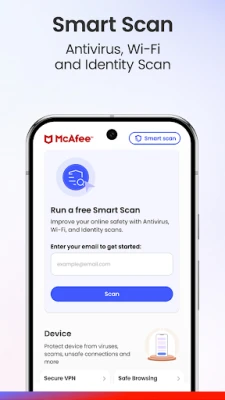
McAfee Security is a free Android application that bundles core cybersecurity tools into a single, easy‑to‑use package. It provides real‑time virus scanning, a built‑in virtual private network (VPN), and a scam detector that monitors emails, text messages, and QR codes for phishing or malicious content.
Key features
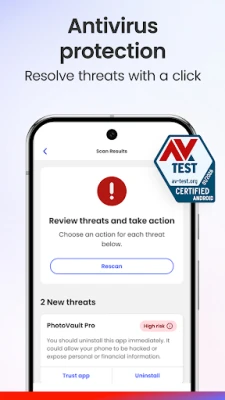
- Real‑time antivirus – AI‑driven scanning protects apps, downloads, and files from known malware, spyware, and adware.
- Secure VPN – Encrypts your internet traffic, masks your IP address, and lets you browse safely on public Wi‑Fi.
- Scam Detector – Flags risky emails, suspicious SMS, and dangerous QR codes before you interact with them.
- Wi‑Fi analyzer – Checks nearby networks for vulnerabilities and warns you before connecting.
- Identity monitoring – Monitors up to ten email addresses and personal identifiers for signs of data‑broker exposure.
- Transaction alerts – Sends push notifications when unusual financial activity is detected.
How the application works
When you install McAfee Security, the app requests permission to run in the background and to access network information. The antivirus engine continuously scans installed apps and newly downloaded files, using a cloud‑based threat database that updates automatically. The VPN component activates automatically on unsecured Wi‑Fi networks, encrypting traffic with industry‑standard AES‑256 encryption. The Scam Detector monitors incoming messages and QR‑code scans, comparing them against known phishing patterns and malicious URLs.
Installation information
Download the app from the Google Play Store, then follow the on‑screen prompts to grant the required permissions (access to storage, contacts, and network state). After the initial setup, you can enable or disable individual modules—such as the VPN or identity monitoring—from the main dashboard. The free tier includes antivirus scanning, Wi‑Fi analysis, and basic scam detection; additional features are unlocked with a paid subscription.
Compatibility
McAfee Security supports Android 6.0 (Marshmallow) and newer. It runs on smartphones and tablets with at least 1 GB of RAM and 100 MB of free storage. The VPN works on both cellular and Wi‑Fi connections, and the app is optimized for low‑battery consumption.
Things to know before installing
- The free version provides essential protection but limits the number of devices you can secure.
- Some advanced features—such as credit‑monitoring and identity‑restoration—require a paid subscription.
- Because the VPN routes all traffic through McAfee servers, a stable internet connection is needed for optimal performance.
- The app uses the AccessibilityService API to monitor web activity for real‑time threat blocking; this is disclosed in the permissions screen.
Frequently asked questions
Is the VPN truly private? Yes. All traffic is encrypted and routed through McAfee’s secure servers, which do not log browsing history.
Can I use the app on multiple devices? The free tier protects a single device. Paid plans allow unlimited device coverage under the same subscription.
Will the app slow down my phone? The app is designed to run efficiently in the background. Battery impact is minimal, and you can disable modules you don’t need.
How often are virus definitions updated? Updates occur automatically via the cloud, typically multiple times per day.
Rate the App
User Reviews















Popular Apps










 Games
Games Entertainment
 Communication
 E-mail
 Security
 Tools
Tools Media
Media Internet
 Finance
 Design
 Education
 Android Firmwares
 Travel & Local
 Android
 Windows
 Linux
Linux