





Latest Version
Latest
September 12, 2026
SOON BODYWERKZ
Tools
Android
5
Free
app.jumpjumpvpn.jumpjumpvpn
Report a Problem
More About JumpJumpVPN: Fast & Secure – Free VPN for Android
What is JumpJumpVPN?
JumpJumpVPN is a free Android application developed by SOON BODYWERKZ that provides a virtual private network (VPN) service. Its primary aim is to let users route their internet traffic through encrypted tunnels, helping to protect privacy and improve connection stability when browsing, streaming, or using apps on public networks.
Main Features
- Free access – The app does not require a subscription or payment to connect to its servers.
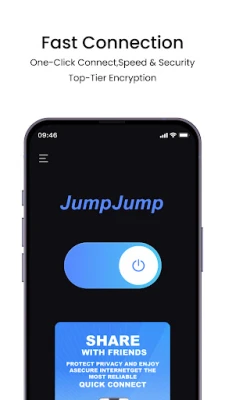
- One‑tap connection – Users can enable or disable the VPN with a single button, avoiding complex configuration steps.
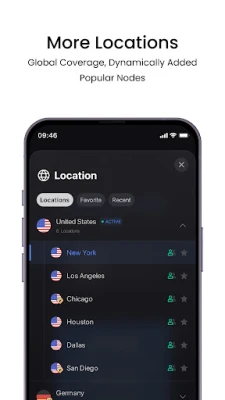
- Global server list – A selection of servers located in different regions is available, allowing users to choose a location that best fits their needs.
- Optimised routing – The service is designed to choose efficient paths for data, aiming to keep speeds as high as possible.
- Lightweight interface – The UI focuses on clarity, showing connection status and basic options without overwhelming the user.
How It Works
When you turn on JumpJumpVPN, the app establishes an encrypted tunnel between your device and the chosen server. All outbound and inbound traffic passes through this tunnel, masking your IP address and encrypting the data payload. The app handles the handshake and key exchange automatically, so you do not need to manage certificates or advanced settings.
Practical Uses
JumpJumpVPN can be useful in several everyday scenarios:
- Public Wi‑Fi security – Encrypting traffic on coffee‑shop or airport networks reduces the risk of eavesdropping.
- Accessing region‑restricted content – Selecting a server in a different country may allow you to view services that are otherwise limited to that location.
- Improving connection stability – Some users report smoother streaming or gaming when the VPN routes around congested ISP paths.
Installation Information
To install JumpJumpVPN, open the Google Play Store on your Android device, search for "JumpJumpVPN: Fast & Secure", and tap the Install button. The app requires standard Android permissions for network access; these are requested during the first launch.
Things to Know Before Installing
- The app is offered free of charge, but it may include optional in‑app purchases or ads, which are typical for free VPN utilities.
- Because the service is provided without a paid tier, server availability can vary depending on demand.
- Performance depends on your own internet connection and the distance to the selected server.
Who May Find It Useful?
JumpJumpVPN is suited for users who need a quick, no‑cost way to add a layer of privacy to their mobile browsing. It is especially handy for travelers, students, or anyone who frequently connects to public Wi‑Fi and wants a straightforward solution without dealing with complex VPN clients.
Frequently Asked Questions
Is JumpJumpVPN safe to use?
The app uses standard VPN encryption protocols to protect data in transit. As with any free service, you should review the developer’s privacy policy for details on data handling.
Do I need technical knowledge to use it?
No. The interface is designed for one‑tap activation, and the app manages all technical aspects automatically.
Can I choose a specific server location?
Yes. The server list is presented within the app, allowing you to select a region that matches your needs.
Will the VPN affect my battery life?
Running a VPN does consume some additional power, but JumpJumpVPN’s lightweight design aims to minimise impact.
Rate the App
User Reviews















Popular Apps










 Games
Games Entertainment
 Communication
 E-mail
 Security
 Tools
Tools Media
Media Internet
 Finance
 Design
 Education
 IT Tools
 Travel & Local
 Android
 Windows
 Linux
Linux