

Latest Version
Latest
September 15, 2026
TheHexCoders
Tools
Android
5
Free
hexcoders.hidebluetick
Report a Problem
More About Hide Blue Ticks: No Last Seen – Control Your WhatsApp Visibility
What is Hide Blue Ticks: No Last Seen?
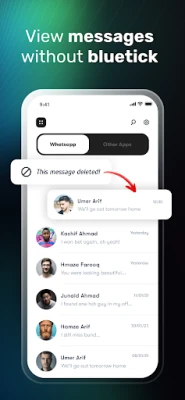
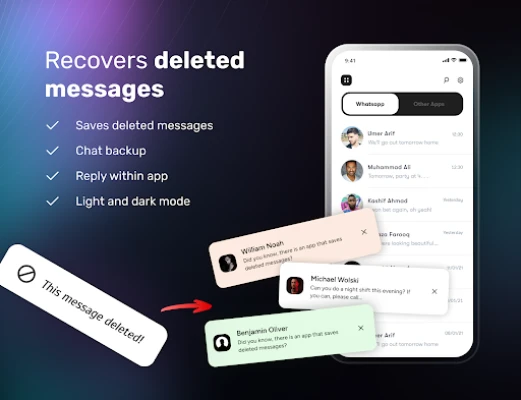
Hide Blue Ticks: No Last Seen is a free Android utility developed by TheHexCoders. The app focuses on giving users control over two common WhatsApp privacy indicators: the blue read receipt tick and the last‑seen timestamp. By toggling these indicators, you can read messages without automatically notifying the sender that you have seen them.
Main Features
- Blue tick control – Choose whether to send the read receipt when you open a chat.
- Last‑seen hiding – Prevent your contacts from seeing the time you were last online.
- Simple toggle interface – One‑tap switches let you enable or disable each feature quickly.
- Lightweight design – The app is built to run in the background without consuming excessive battery or storage.
How It Works
The application interacts with WhatsApp through Android’s accessibility services. When you enable a toggle, the app intercepts the signal that would normally be sent to WhatsApp’s servers, suppressing the blue tick or last‑seen update. The original message remains unchanged, so you can still read it at your convenience.
Practical Uses
- Maintain privacy in professional or personal chats where you prefer not to reveal immediate availability.
- Read messages in situations where replying instantly is not possible, such as during meetings or while driving.
- Avoid the pressure of “read‑receipt anxiety” by deciding when to acknowledge a conversation.
Installation Information
Download the APK from a trusted source, then follow the standard Android installation steps. After installation, you will be prompted to grant accessibility permissions; these are required for the app to manage WhatsApp’s status indicators.
Things to Know Before Installing
- The app works only with WhatsApp; other messaging platforms are not affected.
- Because it relies on accessibility services, you should review the permission request carefully.
- Disabling read receipts may affect how others perceive your responsiveness, as they will not receive the usual confirmation.
Who May Find It Useful?
Anyone who values discretion in messaging—students, professionals, or anyone who wants to separate reading from replying—can benefit from Hide Blue Ticks: No Last Seen. It is especially helpful for users who receive frequent messages but need to manage their response time without appearing unresponsive.
Frequently Asked Questions
Will the app work on all Android versions?
The app requires Android’s accessibility framework, which is available on most modern versions. Specific version requirements are listed in the Play Store listing.
Can I hide both blue ticks and last‑seen simultaneously?
Yes. Each feature has its own toggle, allowing you to enable one, both, or none according to your preference.
Will using the app affect my WhatsApp account?
The app does not modify WhatsApp’s core files. It only controls the signals sent to the server, so your account remains unchanged.
Is there any impact on battery life?
The app runs lightweight background services and is designed to have minimal impact on battery consumption.
Rate the App
User Reviews













Popular Apps










 Games
Games Entertainment
 Communication
 E-mail
 Security
 Tools
Tools Media
Media Internet
 Finance
 Design
 Education
 IT Tools
 Travel & Local
 Android
 Windows
 Linux
Linux