

Latest Version
September 08, 2026
Fossify
Tools
Android
9
Free
org.fossify.keyboard
Report a Problem
More About Fossify Keyboard Beta – Open‑Source Android Keyboard
What is Fossify Keyboard Beta?
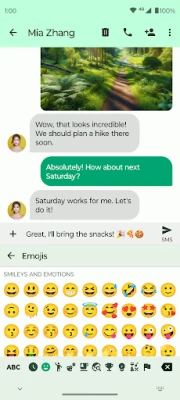
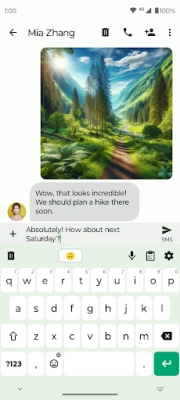
Fossify Keyboard Beta is a free, open‑source keyboard app for Android devices. Developed by the community‑driven team behind Fossify, it aims to provide a reliable typing experience without requiring an internet connection. The app respects user privacy by operating entirely offline and does not collect personal data.
Main Features
- Offline operation – No internet permission is needed, so you can type securely anywhere.
- Multiple language support – Choose from a range of languages and keyboard layouts to match your typing habits.
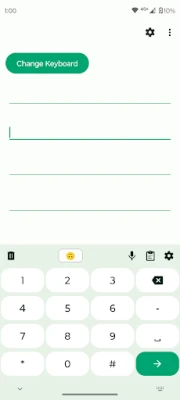
- Built‑in clipboard manager – Save frequently used snippets and pin them for quick insertion.
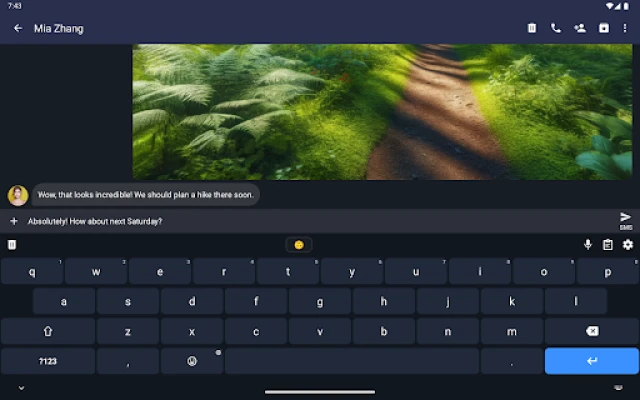
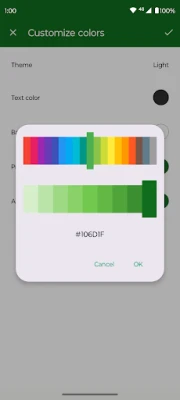
- Customizable appearance – Adjust colors and switch between light and dark themes to suit your visual preferences.
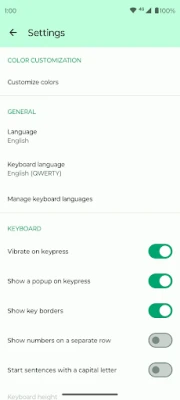
- Vibration and sound options – Enable or disable haptic feedback and key‑press sounds.
- Open‑source transparency – The source code is publicly available, allowing anyone to audit or contribute.
How It Works
After installation, Fossify Keyboard Beta appears in your system’s keyboard list. You can enable it in the Android settings and select it as the default input method. The app loads its language packs locally, so switching languages or layouts happens instantly without network calls. The clipboard feature is accessed via a dedicated button on the keyboard, where you can add, edit, or pin text entries.
Practical Uses
- Typing in multiple languages during travel or when communicating with multilingual contacts.
- Quickly inserting repetitive text such as email signatures, addresses, or code snippets.
- Maintaining privacy in sensitive environments where internet‑connected keyboards might pose a risk.
Installation Information
Download the APK from a trusted source, then follow the standard Android installation steps: enable installation from unknown sources if required, install the package, and grant the necessary input‑method permission. Once installed, activate the keyboard in Settings → System → Languages & input → Virtual keyboard.
Compatibility
The app is built for Android devices that support the standard input‑method framework. Specific version requirements are not listed, but the keyboard is designed to run on a wide range of Android releases.
Things to Know Before Installing
- The keyboard does not request internet access, which enhances privacy but also means language updates must be handled through app updates.
- Because it is a beta release, occasional bugs or missing features may occur; users are encouraged to provide feedback to the developer.
Who May Find It Useful?
Anyone who values privacy, needs multilingual typing, or prefers a highly customizable keyboard will appreciate Fossify Keyboard Beta. It is especially suitable for developers, students, and users who frequently insert repetitive text.
Frequently Asked Questions
Is my typed data collected?
No. The keyboard operates offline and does not transmit or store your keystrokes on external servers.
Can I add new languages?
Language options are bundled with the app. Adding new languages typically requires an app update that includes the desired language pack.
How do I change the keyboard theme?
Open the keyboard settings from the system input method menu, then select your preferred theme and customize colors as desired.
Rate the App
User Reviews















Popular Apps










 Games
Games Entertainment
 Communication
 E-mail
 Security
 Tools
Tools Media
Media Internet
 Finance
 Design
 Education
 IT Tools
 Travel & Local
 Android
 Windows
 Linux
Linux