
Latest Version
September 14, 2026
Fossify
Tools
Android
5
Free
org.fossify.clock
Report a Problem
More About Fossify Clock Beta – Free Time‑Keeping Tools
What is Fossify Clock Beta?
Fossify Clock Beta is a free Android application developed by Fossify. It bundles several basic time‑keeping utilities—clock display, alarm, timer and stopwatch—into a single, lightweight package. The app follows a material‑design style and offers a dark theme for comfortable use in low‑light conditions.
Main features
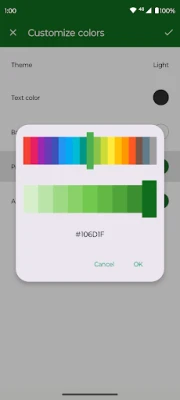
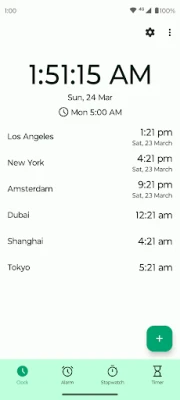
- Clock widget: Add a digital or analog clock to the home screen and adjust basic colors.
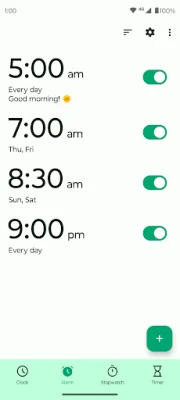
- Alarm manager: Set one‑time or recurring alarms with optional vibration.
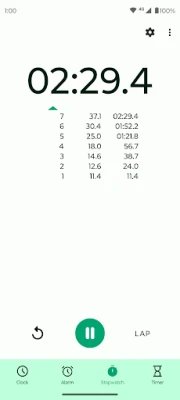
- Stopwatch: Measure elapsed time with lap support.
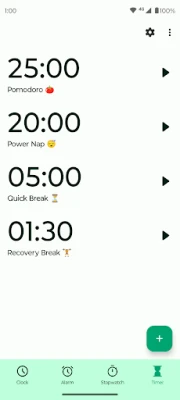
- Timer: Count down from a chosen duration, with pause and resume controls.
How it works
After installation, the app appears in the app drawer. Opening it presents a tabbed interface where each function can be accessed directly. The clock widget can be added from the widget picker, where you choose analog or digital style and basic color options. Alarms are created by selecting a time, optional repeat days and a label. The stopwatch starts, stops and records laps with a single tap, while the timer lets you set minutes and seconds, then start the countdown.
Practical uses
- Morning wake‑up with customizable alarms.
- Cooking or workout intervals using the timer.
- Tracking sports or study sessions with the stopwatch.
- Quick glance at the time from the home screen via the widget.
Installation information
The app can be installed from the standard Android package installer. It requires the usual permissions for setting alarms and displaying a widget. No additional configuration is needed beyond granting those permissions.
Compatibility
Fossify Clock Beta is built for Android devices that support the standard app framework. It runs on phones and tablets that meet the minimum version required by the Android runtime, which is typical for most modern devices.
Things to know before installing
- The app is free and distributed under an open‑source license.
- It does not collect personal data beyond what is needed for alarm and widget functionality.
- Updates are provided by the developer, Fossify, through the usual app distribution channels.
Who may find it useful?
Anyone who needs a simple, ad‑free set of time‑keeping tools without the bloat of larger clock apps. The clean interface makes it suitable for users who prefer minimalistic design, as well as for those who want a dark theme for night‑time use.
Frequently asked questions
- Can I customize the alarm sound? The app uses the system’s default alarm tone; you can change the default tone in Android settings.
- Does the widget support resizing? Yes, the widget can be resized to fit the chosen analog or digital layout.
- Is there a way to export stopwatch laps? The app stores laps locally for the current session; there is no export feature.
Rate the App
User Reviews














Popular Apps










 Games
Games Entertainment
 Communication
 E-mail
 Security
 Tools
Tools Media
Media Internet
 Finance
 Design
 Education
 IT Tools
 Travel & Local
 Android
 Windows
 Linux
Linux