
Latest Version
Latest
June 24, 2026
Seiko Epson Corporation
Tools
Android
486
Free
com.epson.epsonsmart
Report a Problem
More About Epson Smart Panel – Mobile Control for Printers & Scanners
What is Epson Smart Panel?
Epson Smart Panel is a free Android application designed to act as a mobile command centre for compatible Epson wireless printers and scanners. The app lets you perform common tasks—such as initial Wi‑Fi setup, status monitoring, ink or toner level checks, and basic maintenance—directly from your smartphone or tablet.
Key features
- Quick Wi‑Fi configuration – Scan a QR code or enter network details to connect your printer or scanner without using a computer.
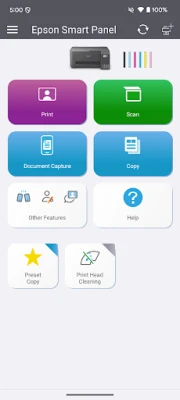
- Live status dashboard – View print queue, paper status, and consumable levels at a glance.
- One‑tap actions – Start, pause or cancel jobs, clean print heads, and run scanner presets with a single tap.
- Support hub – Register your device, order supplies, and access troubleshooting guides without leaving the app.
- Auto‑tailored interface – The app detects the connected model and shows only the controls that are relevant to that device.
How the application works
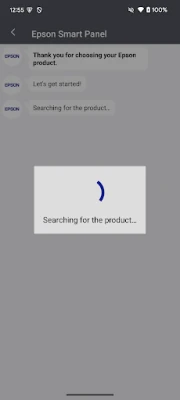
When you launch Epson Smart Panel, it searches the local Wi‑Fi network for Epson devices that are listed on Epson’s supported‑product database. Once a device is found, the app downloads a small configuration profile that defines the available functions. All communication happens over the local network; no cloud service is required for basic operations, which keeps data private and reduces latency.
Installation information
Download the app from the Google Play Store, then grant the required permissions: location (to locate Wi‑Fi devices), storage (for saving scanned files), and network access. After installation, open the app and follow the on‑screen wizard to add your printer or scanner. The process typically takes less than two minutes.
Compatibility
Epson Smart Panel works with a curated list of Epson wireless printers and scanners. The list is maintained on Epson’s support website and is updated regularly. If your device is not listed, Epson recommends using Epson iPrint for printers or Document Scan for scanners.
Things to know before installing
- The device must be connected to the same Wi‑Fi network as your Android phone or tablet.
- Some older models may require a firmware update before they can be managed by the app.
- Data usage may apply if you download firmware updates or large scan files while not on Wi‑Fi.
- All core functions are free; optional consumable ordering links may redirect to Epson’s online store.
Frequently asked questions
Q: Can I print directly from the app?
A: Yes. After the printer is added, you can select a document from your device and send it to the printer without opening another app.
Q: Does the app work with wired Ethernet printers?
A: The app only discovers devices that are reachable over Wi‑Fi. Ethernet‑only printers need to be connected to a Wi‑Fi bridge or used with Epson iPrint.
Q: Is my scan data stored in the cloud?
A: No. Scanned files are saved locally on your device unless you choose to share them via email or a cloud service.
For the most up‑to‑date list of supported models and troubleshooting tips, visit Epson’s official support page.
Rate the App
User Reviews















Popular Apps










 Games
Games Entertainment
 Communication
 E-mail
 Security
 Tools
Tools Media
Media Internet
 Finance
 Design
 Education
 Android Firmwares
 Travel & Local
 Android
 Windows
 Linux
Linux