

Latest Version
Latest
August 25, 2026
CodeShipping
Tools
Android
150
Free
com.matrix.autoreply
Report a Problem
More About AutoReply | AI Smart Message
What is AutoReply?
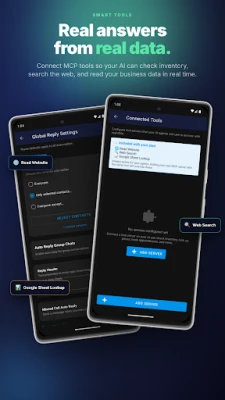
AutoReply is a free Android utility developed by CodeShipping that automates responses in messaging applications. By defining reply templates or scheduling messages in advance, the app can send replies on your behalf when you are unavailable, busy, or simply prefer not to type each response manually.
Main features
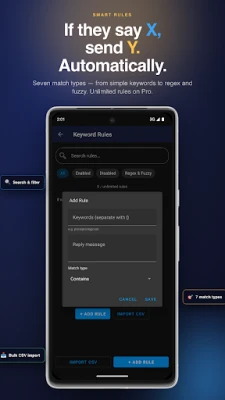
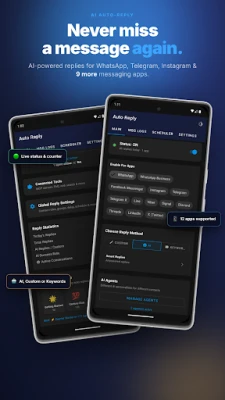
- Automatic replies – Create custom reply templates that are sent automatically to incoming messages.
- Message scheduling – Set a future time for a message to be sent, useful for reminders, greetings, or timed announcements.
- Multi‑app support – Works with several popular messaging platforms such as WhatsApp, Telegram, Instagram, and Messenger.
- No root required – The app operates on standard Android installations without needing root access.
- Free to use – All core functions are available without a purchase.
How it works
After installing AutoReply, you grant the app the necessary permissions to read incoming notifications and send messages on your behalf. Within the app you can:
- Choose the messaging app you want to automate.
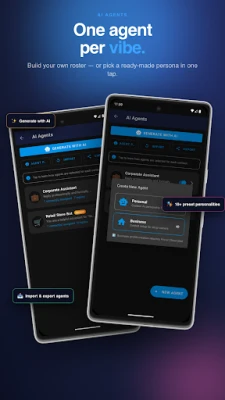
- Define a reply template or a series of messages.
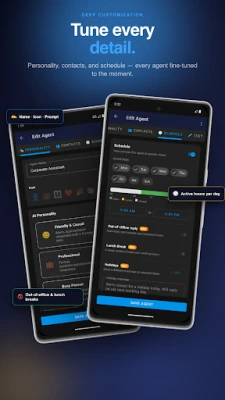
- Set conditions such as time of day, specific contacts, or keywords that trigger the automatic response.
- Optionally schedule a message to be sent at a later time.
When a new message matches your defined criteria, AutoReply sends the prepared response automatically, allowing you to stay engaged without opening the chat.
Practical uses
- Business communication – Acknowledge customer inquiries instantly, even outside office hours.
- Personal convenience – Send “I’m driving” or “I’ll reply later” messages automatically while you’re on the road.
- Event reminders – Schedule birthday wishes, meeting reminders, or promotional messages in advance.
Installation information
Download AutoReply from the Google Play Store, then follow the on‑screen prompts to install. After installation, open the app and enable the required notification and accessibility permissions so it can monitor incoming messages and send replies.
Compatibility
AutoReply is built for Android devices. Specific version requirements are not listed, but the app does not require root access and should work on most modern Android releases that support notification access.
Things to know before installing
- AutoReply needs permission to read notifications and to act as an accessibility service; this is required for it to detect incoming messages and send replies.
- Because the app sends messages automatically, double‑check your reply templates to avoid unintended content.
- The free version includes the core automation features; any additional premium options, if offered later, are not required for basic use.
Who may find it useful?
Anyone who receives frequent messages and wants to maintain timely communication without constant manual typing can benefit from AutoReply. This includes small business owners, freelancers, parents, students, and anyone who spends time driving or in meetings.
Frequently asked questions
Do I need an internet connection for AutoReply to work?
AutoReply relies on the messaging app’s own connectivity. The app itself does not require a separate internet connection beyond what the messaging service uses.
Can I limit auto replies to specific contacts?
Yes. Within the app you can set rules that apply only to selected contacts or groups, ensuring that automatic replies are sent only where appropriate.
Is my data safe?
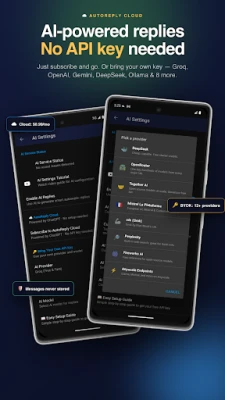
AutoReply processes notifications locally on your device. It does not transmit your message content to external servers unless you enable optional cloud‑based features, which are not required for basic operation.
Rate the App
User Reviews















Popular Apps










 Games
 Entertainment
 Communication
 E-mail
 Security
 Tools
 Media
 Internet
 Finance
 Design
 Education
 Android Firmwares
 Travel & Local
 Android
 Windows
 Linux