

Latest Version
Latest
September 16, 2026
The Travelers Indemnity Company
Finance
Android
101
Free
com.travelers.digitalservice
Report a Problem
More About Travelers Mobile – Manage Your Personal Insurance on the Go
What is Travelers Mobile?
Travelers Mobile is an Android application from The Travelers Indemnity Company designed for customers who hold personal insurance policies with the carrier. The app provides a convenient way to keep essential policy information at hand, make payments, and interact with support services without needing to log into a desktop website.
Main Features
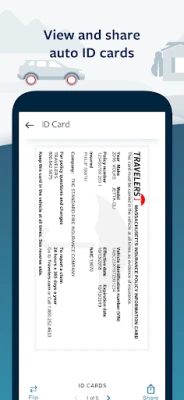
- Policy documents and cards – View and download digital copies of auto insurance cards and other personal insurance documents.
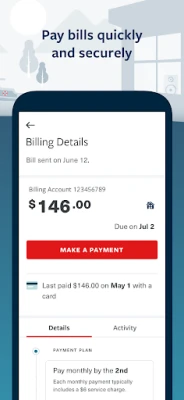
- Payments – Review current balances, make one‑time payments, and set up or modify an automatic payment plan.
- Coverage details – Access detailed information about coverage limits, deductibles and policy terms for selected auto policies.
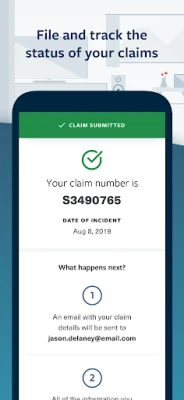
- Claims reporting – Initiate a new claim, track its status, and contact your dedicated claim professional directly from the app.
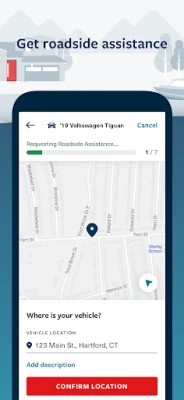
- Roadside assistance – Request help when you’re stranded, with contact details and request tracking built in.
- Document delivery preferences – Choose how you receive policy documents, switching between electronic and paper delivery as needed.
- Secure login – Use fingerprint authentication on supported Samsung devices for quick, secure access.
How It Works
After downloading the app from the Play Store, users sign in with the same credentials used for the Travelers online portal. Once authenticated, the dashboard presents a summary of active policies, recent activity and shortcuts to the most common tasks. Selecting a policy reveals its documents, coverage summary and options to pay or file a claim. The app stores data locally only for the session, and all communications are encrypted.
Practical Uses
- Need proof of insurance while driving? Pull up your digital auto card instantly.
- Forgot to pay your premium? Make a payment from the app before the due date.
- Involved in a minor accident? Report the claim on the spot and receive a claim number.
- Stranded on the highway? Request roadside assistance without searching for a phone number.
Installation Information
The app is free to download. It requires an Android device running a version that supports the Google Play Services framework. Installation follows the standard Play Store process: tap “Install,” wait for the download, and open the app to begin setup.
Things to Know Before Installing
- Existing Travelers customers will need their online account credentials to log in.
- Fingerprint login is limited to select Samsung models that expose the necessary biometric API.
- The app does not replace the full Travelers website; some advanced services may still require a desktop browser.
Who May Find It Useful?
Anyone who holds personal insurance policies with Travelers – including auto, homeowners or renters coverage – will benefit from quick access to policy documents, payment tools and claim assistance. The app is especially handy for drivers who need proof of insurance on the road or for policyholders who prefer managing their accounts from a mobile device.
Frequently Asked Questions
Do I need a separate account for the app?
No. Use the same username and password you use for the Travelers online portal.
Can I view all my policies?
The app shows policies that are linked to your online account. If a policy does not appear, verify that it is associated with the same user ID.
Is my data secure?
All data transmission is encrypted, and the app supports biometric authentication on compatible devices.
What should I do if I lose my phone?
Contact Travelers customer service to deactivate the app’s access and change your online password.
Rate the App
User Reviews













Popular Apps










 Games
 Entertainment
 Communication
 E-mail
 Security
 Tools
 Media
 Internet
 Finance
 Design
 Education
 Android Firmwares
 Travel & Local
 Android
 Windows
 Linux