

Latest Version
Latest
September 18, 2026
Dollar Bank, F.S.B.
Finance
Android
27
Free
com.a24307438.wallet.cardcontrol
Report a Problem
More About Dollar Bank Card Control – Manage and Secure Your Business Cards
Overview
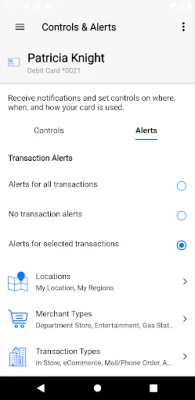
Dollar Bank Card Control is a free utility from Dollar Bank, F.S.B. designed for business customers who need direct oversight of their Dollar Bank credit and debit cards. The app focuses on real‑time monitoring and control features rather than full‑service banking.
Key capabilities
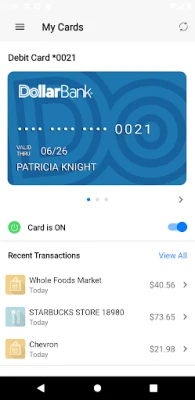
- Card activation toggle – Turn a specific card on or off instantly from the app.
- Real‑time alerts – Receive push notifications when a transaction occurs, helping spot unauthorized activity quickly.
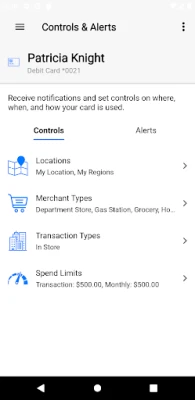
- Location‑based restrictions – Use the phone’s GPS or select regions on an interactive map (city, state, country, zip) to limit where a card can be used.
- Spending limits – Define maximum amounts; transactions that exceed the limit are declined automatically.
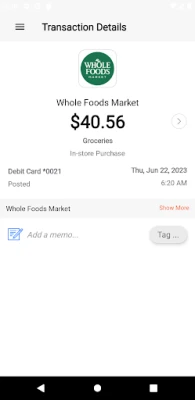
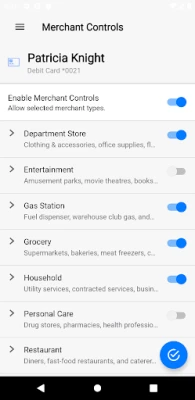
- Category monitoring – View activity broken down by merchant type (e.g., gas stations, restaurants) and transaction channel (in‑store, online, ATM).
How it fits into your workflow
The app operates independently of Dollar Bank Business Mobile Banking, so it can be added as a supplemental tool for card‑specific security without replacing existing banking apps.
Installation and compatibility
Published under the package name com.a24307438.wallet.cardcontrol, the app is available for Android devices. Specific version, size, and OS requirements are not listed, so users should verify compatibility on their device before installing.
Things to consider before installing
- It does not provide full account management; you will still need the main Dollar Bank mobile banking app for balances, transfers, and other banking functions.
- Because the app handles sensitive card controls, ensure your device is protected with a lock screen and that you keep the app updated.
Frequently asked questions
Is Dollar Bank Card Control a replacement for the main banking app?
No. It is a separate tool focused solely on card activation, alerts, and spending controls.
Can I set different limits for different cards?
The provided information indicates you can create spending limits, but does not specify per‑card granularity. Check the app’s settings for detailed options.
Do I need an internet connection for alerts?
Real‑time alerts rely on push notifications, which require an active data connection.
Rate the App
User Reviews













Popular Apps










 Games
Games Entertainment
 Communication
 E-mail
 Security
 Tools
Tools Media
Media Internet
 Finance
 Design
 Education
 Android Firmwares
 Travel & Local
 Android
 Windows
 Linux
Linux