

Latest Version
Latest
September 02, 2026
Novo Platforms
Finance
Android
5
Free
com.novo.android
Report a Problem
More About Novo – Small Business Checking
What is Novo?
Nova is a mobile‑first financial service designed for small‑business owners who need a straightforward way to handle everyday banking tasks. It operates as a fintech platform that partners with a federally insured bank to provide checking accounts, debit cards and basic financial tools directly from your Android device.
Main features
- Account setup in minutes – Complete the application process online without visiting a branch.
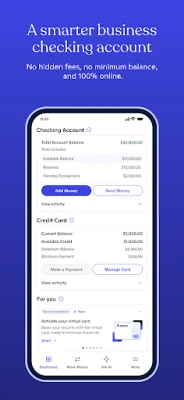
- Debit card management – Activate, lock or unlock your Novo Mastercard Business Debit Card from the app.
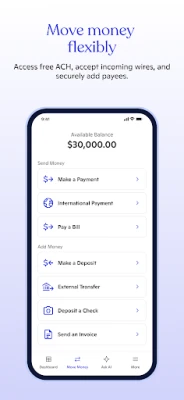
- Bill payment and ACH transfers – Send payments and move money between accounts without extra fees.
- Mobile check deposit – Capture check images to add funds to your account.
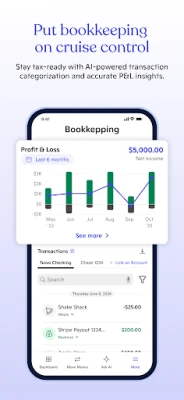
- Transaction categorisation – Tag expenses to keep business spending organised.
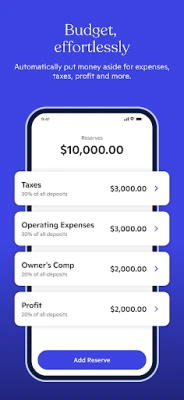
- Reserve savings – Separate a portion of your balance for future needs.
How it works
After downloading the app, you create an account by providing basic personal information and a Social Security number. The platform then links you to a partner bank, which holds the funds under FDIC protection. All banking actions – from issuing a virtual card to initiating a transfer – are performed through the app’s secure interface.
Practical uses
- Pay suppliers and contractors directly from your phone.
- Track business expenses in real time for easier bookkeeping.
- Maintain a dedicated reserve fund without opening a separate account.
- Use the virtual card for online purchases while keeping the physical card for in‑person transactions.
Installation information
Search for “Novo – Small Business Checking” in the Google Play Store, tap Install, and follow the on‑screen prompts. The app requires a compatible Android device with access to Google Play services.
Things to know before installing
- The service is available to U.S.‑based businesses whose owners have a valid Social Security number.
- All banking services are provided by a partner bank; Novo itself does not hold deposits.
- Standard mobile‑device security practices, such as a lock screen and device encryption, help protect your financial data.
Who may find Novo useful?
Freelancers, startups, solo‑proprietors and any small‑business team that wants a simple, fee‑free checking solution that can be managed entirely from a smartphone.
Frequently asked questions
Is Novo a bank?
No. Novo is a fintech platform that partners with a federally insured bank to offer checking accounts.
Are there any monthly fees?
The core checking account and most basic features are offered without a monthly charge.
Can I use the app to withdraw cash?
Yes. The physical Mastercard Business Debit Card can be used at ATMs worldwide; fees are typically covered by the partner bank.
How secure is the app?
Security includes encrypted data transmission, device authentication and the backing of an FDIC‑insured bank.
Rate the App
User Reviews














Popular Apps










 Games
Games Entertainment
 Communication
 E-mail
 Security
 Tools
Tools Media
Media Internet
 Finance
 Design
 Education
 IT Tools
 Travel & Local
 Android
 Windows
 Linux
Linux