

Latest Version
September 07, 2026
Shinobi Codes
Finance
Android
4
Free
com.shinobicodes.momo
Report a Problem
More About Momo: Simple Offline Expense & Budget Tracker
What is Momo?
Momo is a lightweight Android app that helps you track expenses and manage budgets without connecting to any external servers. Developed by Shinobi Codes, the app stores all information locally, giving you full control over your financial records.
Main Features
- Offline‑first design – All entries, categories, and budget limits stay on your phone.
- Ad‑free experience – No banners, pop‑ups, or in‑app promotions interrupt your workflow.
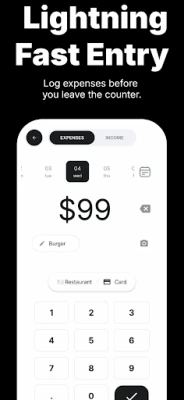
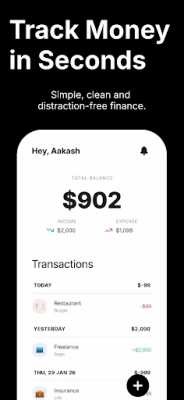
- Fast entry – Add a transaction with a few taps: amount, category, optional note.
- Dark mode – Optimized for OLED screens and low‑light environments.
- Biometric lock – Protect your data with fingerprint or facial recognition.
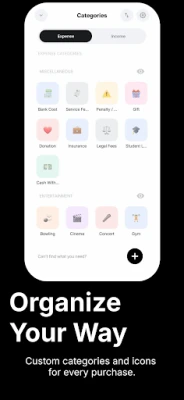
- Custom categories – Create and rename categories that match your spending habits.
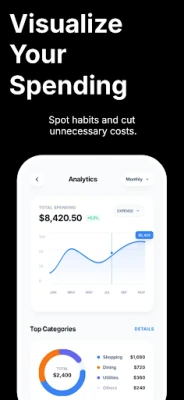
- Visual summaries – Simple charts show where your money goes each month.
How It Works
When you open Momo, you are presented with a clean entry screen. Type the amount spent, select a category from the list (or add a new one), and optionally add a short note. The app instantly updates your daily total and reflects the change in the monthly budget overview. Because everything is saved locally, the app does not require any permissions beyond basic storage access.
Practical Uses
- Track everyday purchases such as coffee, groceries, or transport.
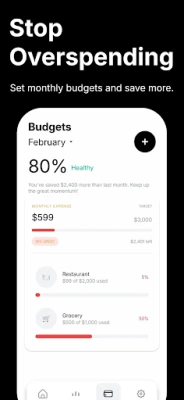
- Set a monthly limit for discretionary spending and see remaining balance at a glance.
- Review spending patterns with the built‑in charts to identify areas for improvement.
- Maintain privacy when you prefer not to share financial data with cloud services.
Installation Information
The app is available as a free download from the Google Play Store. Installation follows the standard Android process: tap Install, grant the requested storage permission, and launch the app from your app drawer.
Things to Know Before Installing
- All data is stored on the device; there is no automatic cloud backup.
- If you lose the phone or uninstall the app, the recorded information cannot be recovered unless you have made a manual backup.
- The app does not integrate with banks or external financial services.
Who May Find Momo Useful?
Anyone who wants a straightforward way to monitor spending without the overhead of online syncing will benefit from Momo. It is especially suited for users who value privacy, prefer an ad‑free interface, or need a quick tool for budgeting on the go.
Frequently Asked Questions
Is my data safe?
Since Momo never uploads information, the only risk is loss of the device itself. Using the biometric lock adds a layer of protection against casual access.
Can I export my records?
The app provides an option to export data as a CSV file, which you can store elsewhere for personal archiving.
Does Momo support multiple currencies?
Currency selection is limited to the default system setting; the app records amounts as entered.
Will I see ads in the future?
The developer’s stated goal is to keep the experience ad‑free, and no in‑app purchase prompts are present at launch.
Rate the App
User Reviews















Popular Apps










 Games
Games Entertainment
 Communication
 E-mail
 Security
 Tools
Tools Media
Media Internet
 Finance
 Design
 Education
 IT Tools
 Travel & Local
 Android
 Windows
 Linux
Linux