

Latest Version
August 25, 2026
Shamadhan Services Limited
Finance
Android
145
Free
com.shamadhan.customerliveapp
Report a Problem
More About gpay – Mobile Wallet by Shamadhan Services Limited
What is gpay?
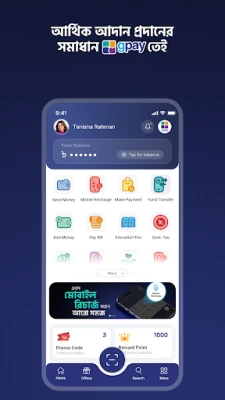
gpay is a digital wallet application developed by Shamadhan Services Limited for Android smartphones. It provides a single place to manage everyday financial tasks such as sending money to contacts, paying utility bills, recharging mobile phones and making merchant payments. The app is offered at no cost and is designed for users in Bangladesh who prefer handling transactions on their mobile device.
Main features
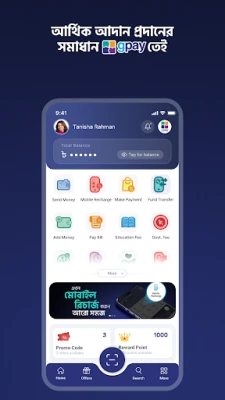
- Send and receive money – Transfer funds instantly to other gpay users or request money from friends and family.
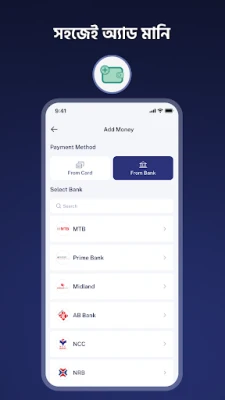
- Add money – Load the wallet from a linked bank account or supported card.
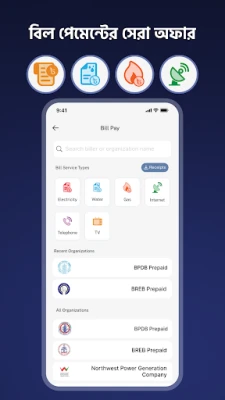
- Bill payments – Pay electricity, gas, water, internet and other utility bills without leaving the app.
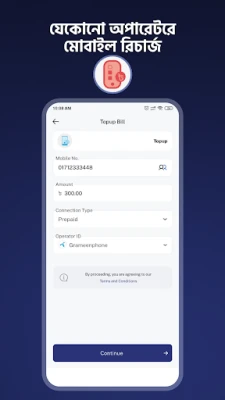
- Mobile recharge – Top up any Bangladeshi mobile operator quickly.
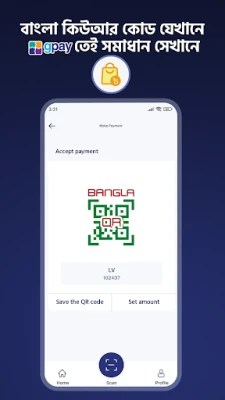
- Merchant payments – Use QR codes to pay at participating shops and online merchants.
- Additional services – Options for education fee payments, credit‑card bill settlement and charitable donations are available where supported.
How it works
After installing gpay, users create an account using their mobile number. The app guides them through linking a bank account or card, which becomes the source for adding funds to the wallet. Once the wallet holds a balance, users can select the desired service – for example, entering a bill reference number to pay a utility bill, scanning a QR code at a store, or choosing a contact to send money. Each transaction is processed in real time, and a receipt is stored within the app for future reference.
Practical uses
gpay is useful for anyone who wants to reduce cash handling. It can be used to:
- Settle split expenses with friends instantly.
- Pay monthly household bills without visiting a payment centre.
- Recharge a prepaid phone while on the move.
- Make quick purchases at merchants that accept QR payments.
- Donate to charitable causes directly from the wallet.
Installation information
The app is distributed through the standard Android marketplace. To install, search for "gpay" by Shamadhan Services Limited, tap Install, and wait for the download to complete. The installation size is modest, and the app requires an Android device with a version that supports the Google Play Services framework.
Things to know before installing
- Because the app handles financial transactions, a stable internet connection is recommended for smooth operation.
- Users should keep their device’s operating system up to date to benefit from the latest security patches.
- Linking a bank account or card may involve verification steps required by the financial institution.
Who may find gpay useful?
Students, professionals, small business owners and anyone who regularly sends money or pays bills can benefit from the convenience of a mobile wallet. The app is especially handy for users who prefer digital payments over cash and who live in areas where QR‑based merchant acceptance is growing.
Frequently asked questions
Is gpay free to use?
Yes, the application can be downloaded and installed at no cost. Some financial services within the app may have fees set by the underlying banks or service providers.
How secure are my transactions?
gpay follows standard security practices for mobile wallets, including encrypted communication and authentication steps when linking financial accounts. Users should also enable device‑level security such as a PIN or biometric lock.
Can I use gpay outside Bangladesh?
The primary focus of the app is the Bangladeshi market, and most services are tied to local banks and utility providers. International usage may be limited.
What should I do if a transaction fails?
Check your internet connection, ensure sufficient wallet balance, and verify the recipient details. If the problem persists, the app provides a support option within its settings menu.
Rate the App
User Reviews













Popular Apps










 Games
 Entertainment
 Communication
 E-mail
 Security
 Tools
 Media
 Internet
 Finance
 Design
 Education
 Android Firmwares
 Travel & Local
 Android
 Windows
 Linux