

Latest Version
Latest
August 21, 2026
Farmers Group Inc
Finance
Android
149
Free
com.farmers.ifarmers
Report a Problem
More About Farmers Insurance – Mobile Account Management
What is the Farmers Insurance app?
The Farmers Insurance mobile application lets policyholders interact with their insurance accounts on the go. Developed by Farmers Group Inc., the app provides a convenient way to keep track of policy documents, billing information, and claim status without needing to log into a web portal.
Main features
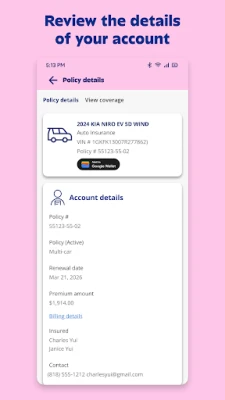
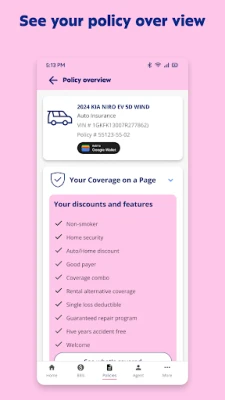
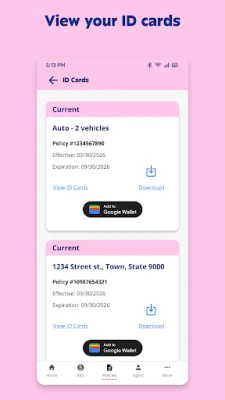
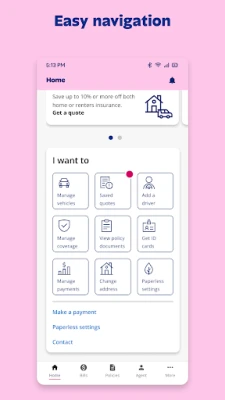
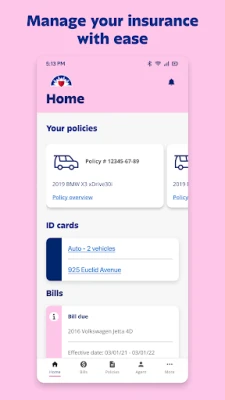
- Policy overview – View details of auto, home, condo or renters coverage, including ID cards and policy documents.
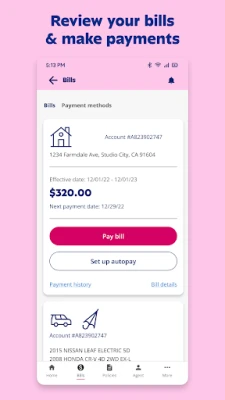
- Billing and payments – Check upcoming bills, review payment history and submit payments using saved payment methods.
- Claims management – Initiate a new claim, upload photos or documents, and monitor the claim’s progress from start to finish.
- Roadside assistance – Request help such as towing, tire changes or battery charging directly through the app.
- Quotes – Get a quick estimate for new or additional coverage.
- Agent contact – Find phone numbers or email addresses for your local Farmers agent.
How it works
After downloading the app from the Google Play Store, you sign in with the same credentials you use for the Farmers online portal. The app supports biometric authentication, allowing you to log in quickly with a fingerprint if your device supports it. Once logged in, the dashboard presents a summary of your active policies, recent bills and any open claims.
To make a payment, select the billing section, choose the bill you wish to pay, and confirm the amount. Payment methods can be added or edited in the settings area. For a claim, tap the claim button, describe the incident, attach any relevant photos, and submit. You’ll receive updates as the claim moves through the review process.
Practical uses
- Check your auto insurance ID card before a road trip.
- Pay a monthly premium while you’re away from a computer.
- Start a claim after a minor accident and avoid a phone call.
- Request roadside assistance when you’re stranded.
- Compare a quick quote for adding a new vehicle to your policy.
Installation information
The app is free to download. Search for "Farmers Insurance" or use the package name com.farmers.ifarmers in the Play Store. Installation follows the standard Android process; no additional permissions beyond those required for network access and optional biometric login are requested.
Things to know before installing
- Existing Farmers policyholders will need their login credentials to access the app.
- The app does not replace the need for a web browser for more complex policy changes.
- All transactions are secured through standard encryption, but users should keep their device’s operating system up to date.
Who may find it useful?
Current Farmers Insurance customers who prefer managing their policies from a mobile device will benefit most. The app is also handy for agents who need quick access to client information while on the road.
Frequently asked questions
Do I need an internet connection?
Yes. The app requires an active data or Wi‑Fi connection to retrieve policy data, process payments and submit claims.
Can I use the app without a Farmers account?
No. Access is limited to customers who have an existing Farmers Insurance account.
Is biometric login optional?
Yes. You can log in with your username and password if you prefer not to use fingerprint authentication.
What should I do if I forget my password?
Use the “Forgot password” link on the sign‑in screen to reset it through the Farmers website.
Rate the App
User Reviews














Popular Apps










 Games
 Entertainment
 Communication
 E-mail
 Security
 Tools
 Media
 Internet
 Finance
 Design
 Education
 Android Firmwares
 Travel & Local
 Android
 Windows
 Linux