

Latest Version
Latest
September 09, 2026
Dollar Bank, F.S.B.
Finance
Android
4
Free
com.dollarbank.onlinebanking
Report a Problem
More About Dollar Bank Mobile App – Manage Your Accounts on Android
What is the Dollar Bank Mobile App?
The Dollar Bank Mobile App is a free Android application that lets Dollar Bank customers handle everyday banking tasks from their smartphones. It provides a convenient way to stay on top of balances, recent transactions and account activity without needing to visit a branch.
Main features
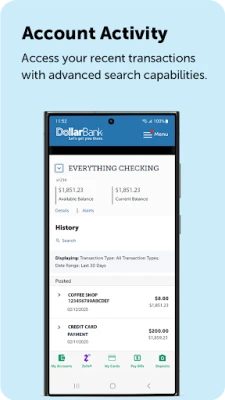
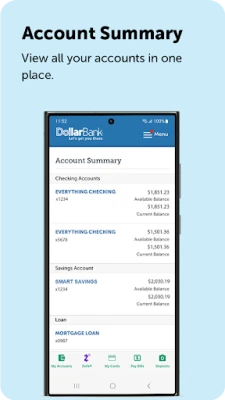
- Account overview – View current balances and recent activity for checking, savings and loan accounts.
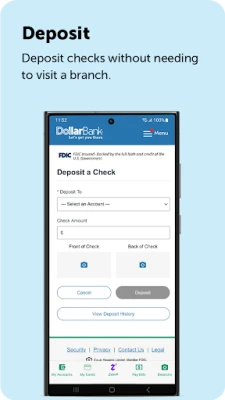
- Mobile check deposit – Capture an image of a check and submit it for deposit directly from the app.
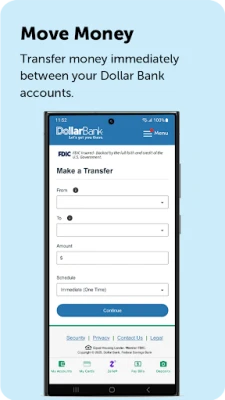
- Fund transfers – Move money between your Dollar Bank accounts or send it to external banks.
- Bill payment – Add payees and settle bills electronically, including mortgage, credit‑card and loan payments.
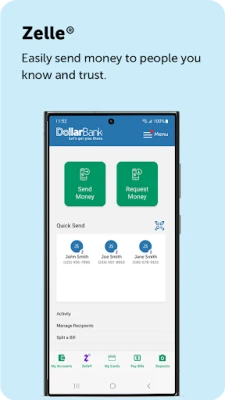
- Zelle® integration – Send money to friends and family who use Zelle.
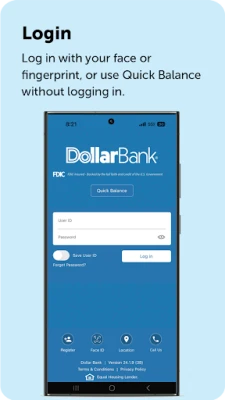
- Quick balance view – Check balances with a single tap without fully logging in.
- Biometric login – Use fingerprint authentication for fast, secure access.
- ATM and branch locator – Find nearby Dollar Bank branches and surcharge‑free ATMs.
How it works
After downloading the app from the Google Play Store, you sign in with your existing Dollar Bank online banking credentials. The app then synchronizes with your accounts, presenting a dashboard that summarizes balances and recent transactions. From the dashboard you can launch any of the core functions – deposit a check, transfer funds, pay a bill or locate an ATM – with a few taps. Biometric authentication can be enabled in the settings to replace password entry for future logins.
Practical uses
- Check your account balance while shopping to avoid overdrafts.
- Deposit a paycheck or refund without a trip to the bank.
- Pay a utility bill instantly from the app’s bill‑pay screen.
- Send money to a friend using Zelle® directly from your phone.
- Locate the nearest surcharge‑free ATM when you need cash.
Installation information
The app is available at no cost on the Google Play Store. Search for "Dollar Bank Mobile App" or use the package name com.dollarbank.onlinebanking. Ensure your device runs a recent version of Android that supports the Play Store.
Things to know before installing
- You need an active Dollar Bank online banking account to use the app.
- Internet connectivity (Wi‑Fi or cellular data) is required for most functions, especially mobile check deposit.
- Biometric login depends on hardware support; devices without a fingerprint sensor will fall back to password entry.
Who may find it useful?
Current Dollar Bank customers who prefer managing finances on the go, as well as anyone looking for a secure way to deposit checks, transfer funds and pay bills without a computer, will benefit from this app.
Frequently asked questions
Is the app free?
Yes, the Dollar Bank Mobile App can be downloaded and used at no charge.
Can I deposit checks with the app?
Yes, the mobile deposit feature lets you capture check images and submit them for processing.
What security measures are in place?
The app requires your online banking credentials and supports fingerprint authentication. All data transmission is encrypted according to standard banking practices.
Do I need a separate account for Zelle®?
Zelle® works through your existing Dollar Bank account; no additional registration is required.
Rate the App
User Reviews














Popular Apps










 Games
Games Entertainment
 Communication
 E-mail
 Security
 Tools
Tools Media
Media Internet
 Finance
 Design
 Education
 IT Tools
 Travel & Local
 Android
 Windows
 Linux
Linux