

Latest Version
September 02, 2026
Dollar Bank, F.S.B.
Finance
Android
4
Free
com.uobapp.dollar
Report a Problem
More About Business Mobile Banking – Dollar Bank
What is Business Mobile Banking?
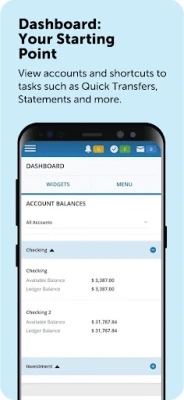
Business Mobile Banking is Dollar Bank’s dedicated Android app for business customers. It brings the core capabilities of the bank’s online portal to a handheld device, allowing owners, accountants, and authorized staff to stay on top of daily cash flow without needing a desktop.
Main features
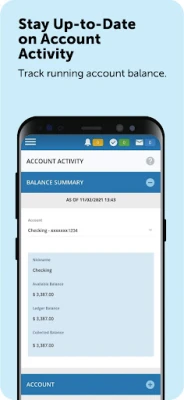
- Real‑time account overview – Instantly see balances and recent activity for every Dollar Bank business account you manage.
- Fund transfers – Move money between your Dollar Bank accounts or send payments to external banks with a few taps.
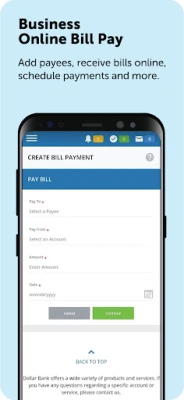
- Bill payment – Add billers, schedule one‑time or recurring payments, and attach invoice details directly from the app.
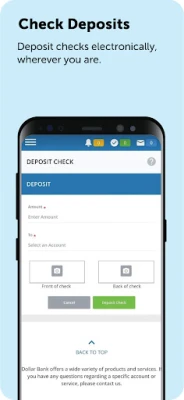
- Check deposit – Capture an image of a business check and submit it for deposit without visiting a branch.
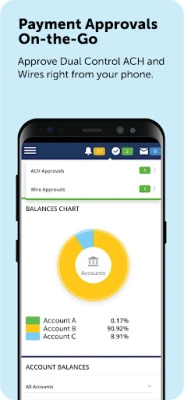
- Dual‑control approvals – Review and approve wire or ACH transactions that require a second authorizer, keeping your internal controls intact.
- Alerts and notifications – Receive push alerts for low balances, large transactions, or pending approvals.
How it works
After installing the app, you log in with the same credentials used for Dollar Bank’s Business Online Banking. The app authenticates against the bank’s secure servers, then presents a dashboard that mirrors the online experience. From there you can navigate to specific functions such as Transfers, Bill Pay, or Approvals. Each action follows the same security steps you would encounter on the web, including multi‑factor verification where required.
Practical uses
- Approve a wire transfer while traveling between meetings.
- Deposit a client’s check immediately after a sales call.
- Monitor cash position in real time to avoid overdrafts.
- Set up recurring utility payments to keep business operations running smoothly.
Installation information
The app is offered free of charge through the Google Play Store. Search for “Business Mobile Banking” by Dollar Bank, F.S.B., and tap Install. The download size and Android version requirements are defined by the store; ensure your device meets the minimum specifications shown on the Play Store page.
Things to know before installing
- You must already be enrolled in Dollar Bank’s Business Online Banking to activate the mobile app.
- Access is limited to users who have been granted mobile permissions by the primary account holder.
- All transactions are subject to the bank’s standard security policies, including encryption and activity monitoring.
Who may find it useful?
Small‑to‑medium business owners, finance managers, and authorized employees who need quick, secure access to banking functions while away from the office will benefit most from this app. It is especially handy for professionals who travel frequently or operate multiple accounts across different locations.
Frequently asked questions
Do I need an internet connection?
Yes. The app requires a data or Wi‑Fi connection to retrieve account information and submit transactions.
Can I use the app on a tablet?
The app is designed for Android phones but will also run on tablets that meet the same OS requirements.
What security measures are in place?
Login credentials are verified against Dollar Bank’s servers, and the app uses encrypted communication. Dual‑control approvals add an extra layer of oversight for high‑value transfers.
Is there a fee for using the app?
The app itself is free to download. Any fees associated with specific banking services (e.g., wire transfers) are governed by Dollar Bank’s standard fee schedule.
Rate the App
User Reviews














Popular Apps










 Games
Games Entertainment
 Communication
 E-mail
 Security
 Tools
Tools Media
Media Internet
 Finance
 Design
 Education
 IT Tools
 Travel & Local
 Android
 Windows
 Linux
Linux