


Latest Version
September 16, 2026
Zoho Corporation
BUSINESS
Android
69
Free
com.zoho.pay
Report a Problem
More About Zoho Payments for Business – Simple Payment Management
What is Zoho Payments for Business?
Zoho Payments for Business is a mobile companion to Zoho’s online payment platform. It gives merchants, freelancers, and service providers a way to receive and manage payments directly from their Android device. The app focuses on core payment tasks—creating payment links, monitoring transactions, and handling refunds—so you can keep your finances organized while you’re on the go.
Main Features
- Multiple payment methods: Accept credit and debit cards as well as ACH Direct Debit where supported.
- Global currency support: Process payments in many currencies, making it easier to serve international clients.
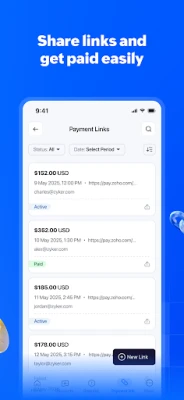
- Instant payment links: Generate a shareable link for a one‑time or recurring invoice and send it via email, messaging apps, or QR code.
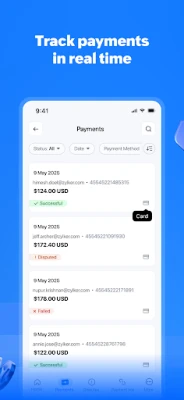
- Real‑time transaction view: See incoming payments, pending authorizations, and refunds as they happen.
- Refund capability: Issue full or partial refunds directly from the app without needing to log into a desktop portal.
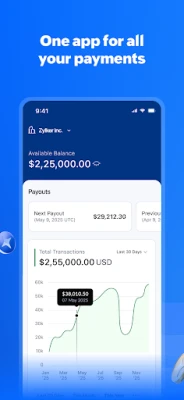
- Basic reporting: Filter transactions by date range, view totals, and get a quick snapshot of cash inflow and outflow.
How It Works
After installing the app, you sign in with your Zoho account. Once authenticated, the dashboard displays recent activity and key balances. To request a payment, tap the “Create Link” button, enter the amount, select the currency, and choose whether the link is for a single payment or a recurring schedule. The generated URL can be copied or shared instantly.
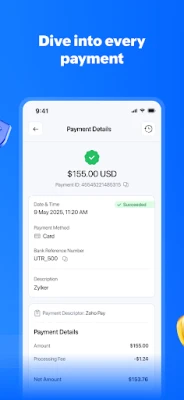
When a customer completes a payment, the transaction appears in the “Transactions” tab. From there you can view details, download receipts, or initiate a refund. The app also notifies you of failed payments, allowing you to follow up quickly.
Practical Uses
- Retail owners: Accept card payments at pop‑up stalls or temporary locations without needing a separate POS terminal.
- Freelancers: Send payment links for project milestones and track when each invoice is settled.
- Subscription services: Set up recurring payment links for monthly or annual plans and monitor renewal status.
- Small teams: Share access with trusted staff members so multiple people can view sales data and process refunds.
Installation Information
The app is available for free on the Google Play Store. Search for “Zoho Payments for Business” or use the package name com.zoho.pay to locate it. Installation follows the standard Android process: tap “Install,” grant any required permissions, and open the app once the download completes.
Things to Know Before Installing
- Because the app handles financial data, it requires a stable internet connection for real‑time updates.
- Some payment methods, such as ACH Direct Debit, may not be available in every country; availability depends on your Zoho account settings.
- The app does not replace the full Zoho Payments web portal; advanced reporting and account management are still performed on the desktop site.
Who May Find It Useful?
Any small to medium‑size business that needs a lightweight way to accept payments on the move will benefit from Zoho Payments for Business. It is especially handy for entrepreneurs who already use other Zoho tools, as the integration is seamless.
Frequently Asked Questions
Do I need a Zoho account to use the app?
Yes. The app works as a mobile extension of your existing Zoho Payments account.
Can I process refunds from the app?
Full and partial refunds can be issued directly within the transaction view.
Is my payment data secure?
Zoho applies industry‑standard encryption for data transmission and storage. The app does not store card details on the device.
What currencies are supported?
The app supports the same currency list as the Zoho Payments web service, which includes over a hundred currencies.
Can I receive notifications for new payments?
Yes. Push notifications alert you when a payment is received or when a transaction fails.
Rate the App
User Reviews















Popular Apps










 Games
 Entertainment
 Communication
 E-mail
 Security
 Tools
 Media
 Internet
 Finance
 Design
 Education
 Android Firmwares
 Travel & Local
 Android
 Windows
 Linux