Latest Version
August 18, 2026
Zoho Corporation
BUSINESS
Android
92
Free
com.zoho.ma
Report a Problem
More About Zoho Marketing Automation – Mobile Campaign Management
What is Zoho Marketing Automation?
Zoho Marketing Automation is a mobile companion to Zoho’s multichannel marketing platform. It lets marketers monitor and adjust campaigns from their Android device, giving quick access to key metrics and basic campaign controls without needing a desktop.
Main capabilities
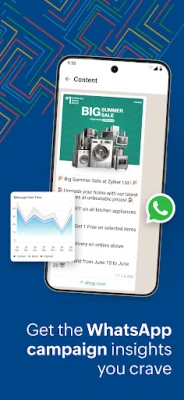
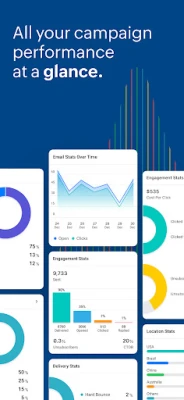
- Real‑time performance overview – View open rates, click‑through rates and delivery statistics for email, SMS and WhatsApp messages directly in the app.
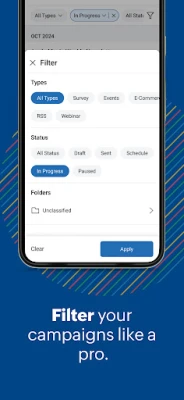
- Campaign filtering – Sort campaigns by date, type or performance thresholds to find the information you need fast.
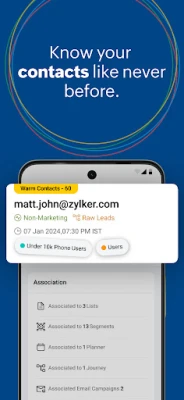
- Segment insights – See how individual contact lists or audience segments are responding, helping you identify high‑value groups.
- Basic campaign actions – Pause, resume or duplicate campaigns, and launch simple follow‑up messages while on the move.
How it works
After signing in with your Zoho account, the app syncs with the cloud‑based marketing workspace. Data is refreshed automatically, so the dashboards reflect the latest activity. From the main screen you can tap a campaign to open a detailed view, where charts display open and click metrics, and options let you adjust scheduling or audience targeting.
Practical uses
- Check the health of a time‑sensitive email blast while traveling.
- Quickly identify a low‑performing SMS segment and re‑target it with a different message.
- Confirm that a WhatsApp promotion has been delivered before a live event.
Installation information
The app is available for free on the Google Play Store. Search for Zoho Marketing Automation or use the package name com.zoho.ma to locate it. Installation follows the standard Android process: tap Install, grant the requested permissions, and open the app to sign in.
Things to know before installing
- The app requires a Zoho account that already has access to the Marketing Automation service.
- All heavy‑weight tasks such as campaign creation, template design and bulk list management are performed on the web portal; the mobile app focuses on monitoring and light adjustments.
- Internet connectivity is needed for data sync; offline access is limited to previously loaded dashboards.
Who may find it useful?
Marketers who need to stay informed about campaign performance while away from their desk, sales teams that want quick visibility into lead‑generation metrics, and small business owners who prefer a lightweight way to track marketing ROI on a mobile device.
Frequently asked questions
Do I need a separate subscription for the mobile app?
No. The app uses the same subscription you have for Zoho Marketing Automation on the web.
Can I create a new campaign from the app?
Campaign creation is limited to the web interface. The app lets you pause, resume or duplicate existing campaigns, but full design and setup remain on the desktop version.
What data is stored on my device?
Only temporary cache for the current session. All campaign data remains on Zoho’s servers and is accessed via secure API calls.
Rate the App
User Reviews















Popular Apps










 Games
Games Entertainment
 Communication
 E-mail
 Security
 Tools
Tools Media
Media Internet
 Finance
 Design
 Education
 Android Firmwares
 Travel & Local
 Android
 Windows
 Linux
Linux