



Latest Version
Latest
September 09, 2026
Zoho Corporation
BUSINESS
Android
11
Free
com.zoho.books
Report a Problem
More About Zoho Books – Accounting App for Android
What is Zoho Books?
Zoho Books is a mobile accounting solution from Zoho Corporation. Designed for entrepreneurs, freelancers, and small‑to‑medium businesses, it brings core bookkeeping tasks to your Android phone or tablet so you can monitor cash flow, create invoices, and keep records up to date while on the go.
Main features
- Invoicing and payments – Generate professional invoices, set recurring billing, and share them directly from the app. Integrated payment gateways let customers pay online, helping you receive money faster.
- Expense tracking – Record purchases, attach photos of receipts, and categorize spending. The app can also import bank transactions to simplify reconciliation.
- Bank reconciliation – Match imported statements with recorded transactions, spot discrepancies, and keep your accounts balanced.
- Client portal – Clients can view their own invoices, payment history, and estimates through a secure portal, reducing back‑and‑forth emails.
- Multi‑user access – Add team members or accountants with role‑based permissions, ensuring each user sees only the data they need.
- Tax support – Configure sales tax rates, generate tax reports, and prepare information needed for year‑end filing.
- Reporting – Access a range of financial reports, such as profit‑and‑loss statements, balance sheets, and cash‑flow summaries, to gain insight into business performance.
How it works
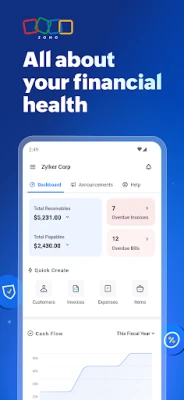
After installing Zoho Books, you sign in with your Zoho account. The dashboard presents a snapshot of recent invoices, expenses, and bank activity. From there you can:
- Create a new invoice, select a client, add line items, and choose a payment method.
- Record an expense by photographing a receipt or entering details manually.
- Connect your bank (if supported) to pull transaction data for automatic categorization.
- Run reports or export data for deeper analysis.
The interface follows Android design guidelines, making navigation intuitive for users familiar with other Zoho web services.
Practical uses
Whether you run a freelance design studio, a boutique retail shop, or a consulting firm, Zoho Books can serve as a central hub for financial management. Typical scenarios include:
- Sending invoices after a project milestone and tracking when they are paid.
- Capturing daily expenses while traveling for client meetings.
- Preparing quarterly tax summaries without leaving the app.
- Collaborating with an accountant who reviews entries through the shared workspace.
Installation information
Zoho Books is available as a free download from the Google Play Store. The app requires an active Zoho account; a free trial of Zoho Books’ cloud service can be started from within the app if you do not already have one.
Things to know before installing
- The Android version requirement is not specified publicly, so ensure your device runs a recent version of the operating system for optimal performance.
- Some advanced features, such as integration with specific payment gateways, may depend on the subscription tier you choose on the Zoho website.
- Data synchronization relies on an internet connection; offline access is limited to viewing previously downloaded records.
Who may find it useful?
Zoho Books is best suited for small business owners, independent contractors, and accountants who need a mobile‑first way to keep financial records current. Teams that already use other Zoho applications will benefit from seamless integration across the Zoho ecosystem.
Rate the App
User Reviews















Popular Apps










 Games
Games Entertainment
 Communication
 E-mail
 Security
 Tools
Tools Media
Media Internet
 Finance
 Design
 Education
 IT Tools
 Travel & Local
 Android
 Windows
 Linux
Linux