

Latest Version
August 26, 2026
Walmart
BUSINESS
Android
150
Free
com.walmart.sourcing.Fast
Report a Problem
More About Walmart Inspect – Simple Tool for Facility Inspections
What is Walmart Inspect?
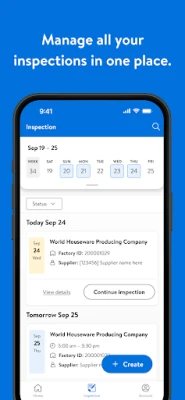
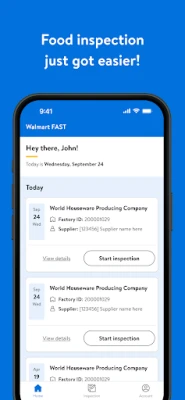
Walmart Inspect is a free Android application created by Walmart for use by its store and distribution‑center staff. The app provides a straightforward way to capture inspection data, track findings, and share results with the relevant teams. It is designed to support routine checks of store layouts, equipment, safety standards, and other operational areas.
Main features
- Custom checklists – Users can select from pre‑defined inspection lists that match Walmart’s standard procedures.
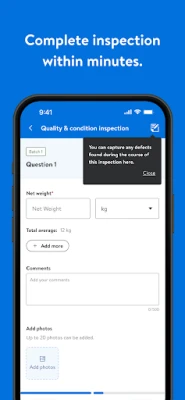
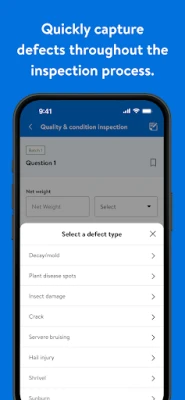
- Photo capture – The app allows attaching photos to specific items, making it easy to document issues visually.
- Offline capability – Inspections can be performed without an active internet connection and synced later.
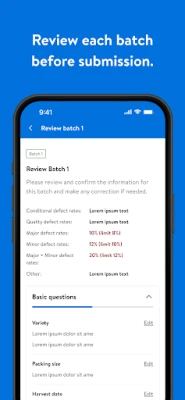
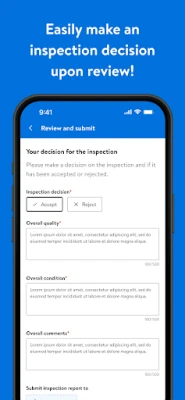
- Simple reporting – After completing a checklist, the app generates a concise report that can be exported or sent to supervisors.
- Secure data handling – Information entered in the app is stored within Walmart’s internal systems, respecting corporate privacy policies.
How it works
When a user opens Walmart Inspect, they choose the appropriate inspection template—such as “Store Front,” “Backroom,” or “Safety Walk‑through.” The checklist appears as a series of items with checkboxes, text fields, or photo prompts. Users mark each item as compliant or note any deviation, optionally adding comments or images. Once the inspection is finished, the app compiles the data into a report that can be saved locally and later uploaded to Walmart’s central database when a network connection is available.
Practical uses
The application is useful for a range of day‑to‑day tasks:
- Ensuring that merchandising standards are met before a store opens.
- Conducting safety checks on equipment, fire exits, and signage.
- Documenting cleanliness and organization in stockrooms.
- Providing evidence for compliance audits.
Installation information
Walmart Inspect is distributed as a free download from the Google Play Store. Users need an Android device that meets the minimum system requirements set by Walmart, which are typically aligned with standard Android versions used in corporate devices. After installation, the app may require login credentials provided by Walmart’s IT department to access internal checklists and sync data.
Things to know before installing
- The app is intended for Walmart employees and partners; personal use is not supported.
- Access to certain features may depend on the user’s role and permissions within Walmart’s network.
- Because the app stores inspection data, a stable internet connection is recommended for syncing, though offline work is possible.
Who may find it useful?
Store managers, department supervisors, safety officers, and any staff member responsible for maintaining store standards will benefit from Walmart Inspect. The tool streamlines the documentation process, reduces paperwork, and helps keep compliance records up to date.
Frequently asked questions
Do I need a special account to use the app?
Yes, you will need a Walmart‑issued login that grants access to the appropriate inspection templates.
Can I export the inspection reports?
Reports can be exported as PDF or CSV files once they are synced with Walmart’s backend system.
Is the app available on iOS?
Currently, Walmart Inspect is offered only for Android devices.
Rate the App
User Reviews















Popular Apps










 Games
 Entertainment
 Communication
 E-mail
 Security
 Tools
 Media
 Internet
 Finance
 Design
 Education
 Android Firmwares
 Travel & Local
 Android
 Windows
 Linux