
Latest Version
September 12, 2026
TimeForge Labor
BUSINESS
Android
6
Free
com.timeforge.one
Report a Problem
More About TimeForge – Employee Scheduling & Time Management
What is TimeForge?
TimeForge is a mobile companion for employees who need quick access to their work schedule, time‑card information, and shift‑management tools. Developed by TimeForge Labor, the app connects to the existing TimeForge web platform, allowing staff to stay informed and act on scheduling matters without a computer.
Main features
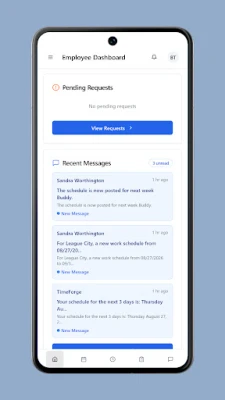
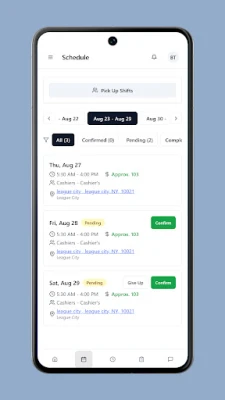
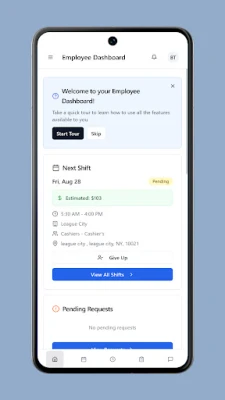
- Schedule overview – See upcoming shifts, days off and any changes posted by your manager.
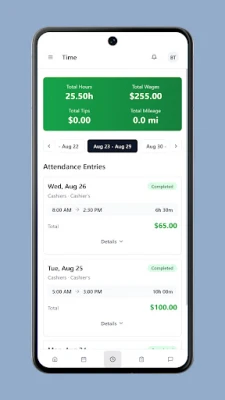
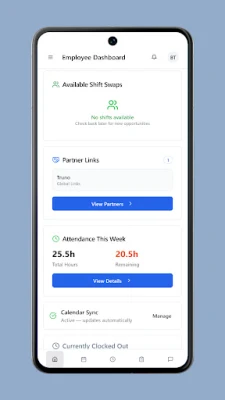
- Time‑card access – Review hours worked, earnings summaries and pending approvals.
- Leave requests – Submit vacation, sick or personal time off directly from the app.
- Shift swapping – Offer your shift to a coworker or pick up an open slot, subject to employer rules.
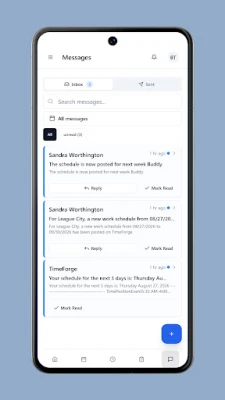
- In‑app messaging – Read announcements and messages sent through the TimeForge system.
- Team visibility – When permitted, view teammates’ schedules to coordinate coverage.
- Clock‑in/out – Record the start and end of a shift from your phone, if your employer enables mobile punching.
How it works
After downloading the app, log in with the same credentials you use on the TimeForge website. The app synchronizes with your account, pulling the latest schedule, time‑card data and any pending requests. Actions such as submitting a time‑off request or swapping a shift are processed through the same backend that powers the web portal, ensuring consistency across devices.
Practical uses
- Check tomorrow’s start time while commuting.
- Submit a sick‑day request as soon as you feel unwell.
- Swap a shift with a colleague when a personal conflict arises.
- Confirm that your hours have been recorded correctly before payday.
Installation information
The app is available for free on the Google Play Store. Search for “TimeForge” or use the package name com.timeforge.one to locate the correct listing. Installation follows the standard Android process: tap Install, grant any required permissions, and open the app once the download completes.
Things to know before installing
- The app requires an existing TimeForge account; it does not create new employer accounts.
- Features such as clock‑in/out or viewing teammates’ schedules depend on the settings configured by your employer.
- Internet connectivity is needed for initial login and for syncing data; some information may be cached for offline viewing.
Who may find it useful?
Any employee who regularly checks a work schedule, tracks hours, or needs to manage shift changes will benefit from TimeForge. It is especially handy for staff in retail, hospitality, healthcare and other industries where shift work is common.
Frequently asked questions
Do I need a separate account for the mobile app?
No. Use the same username and password you already have for the TimeForge web portal.
Can I clock in from any location?
Clock‑in capability is controlled by your employer. Some organizations allow any network, while others restrict it to specific locations or Wi‑Fi networks.
What should I do if my schedule does not update?
Pull to refresh within the schedule screen or reopen the app after a short wait. If the issue persists, contact your employer’s administrator.
Is my data secure?
TimeForge uses the same secure servers as the web platform. The app transmits data over encrypted connections, but you should follow standard device security practices, such as using a lock screen and keeping the OS up to date.
Rate the App
User Reviews














Popular Apps










 Games
Games Entertainment
 Communication
 E-mail
 Security
 Tools
Tools Media
Media Internet
 Finance
 Design
 Education
 IT Tools
 Travel & Local
 Android
 Windows
 Linux
Linux