

Latest Version
Latest
September 12, 2026
Infinisource
BUSINESS
Android
5
Free
com.infinisource.iSolved_hcm_mobile
Report a Problem
More About Timeforce – Mobile Time & Attendance
What is Timeforce?
Timeforce is a mobile solution from Infinisource that brings core time‑and‑attendance functions to Android smartphones and tablets. Designed for employees who spend most of their day away from a desk, the app lets users record work hours, view schedules and recent pay details, and keep their contact information current—all from the convenience of a pocket‑sized device.
Main features
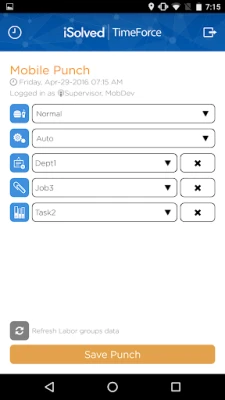
- Quick punch in/out – One‑tap buttons let workers record start and end times, as well as meal and break periods.
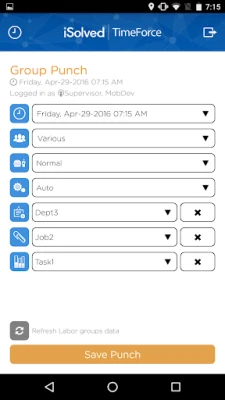
- Group punch – Supervisors can log time for an entire crew with a single transaction.
- Offline capability – Punches are stored locally when there is no network and are sent automatically once connectivity returns.
- GPS capture – When location services are enabled, the app attaches the device’s coordinates to each punch for verification.
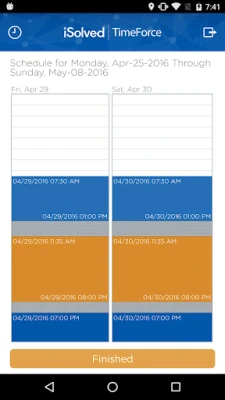
- Schedule view – Employees can see upcoming shifts and any changes posted by their manager.
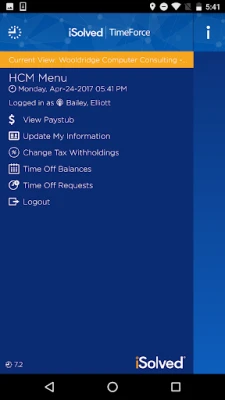
- Paystub preview – The most recent pay information is accessible directly in the app.
- Profile management – Users can update address, phone number and other personal details without leaving the app.
How it works
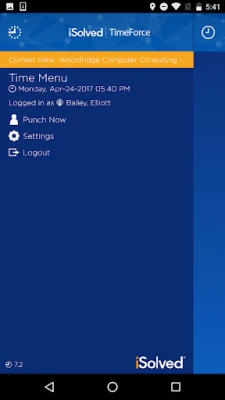
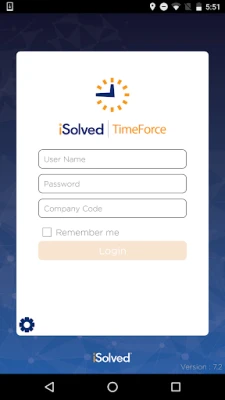
After installing the app, users log in with the credentials provided by their employer’s Timeforce system. The interface presents a simple dashboard where the primary actions—punching in/out, checking the schedule, and viewing pay—are just a tap away. If the device loses signal, the app continues to accept punches and queues them for transmission. When a network connection is restored, the queued entries are uploaded securely to the backend system.
Practical uses
The app is especially useful for trades and service professionals such as carpenters, electricians, landscapers, caterers, home‑care nurses and drivers. These workers often move between job sites and may not have reliable cellular coverage. By allowing offline punches and attaching GPS data when possible, Timeforce helps both employees and supervisors maintain accurate attendance records without interrupting the workflow.
Installation information
Timeforce is offered as a free download from the Google Play Store. The package name is com.infinisource.iSolved_hcm_mobile. Installation follows the standard Android process: tap “Install,” grant any required permissions, and open the app to begin the login setup.
Things to know before installing
- The app requires an existing Timeforce account managed by your employer.
- Location services improve record accuracy but are optional.
- Because punches can be recorded offline, a stable internet connection is only needed for initial login and periodic synchronization.
Who may find it useful?
Any organization that tracks employee hours through Infinisource’s Timeforce platform can benefit. Field staff, mobile crews, and remote workers who need a reliable way to log time without a fixed terminal will find the app particularly valuable.
Frequently asked questions
Do I need a constant internet connection?
No. The app stores punches locally when offline and uploads them automatically once a connection is available.
Is my location data shared?
GPS coordinates are attached only to the punch record and are transmitted to the employer’s Timeforce system in accordance with the organization’s privacy policies.
Can a supervisor punch for an entire crew?
Yes. The “Group Punch” feature lets a manager record time for multiple employees in a single action.
What if I lose my device?
Contact your payroll or IT administrator immediately. They can deactivate the device’s access and issue new login credentials.
Rate the App
User Reviews













Popular Apps










 Games
Games Entertainment
 Communication
 E-mail
 Security
 Tools
Tools Media
Media Internet
 Finance
 Design
 Education
 IT Tools
 Travel & Local
 Android
 Windows
 Linux
Linux