



Latest Version
August 14, 2026
Microsoft Corporation
BUSINESS
Android
227
Free
com.microsoft.office.lync15
Report a Problem
More About Skype for Business for Android – Connect, Chat, and Meet on the Go
What is Skype for Business for Android?
Skype for Business for Android is Microsoft’s mobile client that brings the core collaboration tools of the Skype for Business platform to Android smartphones and tablets. It lets employees stay connected to their organization’s communication network, whether they are in the office, traveling, or working remotely.
Main Features
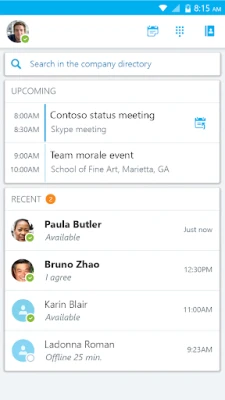
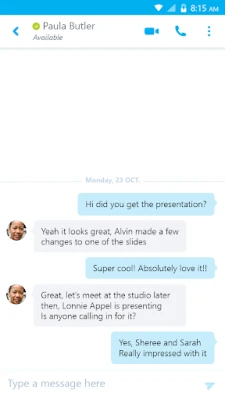
- Instant messaging and presence – See who is online, away, or busy, and start a chat with a single tap.
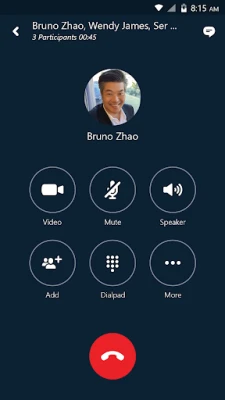
- Voice and video calling – Make high‑quality audio calls or start a video conversation directly from the device.
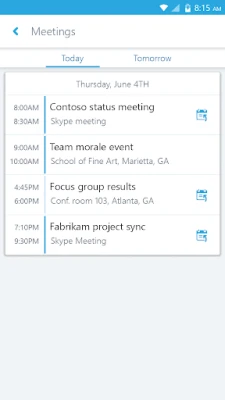
- Meeting participation – Join scheduled Skype for Business meetings, view shared screens, and contribute video or audio without needing a desktop.
- Group conversations – Create group chats or video calls, add participants as needed, and keep the discussion organized.
- Contact search – Find colleagues by name, email address, or phone number using the built‑in directory.
- One‑click meeting access – Upcoming meetings appear in a dedicated list, allowing you to join with a single tap.
How It Works
The app authenticates against your organization’s Azure Active Directory or on‑premises Active Directory via Microsoft’s authentication services. Once signed in, it synchronizes your contacts, calendar, and presence information, mirroring the experience you have on the desktop client. Calls and meetings are routed through the same secure servers used by the enterprise version, ensuring consistent policy enforcement.
Practical Uses
- Remote collaboration – Participate in project meetings, share ideas, and make decisions without needing a laptop.
- Field work support – Sales or service teams can quickly reach colleagues for approvals or advice while on site.
- Quick issue resolution – IT support staff can start a video call to troubleshoot problems in real time.
Installation Information
The application is available for free from the Google Play Store. After downloading, launch the app and follow the on‑screen prompts to sign in with your corporate credentials. The initial setup may request permission to access the microphone, camera, and contacts – these are required for calling and presence features.
Compatibility
Skype for Business for Android runs on devices that meet Microsoft’s minimum operating system requirements for the platform. Typically, this means Android 4.0 (Ice Cream Sandwich) or newer, though newer releases may raise the baseline to ensure optimal performance and security.
Things to Know Before Installing
- Access to the app requires a valid Skype for Business or Microsoft 365 account that is licensed by your organization.
- Some advanced features, such as screen sharing or large‑scale webinars, may depend on the version of the server your company uses.
- Network connectivity (Wi‑Fi or cellular data) is necessary for real‑time communication; a stable connection improves call quality.
Who May Find It Useful?
Anyone who needs to stay in touch with colleagues while away from their desk can benefit from this app – from sales representatives and field engineers to executives and support staff. It is especially valuable for organizations that have standardized on Microsoft’s communication suite.
Frequently Asked Questions
Do I need a separate license for the mobile app?
No. The mobile client uses the same license that grants you access to Skype for Business on the desktop or web.
Can I use the app with a personal Microsoft account?
The app is intended for corporate accounts. Personal accounts may not have access to the enterprise features required for full functionality.
What happens to my chat history?
Conversation history is stored on the server and synchronized across devices, so you can pick up where you left off on any supported client.
Is the app secure?
Communication is encrypted in transit, and authentication follows Microsoft’s enterprise security standards. Your organization’s IT policies also apply.
Rate the App
User Reviews















Popular Apps










 Games
Games Entertainment
 Communication
 E-mail
 Security
 Tools
Tools Media
Media Internet
 Finance
 Design
 Education
 Android Firmwares
 Travel & Local
 Android
 Windows
 Linux
Linux