

Latest Version
Latest
August 27, 2026
Booking.com Hotels & Vacation Rentals
BUSINESS
Android
120
Free
com.booking.hotelmanager
Report a Problem
More About Pulse for Booking.com Partners – Mobile Management Tool
What is Pulse for Booking.com Partners?
Pulse is a free Android application created by Booking.com Hotels & Vacation Rentals for property owners and managers who list their accommodations on the Booking.com platform. The app brings core partner‑center functions to a handheld device, allowing hosts to stay connected with their business while away from a desktop.
Main features
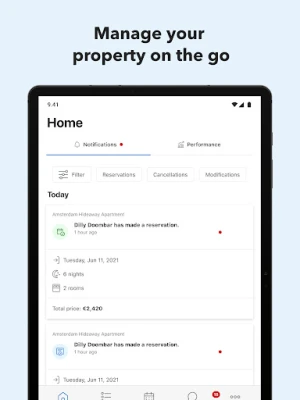
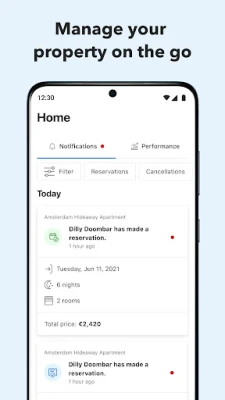
- Reservation overview – View upcoming bookings, check‑in and check‑out dates, and guest details in a single list.
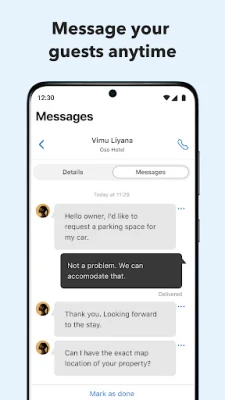
- Guest messaging – Send quick replies or pre‑written templates to answer guest requests, share arrival instructions or send a welcome note.
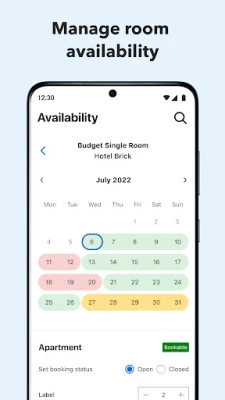
- Rate and availability control – Adjust nightly prices or block dates directly from the phone to respond to market demand.
- Photo upload – Capture and upload new images of rooms or common areas to keep the listing fresh.
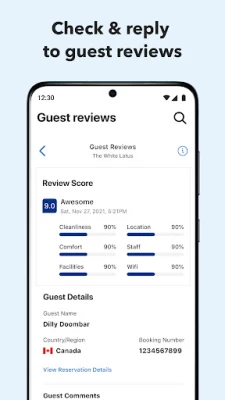
- Review management – Read guest reviews after checkout and respond to them without leaving the app.
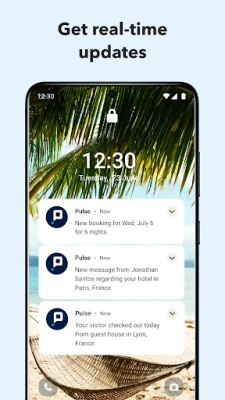
- Push notifications – Choose which events trigger alerts, such as new bookings, cancellations, or upcoming promotions.
How it works
After installing Pulse, you sign in with the same credentials you use for the Booking.com partner portal. The app syncs with your existing listings, pulling the latest reservation data and property settings. From the home screen you can tap a reservation to see full details, reply to a guest message, or update the rate for that night. Templates for common messages can be created in the settings, making repetitive communication faster.
Practical uses
- Last‑minute adjustments – If a room becomes unavailable, you can instantly block the date and notify affected guests.
- On‑site guest support – While checking in a guest, you can answer questions about Wi‑Fi, breakfast hours, or local attractions without needing a laptop.
- Marketing refresh – Upload a new photo of a renovated bathroom directly from your phone to improve the listing’s visual appeal.
Installation information
Search for “Pulse for Booking.com Partners” in the Google Play Store, then tap Install. The app requires a standard Android device with internet access. No additional files are needed.
Things to know before installing
- The app works with any property that is already listed on Booking.com and linked to your partner account.
- All changes you make in Pulse are reflected in the online partner centre, so you do not need to duplicate updates.
- Push notifications can be customized or disabled in the app’s settings if you prefer fewer alerts.
Who may find it useful?
Independent hosts, small boutique hotels, vacation‑rental managers and anyone who needs to stay on top of bookings while traveling or handling multiple properties will benefit from the mobile convenience Pulse provides.
Frequently asked questions
Do I need a separate account for Pulse?
No. Use the same login credentials you already have for the Booking.com partner portal.
Can I manage multiple properties?
Yes. All properties linked to your partner account appear in the app, and you can switch between them easily.
Is the app free to use?
Pulse is offered at no cost to Booking.com partners.
What if I lose my phone?
Because the app requires your partner credentials, you can reinstall it on a new device and sign in again. Consider enabling two‑factor authentication on your Booking.com account for added security.
Rate the App
User Reviews















Popular Apps










 Games
 Entertainment
 Communication
 E-mail
 Security
 Tools
 Media
 Internet
 Finance
 Design
 Education
 Android Firmwares
 Travel & Local
 Android
 Windows
 Linux