

Latest Version
September 02, 2026
Zero Comfort
BUSINESS
Android
7
Free
com.projectmngr.app
Report a Problem
More About Project Manager – Simple Task & Team Organizer
What is Project Manager?
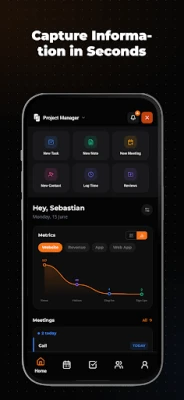
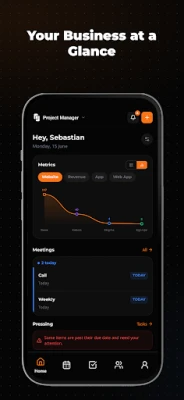
Project Manager is a free Android app created by Zero Comfort that brings together the core tools many people use to organise their work. Rather than juggling several separate applications, you can create tasks, schedule events, capture meeting notes, and track simple metrics all within a single, lightweight interface.
Main features
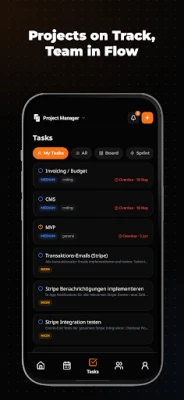
- Task creation and assignment – Add tasks quickly, set due dates, and, when working with a team, assign them to specific members.
- Project view – Group related tasks into projects or milestones to keep larger pieces of work visible.
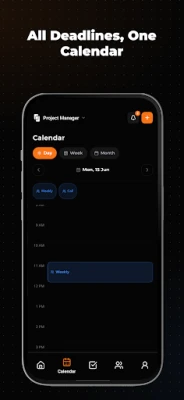
- Calendar integration – A built‑in calendar shows tasks, meetings and deadlines together, helping you plan your day without leaving the app.
- Meeting notes – Record notes during meetings, tag them to the relevant project, and retrieve them later with a single tap.
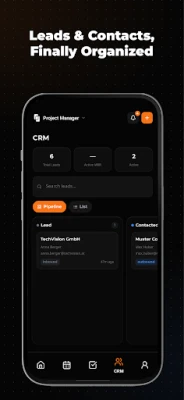
- Basic CRM elements – Store contact details and track simple lead stages, useful for freelancers or small sales teams.
- Goal tracking – Define objectives and key results (OKRs) and monitor progress over time.
- Time logging – Start a timer or manually log hours, then link the time entry to a task or project.
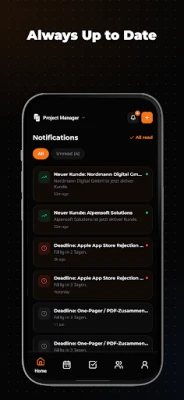
- Notifications – Real‑time alerts keep you aware of upcoming deadlines or changes made by collaborators.
- Knowledge base – A searchable list lets you keep reference material, process documents or quick guides handy.
How it works
When you open Project Manager for the first time, you are guided through a short setup that lets you create your first project or task list. The main screen presents a visual board where each card represents a task; you can drag cards between columns to reflect status changes. The calendar view is accessible from the bottom navigation and aggregates all dated items. All data is stored locally on the device, and the app offers optional cloud backup through the developer’s own service, should you choose to enable it.
Practical uses
- Freelancers can track billable hours, keep client contacts, and store project briefs without needing separate invoicing software.
- Small teams benefit from a shared task board and meeting notes that stay in sync across members.
- Students or solo entrepreneurs can organise coursework, personal goals, and daily to‑dos in one place.
Installation information
The app is available for free on the Android marketplace. Simply search for “Project Manager” by Zero Comfort, tap Install, and follow the standard Android installation prompts. No additional permissions beyond standard storage and notification access are required.
Things to know before installing
- The app does not require a paid subscription; all core features are free.
- Because the developer does not publish detailed version or size information, you may want to ensure you have sufficient storage before downloading.
- Backup and sync options are optional; if you rely on cloud storage, verify the settings after installation.
Who may find it useful?
Anyone who prefers a single app for basic project tracking, whether you are managing personal tasks, coordinating a small team, or handling a simple sales pipeline, will appreciate the straightforward layout and free price point.
Frequently asked questions
Is an internet connection required?
Only for optional cloud backup. All core functions work offline.
Can I export my data?
Project Manager includes a simple export feature that creates a CSV file of tasks and time entries, which you can share or import into other tools.
Does the app support multiple languages?
The interface is currently available in English; additional languages may be added in future updates.
Rate the App
User Reviews














Popular Apps










 Games
Games Entertainment
 Communication
 E-mail
 Security
 Tools
Tools Media
Media Internet
 Finance
 Design
 Education
 IT Tools
 Travel & Local
 Android
 Windows
 Linux
Linux