


Latest Version
Latest
September 08, 2026
VividSphere LLP
BUSINESS
Android
11
Free
com.mindweaver.pocketcrm
Report a Problem
More About Pocket CRM – Customers & Leads
What is Pocket CRM?
Pocket CRM is a mobile‑first customer relationship management tool designed for entrepreneurs, sales teams, and service professionals who need to keep their client information, tasks, and documents handy while on the go. Developed by VividSphere LLP, the app offers a compact yet flexible environment for managing contacts, leads, appointments, and basic financial documents without requiring a desktop computer.
Main features
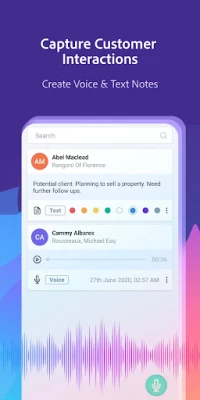
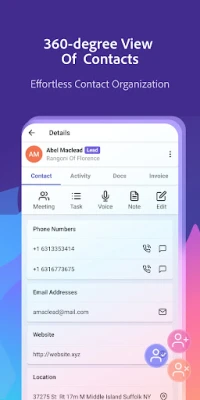
- Contact management – Store detailed information for each person or company, assign a status such as customer, lead, or lost, and add custom fields to capture the data that matters to you.
- Lead tracking – Convert prospects into customers by moving them through stages, adding notes, and setting follow‑up reminders.
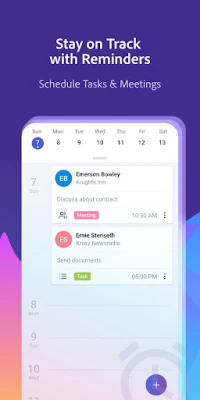
- Scheduling and tasks – Create calendar events, tasks, or meetings, attach them to specific contacts, and receive notifications so nothing slips through the cracks.
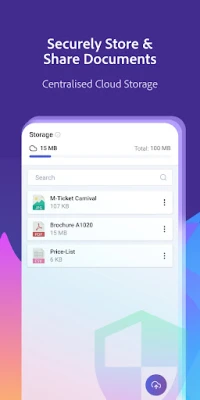
- Document handling – Attach PDFs, images, or other files to a contact record, making contracts, proposals, or receipts easy to locate.
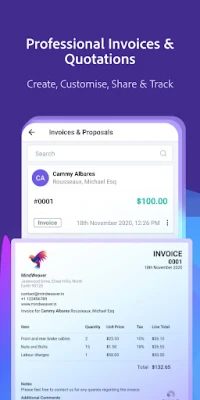
- Invoice and proposal creation – Generate simple invoices or proposals, include your logo and business details, and export them for sharing.
- Offline access – Work with your data without an internet connection; changes sync when you are back online.
How it works
After installing Pocket CRM, you start by adding contacts manually or importing them from your phone’s address book. Each contact can be enriched with phone numbers, email addresses, notes, and tags. The app’s interface lets you switch between a list view and a detailed view, where you can see all related activities, attached documents, and upcoming tasks.
When a new lead appears, you create a lead entry, assign a priority, and set a follow‑up date. The built‑in reminder system alerts you at the chosen time, helping you maintain timely communication. As the relationship progresses, you can convert the lead into a customer, attach invoices, and track payment status.
Practical uses
- Freelancers can keep client contracts and billing information together, reducing the need for separate spreadsheets.
- Small sales teams benefit from a shared view of leads, ensuring that follow‑ups are coordinated.
- Service providers such as consultants or repair technicians can schedule appointments and attach service reports directly to each client record.
Installation information
The app is available for free on the Google Play Store. Search for “Pocket CRM – Customers & Leads” or use the package name com.mindweaver.pocketcrm to locate it. Installation follows the standard Android process: tap Install, grant the requested permissions, and launch the app.
Things to know before installing
- The app stores data locally on the device; consider regular backups if you rely on it for critical business information.
- Permissions are limited to storage access for attaching documents and calendar access for scheduling events.
- Because the app is free, some advanced CRM features found in enterprise solutions may not be present.
Who may find it useful?
Anyone who needs a portable way to keep track of customers, leads, and basic invoicing will benefit from Pocket CRM. It is especially suited for small businesses, independent professionals, and teams that prefer a lightweight solution over complex cloud‑based platforms.
Frequently asked questions
Can I use Pocket CRM on multiple devices?
The free version stores data on the device where it is installed. Synchronization across devices is not built in, so each installation works independently.
Is my data encrypted?
Pocket CRM does not claim built‑in encryption; users should rely on Android’s device security features such as screen locks and encrypted storage.
Can I export my contacts or invoices?
Yes, the app provides options to export contact lists and generated invoices as standard files (e.g., CSV or PDF) that can be shared manually.
Rate the App
User Reviews















Popular Apps










 Games
Games Entertainment
 Communication
 E-mail
 Security
 Tools
Tools Media
Media Internet
 Finance
 Design
 Education
 IT Tools
 Travel & Local
 Android
 Windows
 Linux
Linux