



Latest Version
September 06, 2026
MicroMacro Mobile Incorporated
BUSINESS
Android
9
Free
com.mobileo2o.checkout
Report a Problem
More About Pass2U Checkout – Mobile Pass Verification for Merchants
What is Pass2U Checkout?
Pass2U Checkout is a free Android tool developed by MicroMacro Mobile Incorporated that enables merchants to verify and redeem digital passes such as Apple Wallet Passes or Passbook tickets. The app acts as a portable checkout station, allowing businesses to confirm the authenticity of a pass and record the transaction without needing a separate desktop system.
Main features
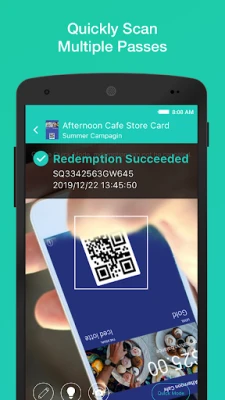
- Pass verification – Scan or enter a pass code to confirm its validity instantly.
- Multiple redemptions – Supports passes that can be used more than once, useful for recurring discounts or multi‑session tickets.
- Real‑time updates – When a pass includes points, credits, or balance information, the app can refresh those values at the moment of redemption.
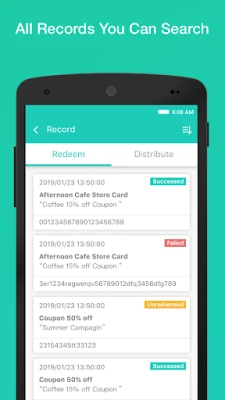
- Record keeping – All redemption events are logged within the app, giving merchants quick access to transaction history.
How it works
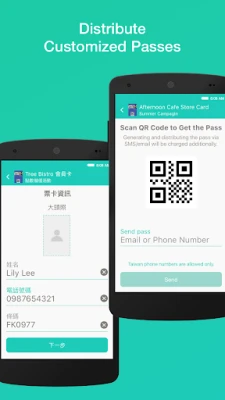
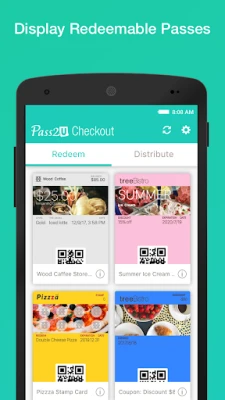
Merchants first create and configure their passes on the Pass2U web portal (www.pass2u.net). After setting up an account, they can log in to the Android app with the same credentials. When a customer presents a digital pass, the merchant opens Pass2U Checkout, scans the QR code or enters the pass identifier, and confirms the redemption. The app updates the pass status and stores the transaction record locally.
Practical uses
- Retail stores offering loyalty cards or discount vouchers.
- Fitness centers issuing class passes that can be used multiple times.
- Event organizers managing tickets that allow re‑entry.
- Service providers tracking prepaid credits or points.
Installation information
The app is available for free on the Android marketplace. Simply search for "Pass2U Checkout" and install it like any other application. No additional configuration is required beyond logging into your Pass2U account.
Things to know before installing
- You will need an active Pass2U account to use the app.
- The app stores redemption records on the device; regular backups are recommended if you need long‑term archival.
- Internet connectivity is required for initial login and for synchronising pass updates.
Who may find it useful?
Small to medium‑size merchants who issue digital passes for promotions, loyalty programs, or ticketing will benefit from the quick, on‑the‑go verification that Pass2U Checkout provides. It is also helpful for businesses that need a simple way to track pass usage without investing in complex point‑of‑sale hardware.
Frequently asked questions
Do I need a separate scanner?
No. The app uses the device’s camera to read QR codes, so no extra hardware is necessary.
Can I redeem a pass offline?
Redemption requires an internet connection to validate the pass against the Pass2U server. Offline use is not supported.
Is my customer data safe?
Pass2U Checkout only stores minimal transaction data needed for record‑keeping. All communication with the Pass2U service is encrypted.
Rate the App
User Reviews















Popular Apps










 Games
Games Entertainment
 Communication
 E-mail
 Security
 Tools
Tools Media
Media Internet
 Finance
 Design
 Education
 IT Tools
 Travel & Local
 Android
 Windows
 Linux
Linux