

Latest Version
August 22, 2026
BinaryScript
BUSINESS
Android
131
Free
com.binaryscript.whatsorder
Report a Problem
More About OrderPage: WhatsApp Orders – Simple Order Management
What is OrderPage?
OrderPage is a free Android tool that helps small businesses collect orders through WhatsApp without requiring customers to install another app. By turning a product list into a shareable link or QR code, the app formats incoming requests so they appear as clean, readable messages in your WhatsApp conversation.
Main features
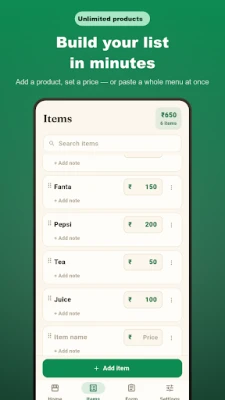
- Catalog builder – Add items one by one or paste a whole list, set prices, and organise them by dragging.
- Stock control – Mark items as out of stock without deleting them.
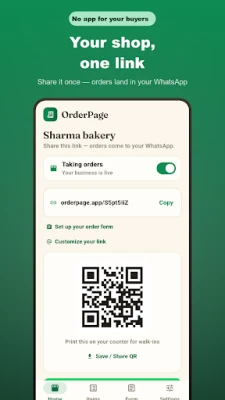
- Order toggle – Pause the order form when you are closed.
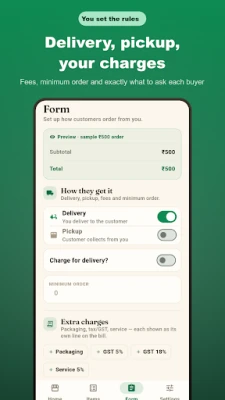
- Delivery & pickup options – Include optional delivery fees, minimum order amounts, and custom fields such as address or preferred time.
- QR code generation – Print a QR code for walk‑in customers or place it on a counter.
- No accounts needed – Both you and your customers stay within WhatsApp; the app does not require login credentials.
How it works
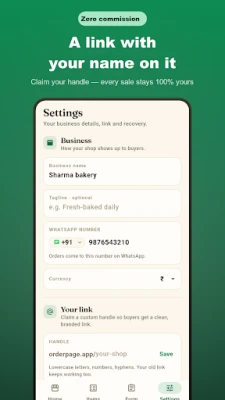
- Enter your business name, WhatsApp number, and the items you sell.
- Generate a shareable link and a QR code.
- Post the link in your WhatsApp bio, status, or print the QR code for in‑store use.
- Customers tap the link, select items, and send the order. The order arrives in your chat already formatted.
Practical uses
The app is suited for home bakers, cloud kitchens, small grocery shops, boutiques, diagnostic labs, florists, and any other venture that already uses WhatsApp to communicate with customers. It removes the back‑and‑forth of confirming items, quantities, and prices, letting you focus on preparation and delivery.
Installation information
OrderPage is available as a free download from the Google Play Store. After installation, launch the app, set up your catalog, and you are ready to share your order link.
Things to know before installing
- The app does not collect customer data beyond what you enter for your catalog.
- All orders are sent to the WhatsApp number you configure; there is no separate messaging platform.
- A recovery code is provided during setup so you can restore your catalog if you change devices.
Who may find it useful?
Anyone who already uses WhatsApp for business communication and wants a quick way to receive structured orders without asking customers to fill out separate forms.
Frequently asked questions
Do customers need to install OrderPage?
No. Customers place orders through a web form that opens in their browser and the result is sent to your WhatsApp.
Is there a subscription?
The core functionality is free. Additional premium features may be offered through an optional subscription, but the basic order flow works without any payment.
Can I customize the order form?
Yes. You can add custom fields such as delivery address, preferred time, or any note you need from the customer.
Rate the App
User Reviews















Popular Apps










 Games
 Entertainment
 Communication
 E-mail
 Security
 Tools
 Media
 Internet
 Finance
 Design
 Education
 Android Firmwares
 Travel & Local
 Android
 Windows
 Linux