




Latest Version
Latest
September 10, 2026
Anyday Apps
BUSINESS
Android
1
Free
com.aimobiapps.onphone
Report a Problem
More About OnPhone: Second Number & eSIM – Free Call & Text App
What is OnPhone?
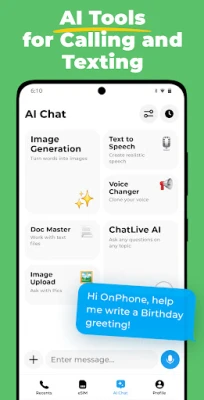
OnPhone, developed by Anyday Apps, is a free Android application that creates a virtual second phone number on your device. The app uses eSIM technology, so you can obtain and manage an additional number without swapping physical SIM cards or buying extra hardware.
Main capabilities
- Separate personal and work communication – keep your primary number private while using a dedicated line for business or online services.
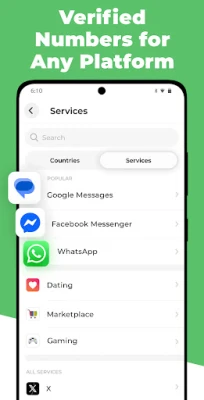
- Receive SMS verification codes – sign up for apps and services that require a text message without exposing your main number.
- Make and receive calls – place outbound calls and answer inbound calls through the virtual number, just like a regular phone line.
- Message handling – send and receive standard SMS messages; the app integrates with the native messaging interface.
- Multiple numbers – manage more than one virtual line from the same app, switching between them as needed.
How it works
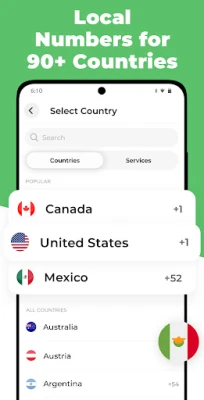
After installing OnPhone, you create a virtual profile that is linked to an eSIM carrier. The app handles the provisioning process, assigning a local or international number based on the options presented. Once the number is active, calls and texts are routed through the app’s data connection, eliminating the need for a physical SIM slot.
Practical uses
- Online registrations – use the virtual number for account creation on social platforms, marketplaces, or any service that sends a verification SMS.
- Travel – obtain a local number in a destination country without purchasing a new SIM, helping you stay reachable and avoid roaming charges.
- Privacy protection – share the virtual number with contacts or services you prefer not to disclose your personal number to.
- Business separation – keep client communications on a dedicated line, making it easier to organize messages and calls.
Installation information
The app is available for free on the Google Play Store. Search for the package name com.aimobiapps.onphone or the title "OnPhone: Second Number & eSIM" and tap Install. No additional files or side‑loading steps are required.
Compatibility notes
OnPhone runs on Android devices that support eSIM functionality. While the exact minimum Android version is not listed, the app requires a device capable of handling virtual SIM profiles and a stable internet connection (Wi‑Fi or mobile data) for call and message routing.
Things to consider before installing
- Ensure your device supports eSIM; older phones without this capability cannot use the virtual number feature.
- The app relies on data connectivity, so a data plan or Wi‑Fi access is needed for calls and texts.
- Some carriers may have restrictions on eSIM provisioning; check with your carrier if you encounter issues.
Who may find OnPhone useful?
Frequent travelers, freelancers, small business owners, and anyone who wants to keep their personal number separate from online activities will benefit from a virtual second line. The free pricing model also makes it attractive for users who need occasional verification codes without committing to a paid service.
Frequently asked questions
Do I need a physical SIM to use OnPhone?
No. The app creates a virtual number using eSIM technology, so a physical SIM is not required for the second line.
Can I use the virtual number with messaging apps like WhatsApp?
Yes, the number can be entered during the registration process of most messaging apps that accept SMS verification.
Is there a limit to how many numbers I can add?
The app allows multiple virtual numbers, but the exact limit depends on the eSIM provider and available plans.
Are calls and texts charged?
Calls and SMS are routed over your data connection. Any charges will depend on your data plan or any specific rates applied by the eSIM provider.
Rate the App
User Reviews















Popular Apps










 Games
Games Entertainment
 Communication
 E-mail
 Security
 Tools
Tools Media
Media Internet
 Finance
 Design
 Education
 IT Tools
 Travel & Local
 Android
 Windows
 Linux
Linux