



Latest Version
September 04, 2026
NextIntelligence.ai
BUSINESS
Android
3
Free
app.officemail.go
Report a Problem
More About OfficeMail Go – Secure Exchange Email for Android
What is OfficeMail Go?
OfficeMail Go is a lightweight Android email client designed for business users who need reliable access to Microsoft Exchange and Microsoft 365 mailboxes. Developed by NextIntelligence.ai, the app focuses on secure synchronization, a clean user interface, and compatibility with common mobile device management (MDM) platforms.
Main features
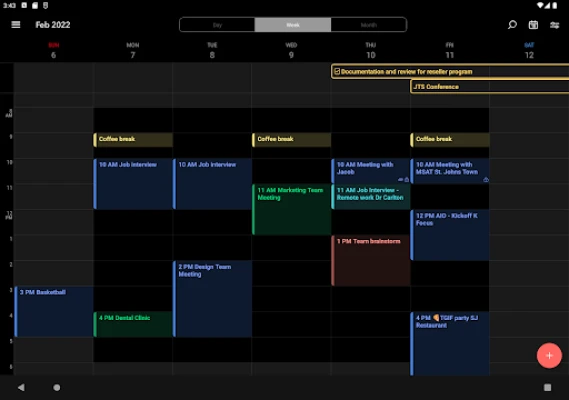
- ActiveSync support – Seamless two‑way sync of email, calendar, contacts, tasks and notes with Exchange servers.
- Multiple accounts – Manage several Exchange or Office 365 accounts from a single interface.
- Shared mailboxes and calendars – Access group mailboxes and shared calendars without leaving the app.
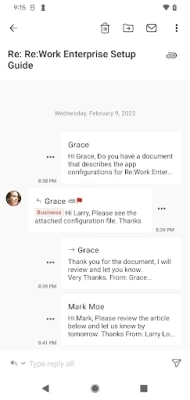
- Rich‑text composer – Create formatted messages with HTML signatures and inline images.
- S/MIME integration – Add digital signatures and encryption when the server supports it.
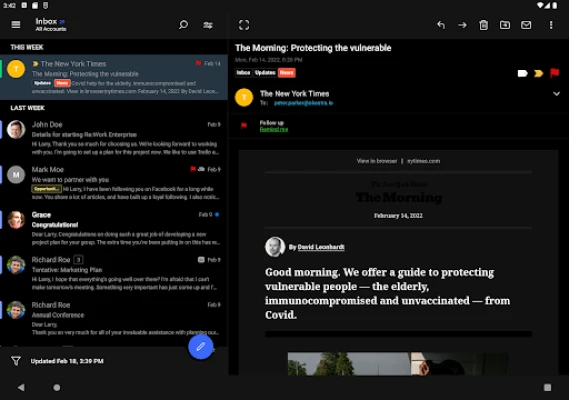
- Focused Inbox – Separate important messages from bulk mail for supported Office 365 accounts.
- Dark theme – Reduce eye strain and save battery on OLED screens.
- MDM compatibility – Works with Microsoft Intune, AirWatch, Citrix, MobileIron and other Android Enterprise solutions.
How it works
When you add an account, OfficeMail Go uses the ActiveSync protocol to negotiate the best authentication method, including modern OAuth for Office 365. The app then creates a local cache of messages, allowing you to read and compose offline. Push notifications are delivered directly from the Exchange server, so new mail appears instantly without a separate push service.
Practical uses
- Corporate employees who need to stay connected to their Exchange mail on the go.
- Field workers using devices managed by an MDM solution.
- Teams that share a common mailbox for support or sales inquiries.
- Users who prefer a dedicated email client rather than the default Android mail app.
Installation information
OfficeMail Go is available as a free download from the Google Play Store. After installation, launch the app and follow the on‑screen wizard to enter your email address and password. The wizard can automatically detect server settings for most Microsoft 365 and Exchange environments.
Compatibility
The app runs on Android devices that support the Android Enterprise framework. Because it relies on standard Android APIs, it works on a wide range of smartphones and tablets, from older models to the latest releases.
Things to know before installing
- The app does not include its own push server; all notifications come directly from the Exchange server.
- To take full advantage of MDM policies, the device must be enrolled in a compatible management solution.
- Some advanced Exchange features (e.g., custom transport rules) depend on server configuration, not the client.
Who may find it useful?
OfficeMail Go is aimed at business professionals, IT administrators, and anyone who needs a secure, standards‑based email client that integrates smoothly with Microsoft’s cloud and on‑premises services.
Frequently asked questions
Is OfficeMail Go free?
Yes, the app is offered at no cost.
Can I use it with personal Outlook.com accounts?
Personal Outlook.com accounts that support ActiveSync can be added, but the primary focus is on Exchange and Microsoft 365 environments.
Does the app support calendar invites?
Yes, you can view, create and respond to calendar events directly within the app.
How does the app handle security?
Security relies on the underlying Exchange server and any MDM policies applied to the device. The client supports S/MIME for encrypted messages when configured on the server side.
Rate the App
User Reviews















Popular Apps










 Games
Games Entertainment
 Communication
 E-mail
 Security
 Tools
Tools Media
Media Internet
 Finance
 Design
 Education
 IT Tools
 Travel & Local
 Android
 Windows
 Linux
Linux