Latest Version
August 26, 2026
Next Plus
BUSINESS
Android
135
Free
com.nextplus.nextplus_android_wrapper
Report a Problem
More About Next Plus – Industrial IoT & Paperless Support for Manufacturing
What is Next Plus?
Next Plus is a mobile application designed for factories and maintenance crews that want to move away from paper‑based processes. It provides a digital workspace where performance data, work orders, and equipment information can be captured, viewed, and shared in real time.
Main features
- Digital work orders – Create, assign, and close tasks directly from the device, eliminating the need for printed forms.
- Real‑time data capture – Record measurements, observations, and status updates on the shop floor instantly.
- Equipment library – Store specifications, manuals, and maintenance histories for quick reference.
- Offline mode – Continue working when connectivity is limited; data syncs automatically once a network is available.
- Secure sharing – Share reports and alerts with supervisors or other teams through built‑in export options.
How it works
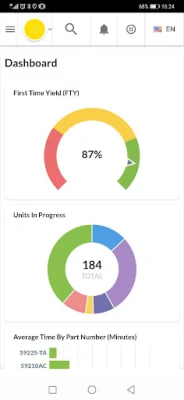
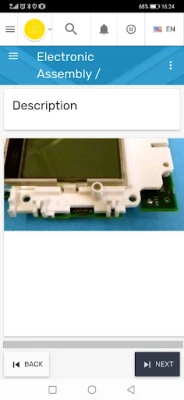
After installing the app, users log in with credentials provided by their organization. The main dashboard presents a list of pending tasks and recent alerts. Selecting a task opens a form where users can enter measurements, attach photos, and mark completion. All entries are timestamped and linked to the relevant piece of equipment, creating a traceable record that can be reviewed later.
Practical uses
- Routine maintenance – Technicians can follow step‑by‑step checklists and record outcomes without carrying paper sheets.
- Performance monitoring – Operators can log key performance indicators (KPIs) such as cycle time or temperature directly from the production line.
- Incident reporting – Quick capture of faults or safety incidents helps supervisors respond faster.
- Audit preparation – A digital history of work orders simplifies compliance checks and audits.
Installation information
The app is available for free on the Android platform. Installation follows the standard process: open the Google Play Store, search for “Next Plus,” and tap Install. After the download completes, launch the app and follow the on‑screen setup instructions.
Compatibility
Next Plus runs on Android devices that meet the minimum system requirements set by the developer. Because the exact Android version is not specified, users should ensure their device runs a recent version of Android (typically Android 6.0 Marshmallow or later) for optimal performance.
Things to know before installing
- Account access – The app requires an account managed by your organization; it cannot be used as a standalone consumer app.
- Data connectivity – While offline mode is supported, full functionality (such as real‑time alerts) depends on an internet connection.
- Device permissions – The app may request access to storage for saving reports and to the camera for capturing photos of equipment.
Who may find it useful?
Manufacturing plants, maintenance departments, and any industrial operation that relies on regular equipment servicing can benefit from Next Plus. It is especially helpful for teams looking to reduce paperwork, improve data accuracy, and enhance communication between field staff and supervisors.
Frequently asked questions
Is Next Plus free to use?
Yes, the application is offered at no cost. Any additional services or integrations would be managed separately by the developer or the organization.
Can I export the data collected in the app?
Export options are built into the app, allowing users to generate reports in common formats such as CSV or PDF for further analysis.
Is my data secure?
Data is stored locally on the device and synchronized to the organization’s backend system using encrypted connections. Specific security policies depend on the implementation by the deploying company.
Rate the App
User Reviews















Popular Apps










 Games
 Entertainment
 Communication
 E-mail
 Security
 Tools
 Media
 Internet
 Finance
 Design
 Education
 Android Firmwares
 Travel & Local
 Android
 Windows
 Linux