
Latest Version
Latest
September 13, 2026
Microsoft Corporation
BUSINESS
Android
4
Free
com.microsoft.intune
Report a Problem
More About Microsoft Intune – Mobile Device Management for Your Organization
What is Microsoft Intune?
Microsoft Intune is a cloud‑based service that helps organizations protect their data by managing mobile devices, apps, and the way users access corporate resources. The Android client lets employees enroll their phones or tablets, apply security policies, and connect to work services without compromising personal data.
Main capabilities
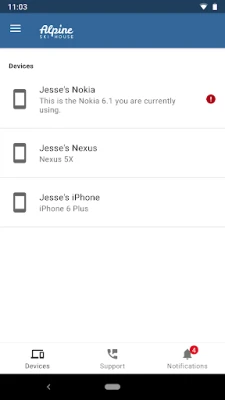
- Device enrollment – Quickly register an Android device with your organization’s Intune tenant.
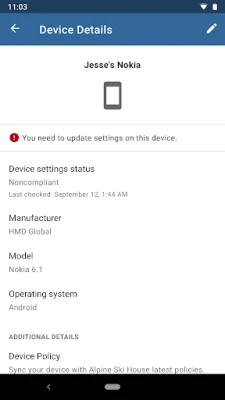
- Policy enforcement – Apply password, encryption, and compliance rules defined by your IT department.
- App protection – Control how corporate apps store and share data, including preventing copy‑and‑paste to personal apps.
- Resource access – Seamlessly connect to email, SharePoint, Teams, and other Microsoft 365 services while respecting security policies.
- Remote actions – IT can locate, lock, or wipe a device remotely if it is lost or compromised.
How it works
After your organization’s IT team configures Intune, you receive an invitation to enroll your device. The app guides you through signing in with your work account, after which the required policies are applied automatically. From that point, the app runs in the background, ensuring the device stays compliant while you continue to use it for personal tasks.
Practical uses
- Access corporate email and calendars securely on a personal Android phone.
- Ensure that sensitive documents are only opened within managed apps.
- Receive automatic updates to security settings without manual intervention.
- Allow IT to enforce a minimum password length or require device encryption.
Installation information
Download the Microsoft Intune app from the Google Play Store. During installation, you will be prompted to grant permissions that allow the app to enforce security policies, such as device administration rights. These permissions are required for the app to apply compliance settings and perform remote actions if needed.
Compatibility and requirements
The app is designed for Android devices that support Google Play services. Specific version requirements depend on the policies set by your organization, but generally a recent version of Android is recommended for optimal performance.
Things to know before installing
- Your organization must have an active Microsoft Intune subscription and must configure your account before you can enroll.
- Some features may be restricted in certain regions due to local regulations.
- The app does not replace the device’s native security settings; it works alongside them.
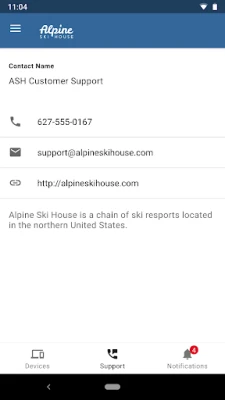
- If you encounter issues, contact your organization’s IT support rather than the app developer.
Who may find it useful?
Employees who need to access corporate resources from their personal Android devices, IT administrators looking for a centralized way to enforce security policies, and businesses adopting a BYOD (bring your own device) strategy will benefit from Microsoft Intune.
Frequently asked questions
Do I need a separate Microsoft account?
No. You use the same work or school account that your organization provides for Microsoft 365 services.
Can I remove the app if I leave the company?
Yes. Once your account is removed from the Intune tenant, the app will no longer enforce policies, and you can uninstall it like any other app.
Will the app access my personal data?
Intune respects the separation between personal and corporate data. It only manages resources that are part of the organization’s policy scope.
Rate the App
User Reviews













Popular Apps










 Games
Games Entertainment
 Communication
 E-mail
 Security
 Tools
Tools Media
Media Internet
 Finance
 Design
 Education
 IT Tools
 Travel & Local
 Android
 Windows
 Linux
Linux